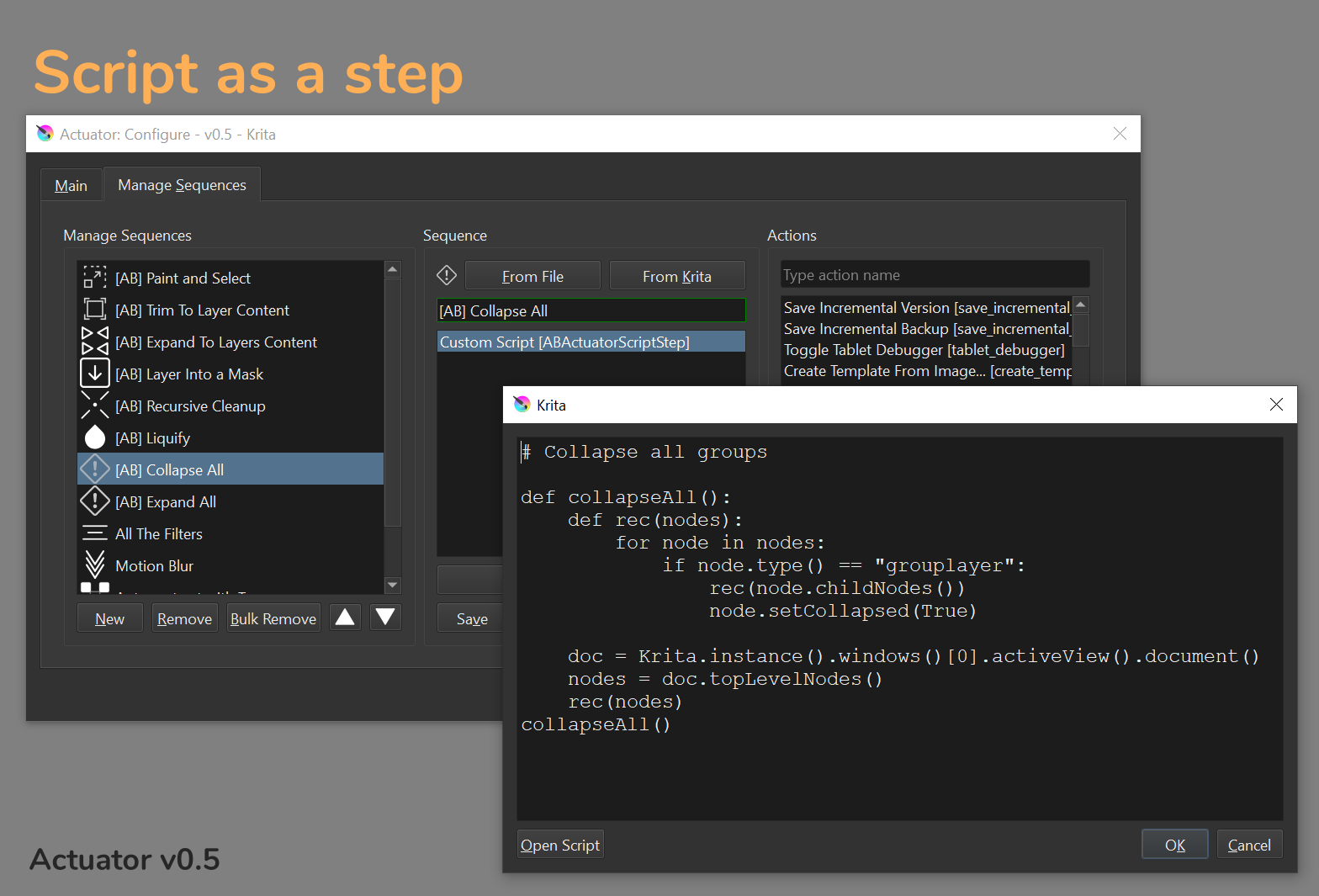
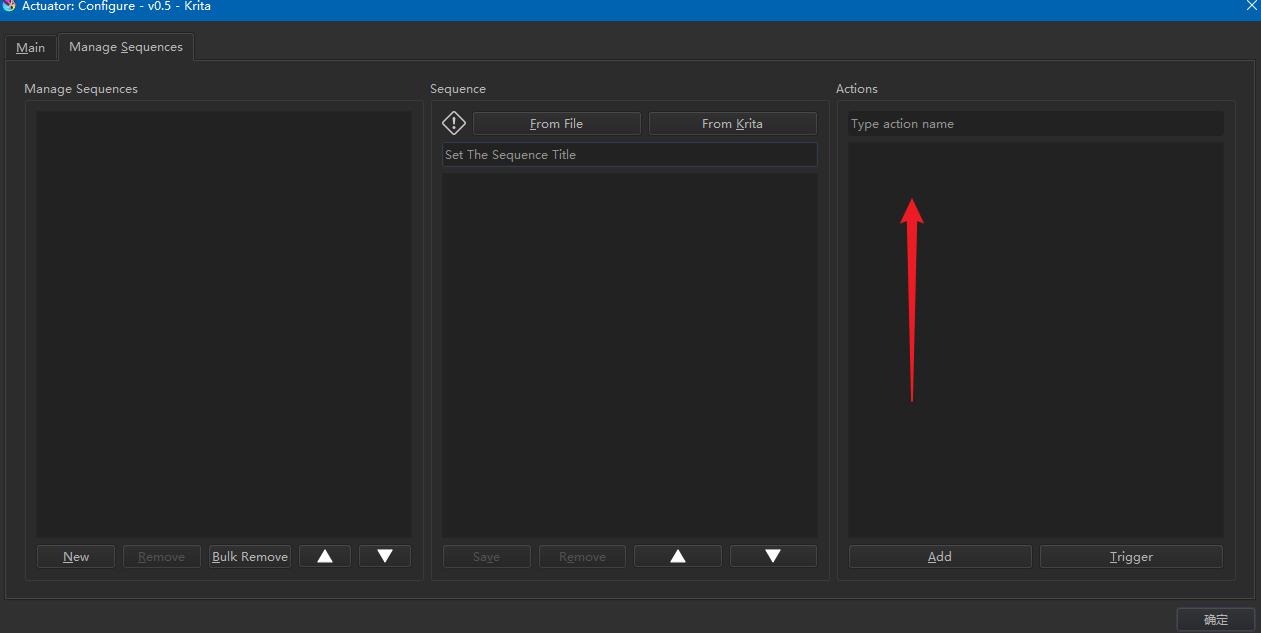
It is something what i want to introduce with version v0.5
Theoretically it should be feasible.
It is something what i want to introduce with version v0.5
Theoretically it should be feasible.
Actuator v0.3.1 is out.
The main thing about this update is that now the user can set default parameters for almost all filters that are part of a sequence.
Learn more here: Actuator - v0.3.1 release notes - Actuator - Krita Plugin by Augmented Brush
Do I need to pay for the update ? When I go to my itch.io account, I have “Nothing is available for download yet.” for the product.
Once the plugin purchased all the following updates are shipped for free. Please check your email (maybe spam directory) for the activation key.
OK, thanks - I just sent you a private message for this.
@yetanotherpainter hi
I accidentally imported both sequances… now there are a lot of copies. it takes too long to delete one by one… where can i delete the whole sequence all at once??
The only way to remove a lot of sequences at this point is to directly edit kritarc file. Which I do not recommend doing.
However, if you actually want to do it. Use a text editor. Preferably the one which will not autoformat the file. And please, make a reserved copy of the file before removing things this way 
Here you can learn how to locate this file: Preferences — Krita Manual 5.2.0 documentation
You need to find an entry ABActuatorPlugin. It is a json-like file. The field "sequences" has a list of sequences. You need to remove redundant entries and save the file.
P.S. I will add “Bulk remove” feature to next release.
Thanx a lot 
Actuator v0.4 is out!
Available on itch.io
The main thing of this update is that now you can assign shortcut to any sequence you created. Additionally the UI of the configuration window is improved and bulk remove for sequences is now available.
It is important to note that when you install new version of the plugin you will need to restart Krita two times. First time when you restart the Actuator will collect all the sequences and prepare keyboard shortcut for them. Second time when you restart you will be able to assign shortcuts.
From that moment the shortcuts will be maintained while you edit your sequences.
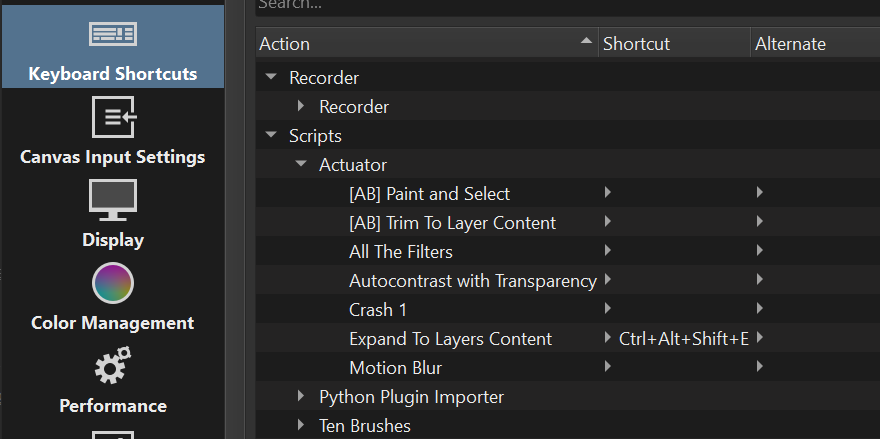
Here the screenshot showing the sequences in Krita Settings window:
Here the full list of things that changed:
Amazingggg update  thanxx
Great news, I was just on the way to ask for shortcuts.
@yetanotherpainter hi,
I noticed an error. I think the actuator script creates an action folder when starting every krita. but it deletes the actions in this folder.
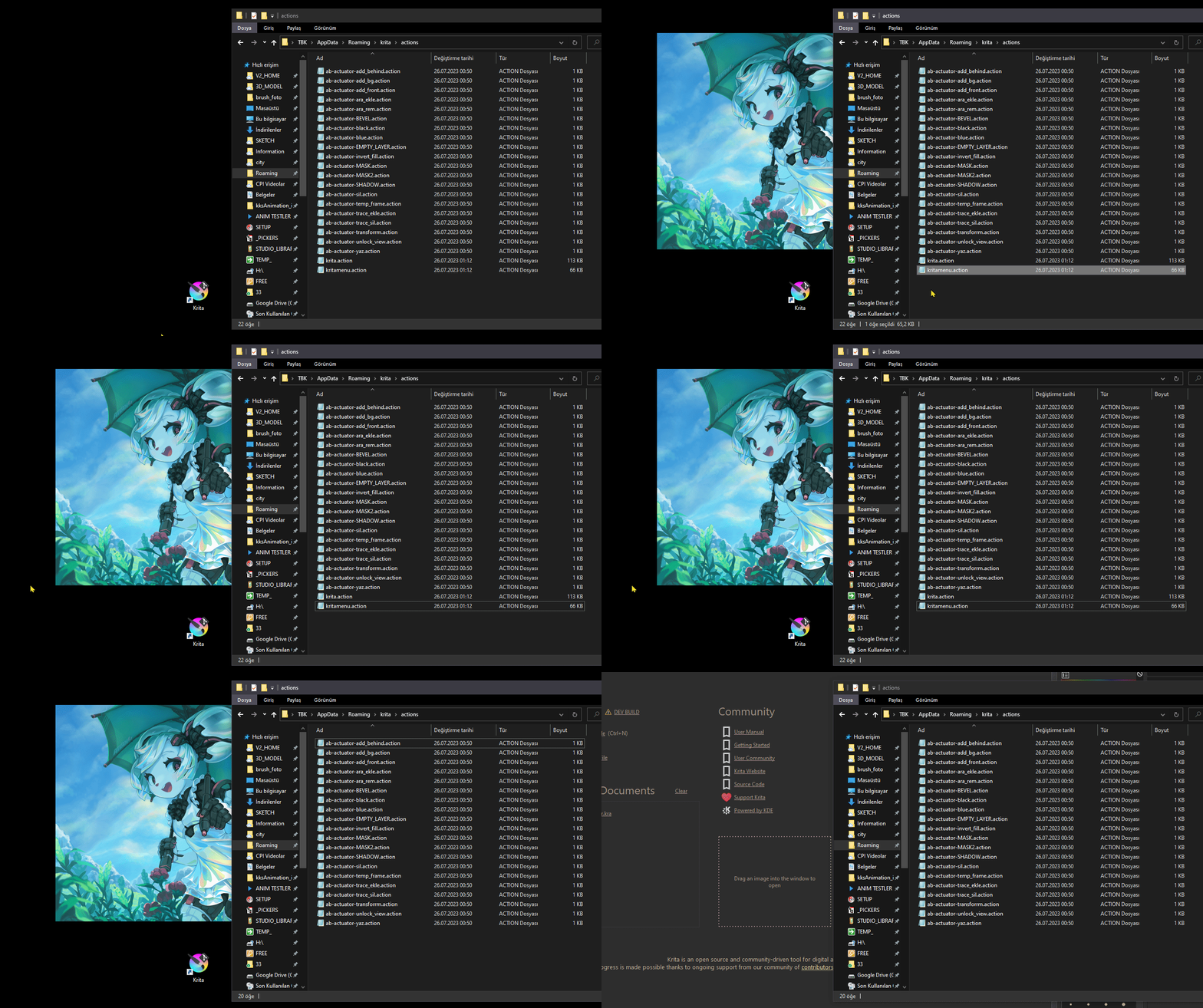
I already published a new version with a hotfix. Please download it to avoid this behavior.
My apologies for inconvenience 
I am currently working on Script as a Step functionality.
To better understand how small scripts are used could you share your scripts? It would be helpful.
Here are all the useful scripts I have collected (comments are in Chinese, but there are links to the original text):
脚本 (yuque.com)
Actuator v0.5 is out!
P.S. I know I was a bit crazy about releases recently
P.P.S This one should be last in the near future. Next steps for the plugin would be improving the usability and responding on user request
I think that would be great if pigment.o has this additional plugin
I met a bug on 5.2 beta1:
UnicodeEncodeError
Python 3.10.7: C:\工作软件\Krita (x64)\bin\krita.exe
Fri Jul 28 23:51:53 2023

A problem occurred in a Python script.  Here is the sequence of
function calls leading up to the error, in the order they occurred.

 C:\Users\123\AppData\Roaming\krita\pykrita\actuator\common\general.py in make_new_attempt(self=<actuator.common.general.InitializeWithWindow object>)
  106                     print("All good, can initialize now")
  107                     self.is_complete = True
  108                     self.action(qwindow)
  109                     self.initialized.emit()
  110
self = <actuator.common.general.InitializeWithWindow object>
self.action = <bound method ActuatorDocker.reset_ui of <actuator.plugin.ActuatorDocker object>>
qwindow = <PyQt5.QtWidgets.QMainWindow object>

 C:\Users\123\AppData\Roaming\krita\pykrita\actuator\plugin.py in reset_ui(self=<actuator.plugin.ActuatorDocker object>, qwindow=<PyQt5.QtWidgets.QMainWindow object>)
   60
   61         for b, s in zip(buttons, sequences):
   62             qDebug(f"Making button for actions: {s['actions']}")
   63             b.setIcon(get_icon(s["icon"]))
   64             # Seems like you have to specify the size of the icon to make it work
global qDebug = <built-in function qDebug>
UnicodeEncodeError: 'ascii' codec can't encode characters in position 74-75: ordinal not in range(128)
    __cause__ = None
    __class__ = <class 'UnicodeEncodeError'>
    __context__ = None
    __delattr__ = <method-wrapper '__delattr__' of UnicodeEncodeError object>
    __dict__ = {}
    __dir__ = <built-in method __dir__ of UnicodeEncodeError object>
    __doc__ = 'Unicode encoding error.'
    __eq__ = <method-wrapper '__eq__' of UnicodeEncodeError object>
    __format__ = <built-in method __format__ of UnicodeEncodeError object>
    __ge__ = <method-wrapper '__ge__' of UnicodeEncodeError object>
    __getattribute__ = <method-wrapper '__getattribute__' of UnicodeEncodeError object>
    __gt__ = <method-wrapper '__gt__' of UnicodeEncodeError object>
    __hash__ = <method-wrapper '__hash__' of UnicodeEncodeError object>
    __init__ = <method-wrapper '__init__' of UnicodeEncodeError object>
    __init_subclass__ = <built-in method __init_subclass__ of type object>
    __le__ = <method-wrapper '__le__' of UnicodeEncodeError object>
    __lt__ = <method-wrapper '__lt__' of UnicodeEncodeError object>
    __ne__ = <method-wrapper '__ne__' of UnicodeEncodeError object>
    __new__ = <built-in method __new__ of type object>
    __reduce__ = <built-in method __reduce__ of UnicodeEncodeError object>
    __reduce_ex__ = <built-in method __reduce_ex__ of UnicodeEncodeError object>
    __repr__ = <method-wrapper '__repr__' of UnicodeEncodeError object>
    __setattr__ = <method-wrapper '__setattr__' of UnicodeEncodeError object>
    __setstate__ = <built-in method __setstate__ of UnicodeEncodeError object>
    __sizeof__ = <built-in method __sizeof__ of UnicodeEncodeError object>
    __str__ = <method-wrapper '__str__' of UnicodeEncodeError object>
    __subclasshook__ = <built-in method __subclasshook__ of type object>
    __suppress_context__ = False
    __traceback__ = <traceback object>
    args = ('ascii', "Making button for actions: [{'name': 'toggle_lay...', 'title': '作为透明度写入(W)', 'lower': '作为透明度写入(w)'}]", 74, 76, 'ordinal not in range(128)')
    encoding = 'ascii'
    end = 76
    object = "Making button for actions: [{'name': 'toggle_lay...', 'title': '作为透明度写入(W)', 'lower': '作为透明度写入(w)'}]"
    reason = 'ordinal not in range(128)'
    start = 74
    with_traceback = <built-in method with_traceback of UnicodeEncodeError object>

The above is a description of an error in a Python program.  Here is
the original traceback:

Traceback (most recent call last):
  File "C:\Users\123\AppData\Roaming\krita\pykrita\actuator\common\general.py", line 108, in make_new_attempt
    self.action(qwindow)
  File "C:\Users\123\AppData\Roaming\krita\pykrita\actuator\plugin.py", line 62, in reset_ui
    qDebug(f"Making button for actions: {s['actions']}")
UnicodeEncodeError: 'ascii' codec can't encode characters in position 74-75: ordinal not in range(128)
UnicodeEncodeError
Python 3.10.7: C:\工作软件\Krita (x64)\bin\krita.exe
Fri Jul 28 23:58:17 2023

A problem occurred in a Python script.  Here is the sequence of
function calls leading up to the error, in the order they occurred.

 C:\Users\123\AppData\Roaming\krita\pykrita\actuator\ui\sequencemanagedialog.py in on_button_remove_sequence_clicked(self=<actuator.ui.sequencemanagedialog.SequencesManageWidget object>)
  346         sequence_name = self.sequences[row]["name"]
  347         del self.sequences[row]
  348         actions_manager.sequence_removed(sequence_name)
  349         self.refresh_sequences_list_view()
  350         self.update_sequences()
global actions_manager = <actuator.common.actionmanager.ActionsManager object>
actions_manager.sequence_removed = <bound method ActionsManager.sequence_removed of...ator.common.actionmanager.ActionsManager object>>
sequence_name = '!!!!!!【分隔】'

 C:\Users\123\AppData\Roaming\krita\pykrita\actuator\common\actionmanager.py in sequence_removed(self=<actuator.common.actionmanager.ActionsManager object>, name='!!!!!!【分隔】')
  115             os.remove(file_path)
  116         else:
  117             qDebug(f"[Actuator] Unable to locate file {file_path} for removal")
  118
  119     def _remove_orphans(self):
global qDebug = <built-in function qDebug>
UnicodeEncodeError: 'ascii' codec can't encode characters in position 88-97: ordinal not in range(128)
    __cause__ = None
    __class__ = <class 'UnicodeEncodeError'>
    __context__ = None
    __delattr__ = <method-wrapper '__delattr__' of UnicodeEncodeError object>
    __dict__ = {}
    __dir__ = <built-in method __dir__ of UnicodeEncodeError object>
    __doc__ = 'Unicode encoding error.'
    __eq__ = <method-wrapper '__eq__' of UnicodeEncodeError object>
    __format__ = <built-in method __format__ of UnicodeEncodeError object>
    __ge__ = <method-wrapper '__ge__' of UnicodeEncodeError object>
    __getattribute__ = <method-wrapper '__getattribute__' of UnicodeEncodeError object>
    __gt__ = <method-wrapper '__gt__' of UnicodeEncodeError object>
    __hash__ = <method-wrapper '__hash__' of UnicodeEncodeError object>
    __init__ = <method-wrapper '__init__' of UnicodeEncodeError object>
    __init_subclass__ = <built-in method __init_subclass__ of type object>
    __le__ = <method-wrapper '__le__' of UnicodeEncodeError object>
    __lt__ = <method-wrapper '__lt__' of UnicodeEncodeError object>
    __ne__ = <method-wrapper '__ne__' of UnicodeEncodeError object>
    __new__ = <built-in method __new__ of type object>
    __reduce__ = <built-in method __reduce__ of UnicodeEncodeError object>
    __reduce_ex__ = <built-in method __reduce_ex__ of UnicodeEncodeError object>
    __repr__ = <method-wrapper '__repr__' of UnicodeEncodeError object>
    __setattr__ = <method-wrapper '__setattr__' of UnicodeEncodeError object>
    __setstate__ = <built-in method __setstate__ of UnicodeEncodeError object>
    __sizeof__ = <built-in method __sizeof__ of UnicodeEncodeError object>
    __str__ = <method-wrapper '__str__' of UnicodeEncodeError object>
    __subclasshook__ = <built-in method __subclasshook__ of type object>
    __suppress_context__ = False
    __traceback__ = <traceback object>
    args = ('ascii', r'[Actuator] Unable to locate file C:\Users\123\Ap...actions\ab-actuator-!!!!!!【分隔】.action for removal', 88, 98, 'ordinal not in range(128)')
    encoding = 'ascii'
    end = 98
    object = r'[Actuator] Unable to locate file C:\Users\123\Ap...actions\ab-actuator-!!!!!!【分隔】.action for removal'
    reason = 'ordinal not in range(128)'
    start = 88
    with_traceback = <built-in method with_traceback of UnicodeEncodeError object>

The above is a description of an error in a Python program.  Here is
the original traceback:

Traceback (most recent call last):
  File "C:\Users\123\AppData\Roaming\krita\pykrita\actuator\ui\sequencemanagedialog.py", line 348, in on_button_remove_sequence_clicked
    actions_manager.sequence_removed(sequence_name)
  File "C:\Users\123\AppData\Roaming\krita\pykrita\actuator\common\actionmanager.py", line 117, in sequence_removed
    qDebug(f"[Actuator] Unable to locate file {file_path} for removal")
UnicodeEncodeError: 'ascii' codec can't encode characters in position 88-97: ordinal not in range(128)
Thanks for a feedback. I will look into it.
By the look of it, the plugin cannot handle Chinese symbols.
As a workaround, maybe try to use only english letters for naming.