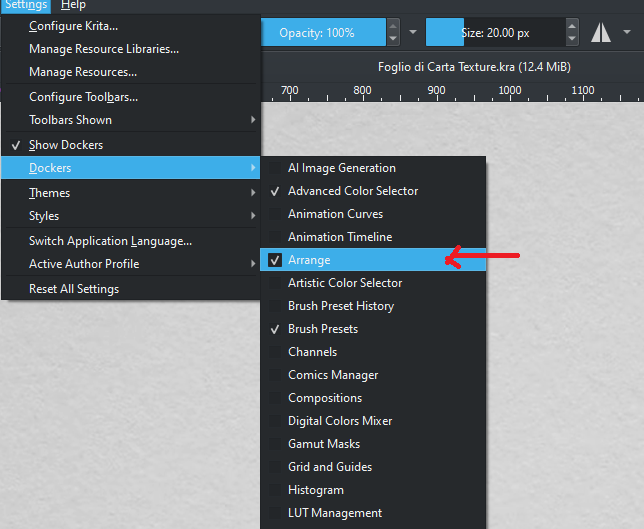
When I installed it, it took me a few minutes to find the panel, but in any case I leave a screen in the hypothesis that it can serve someone, that is in Settings → Dockers → Arrange
1 Like
Found this plugin only today.
Just WOW. Thank you so so much 
Idk how I just found this but it’s a LIFE SAVER!
For anybody who wants to use this plugin with the new Krita 6.0.0 beta but are having errors with “Qt.FindDirectChildrenOnly” and the like, I’ve personally fixed this by changing two lines in the __init__.py file:
I changed this line (you can see the line number on the left):

to this:
qdock = qwin.findChild(QWidget, "ArrangeDockerWidget")
and I changed this line:

to this:
vertical_spacer = QSpacerItem(40, 16, QSizePolicy.Policy.Minimum, QSizePolicy.Policy.Expanding)
This fixed the problem for me and I personally haven’t experienced any new bugs from these changes.
2 Likes