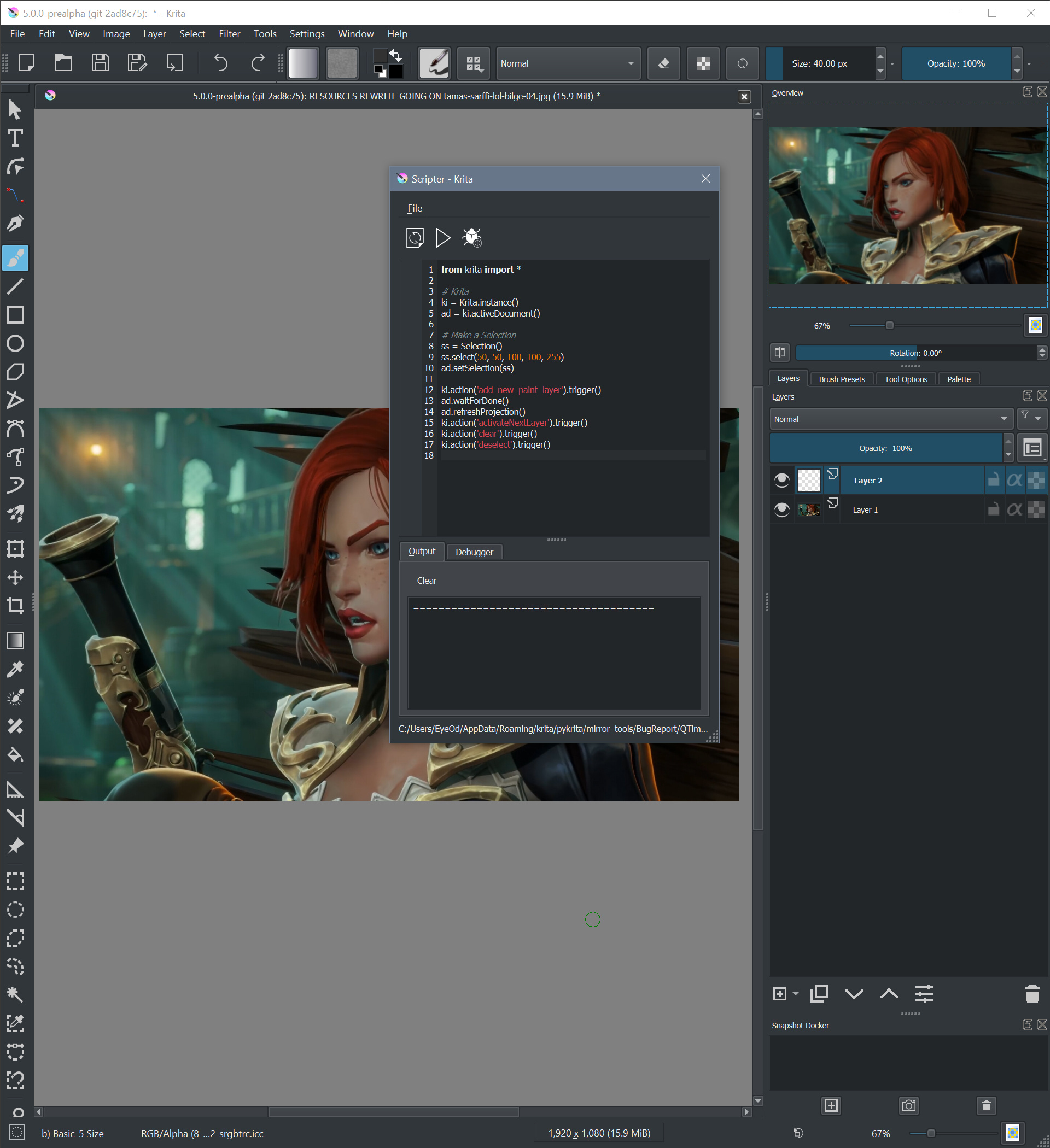
I can confirm that, on my side, with or without sleep (tested from 1 to 10seconds) doesn’t change anything: sometime the bug still occurs, sometime it doesn’t occurs
If I replace the time.sleep() by QMessageBox.information(QWidget(),'test','test'), the problem doesn’t occurs anymore.
@EyeOdin can you test it?
I know that’s not a solution, but it’s just to check if in this case, it also works on your side or not (as on my side the bug occurs ‘randomly’ and on your side it’s ‘systematically’)
It can be placed after the add_new_paint_layer action or the activateNextLayer (no need to have it twice, on my side just one message box placed after one of these actions is enough to ‘solve’ the problem)
If sleep doesn’t work but showing a message box, it’s a sign that something needs to go through the Qt eventloop. You might try QTimer.singleShot() instead.
from krita import *
import time
from PyQt5.QtCore import QTimer

def test():
    ki.action('activateNextLayer').trigger()

    ki.action('fill_selection_foreground_color_opacity').trigger()
    ki.action('deselect').trigger()

# Krita
ki = Krita.instance()
ad = ki.activeDocument()

# Make a Selection
ss = Selection()
ss.select(50, 50, 100, 100, 255)
ad.setSelection(ss)

ki.action('add_new_paint_layer').trigger()
QTimer.singleShot(1000, test)
from krita import *

def executeAction(actionId):
    ki.action(actionId).trigger()
    QApplication.instance().processEvents()

# Krita
ki = Krita.instance()
ad = ki.activeDocument()

# Make a Selection
ss = Selection()
ss.select(50, 50, 100, 100, 255)
ad.setSelection(ss)

executeAction('add_new_paint_layer')
executeAction('activateNextLayer')

executeAction('fill_selection_foreground_color_opacity')
executeAction('deselect')
But I can’t guarantee that is enough in all situation, I’m not yet enough involved into Qt development to understand exactly what happen, but doing some tests let me think that’s a solution to force all events (ie: here the triggered action) being executed before continuing script execution.
@EyeOdin if you can test this solution too and tell me if it work
If yes, it my might be a recommendation for plugin developpers to do it after triggering an action…
I did not noticed the different command on one of the actions so I was expecting another result.
After that I was checking your code and i started pushing my luck considering what you did and then I noticed that it even worked as it should… ? I did not test much so I don’t know if it was the command order messing up or the bug itself. But like this works. There is no need for a QTimer even. but it seems quite unstable order wise.
The fact that nothing happens to the image means it is working.
# Krita
ki = Krita.instance()
ad = ki.activeDocument()

# Make a Selection
ss = Selection()
ss.select(50, 50, 100, 100, 255)
ad.setSelection(ss)

ki.action('add_new_paint_layer').trigger()
ad.waitForDone()
ad.refreshProjection()
ki.action('activateNextLayer').trigger()
ki.action('clear').trigger()
ki.action('deselect').trigger()
That strange…
Your code is the code I tested and for which sometimes the bug occurs, and sometimes not…
But I didn’t tested the 5.0.0-pre-alpha too much
The case it occurs more often [on my side, 4.3.0] is, when you have 2 layers, execute the script when top layer is selected… the bug practically occurred systematically
If the problem seems to be solved without any more code modification, it’s a good thing
But for all actions that can be made through PyKrita API (Document + Nodes) I think that [in most case] it’s better to use them, you’ll have more control on what is really made
Strange it surely is. I kinda still don’t believe it really works yet despite it being working.
The first time I tried was through the API it allows more options for sure, but there is also another bug you encounter. or at least I did when I tried it.
The script I was doing was:
It is just a copy paste from a given selection.
When you use the API to paste you have some odd behavior that i reported before.
However I managed to make it work with actions properly by the looks of it without the need to name the node by doing a duplicate. The Node counter is something that really gets on my nerves I don’t know why.
I guess it might crash once I update krita to another version… but I hope not fingers crossed
Ok, so I talked to @dkazakov and he said that in 4.3.0 and on master (which means both Krita Plus and Krita Next) image->waitForDone() should call processEvents() internally, which is probably the reason why nobody from the development team could reproduce it (especially if it happens only half the time). In 4.2.9 it can happen (in “only few cases”) that it hangs if processEvents() is not called separately. But in 4.3.0 and onwards it should work just fine with just waitForDone().
Thanks @EyeOdin for your patience in trying to investigate this and thanks @Grum999 for helping
Also I see now that @halla was changing calls in Document class to embed waitForDone() inside them already. (But it’s not for actions yet). So maybe soon one won’t need to call it in Python scripts at all