Hey, I colorised comics directly in CMYK in the past. I’m not doing that now (I prefer to work in sRGB 8Bit, then convert and tweak later for print), but I can share experience about it:
In CMYK 8bit; the values of pixels on each channels (C, M, Y and K + alpha) are stored on 8bit.
So, 2^8 = 256 information. But because we start counting at 0 for the lowest value, 255 become the max values. Therefore, a Cyan 255 exists , in your file.
You can get a GUI that translate this value to percentage for conveniency because printing folks are speaking in percents as far as I remember. Specific Color Selector docker has this option. ( as @raghukamath Color mixing in CMYK - #13 by raghukamath already mentioned)
A color triangle (or square, circle, whatever variation you use of Advanced Color Selector) will always give you bad and buggy CMYK mix. That’s because there is more than one way to obtain black in CMYK. Color triangle (and other) can’t help you with this.
Pure C+M+Y is supposed to be black (if the substractive physic of the ink was perfect). But inks are never perfect; they rarely can’t substract all the white from paper; and so it always fall into a dark brown/kaki. This CMY ‘black’ color should be pretty well emulated on your display if you use:
- A calibrated monitor
- A color managed workflow with the color profile provided by your printer.
- For perfectionists: a monitor with a wider color gamut than sRGB; because CMYK printer profile are often larger than sRGB (in oranges, greens and violet most of the time).
So, once you can display a CMY kaki/brown black; you can introduce the second way to obtain black: playing on the K “Key” black channel in your colors to get extra deepness in the darks.
But be carefull it’s usage; sometime a low percent of K on a yellow color can ruin the print: dots of black might appears (I had the issue on the illustration of 2000 boxes of a board game 15 years ago, because of a bad sRGB to CMYK auto conversion).
If the Key ink is often cold, you can even get a yellow that starts to appears greenish on the distance. That’s why many comic author (especially cartoony rendering, with uplifting color palette) prefers to shade yellow hair color with orange (because small Magenta dots mixes better in the yellow dots on paper; than dots of Cyan or Black).
This are effects that can’t be predicted by how pixels are colored on your screen. Even super well calibrated. You can only predict if you encode something and you know how the printer machine might decode. Once you know what always fails for a printer; you just avoid certain mixes on screen, and it is ok to work this way.
So, when working in CMYK; you have to think in Inks, and color mix using dithering of dots at a small level. If you think ahead your color choices, you’ll easily avoid possible drama of what a print machine can or cannot do. Gradient to black, darkening pastel colors, too low gamma night scenes; the common errors are always the same. Specific Color Selector docker is your best friend for being in control.
Building a palette
If you want to paint long term directly with CMYK colors; my advice is to get in contact with your printer and print a color swatch. I did it for my comic (but for other CMYK problematics I detail on my blog here); it looks like that:
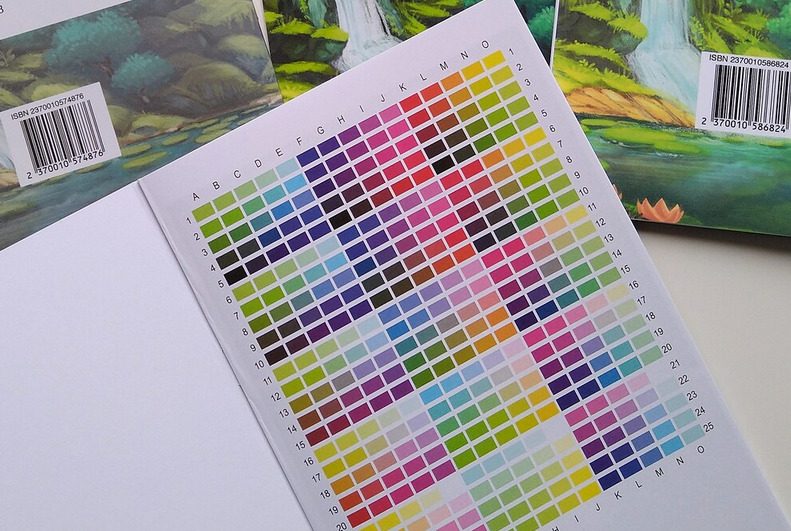
With a printed real-life rendering, and the corresponding CMYK files; you’ll immediately see what tones are working, the one that are buggy, what color are delicious and what other color feels dirty; then you can exploit that for your art. (eg; making a palette in Krita with the best tones). Do not hesitate to test gradient too this way if your painting style involves that.
I hope it will helps!