Custom brush property input slider with shortcuts

That’s something that isn’t talked about in this feature directly, what I’ve proposed so far is a very local way of controlling specific brush properties, and if someone wanted it to be true of all brushes, they’d have to set it manually.
The idea of this is primarily to allow brush creators a way to give the end user or themselves a custom ‘modifier’ that they can change, without having to edit the brush themselves. It has the side effect of also allowing people to edit their own brushes to control things like density with a shortcut.

I’m not entirely sure how this could be made global, if at all. It feels like that’d be outside of the scope of this specific feature request and also much more difficult.

I think it would mainly tackle your idea of dragging vertically for changing opacity or tilt. If a shortcut was added to allow modifier+drag to control this slider, you could accomplish that.

2 Likes

Something to consider here is that if this is the way brush rotation is implemented, would you want one brush to rotate faster than another with a modifier + drag? I would personally prefer the gestures to be consistent across brushes, so the result of a rotation is always the same as what you expect it to be (and would always be an X distance movement). Now if someone were to create a different curve for the custom sensor, the rotation would suddenly be much slower/ faster. This then leads to a lot of inconsistencies throughout brush bundles.

I do like the idea that you can use the same gesture for rotation & opacity (horizontal & vertical) for one brush and hardness & opacity (or spacing or ratio, etc.) for another. I see the merits to the proposal, but I’m not convinced that implementation would be the way to go. To me it looks like a lot of overhead. What do other people think about these points?

1 Like

Any idea when will this feature be merged?

Sorry if I got your hopes up, the video on my original post is an artistic representation and not an actual coded and working thing. If you like the idea, be sure to make your voice heard and vote/let everyone know in the thread so it, or something which solves the same problem, can be considered in the future.

3 Likes

Hey @Ralek! Since I’ve kind of revived the conversation around this 2 year old thread with my similar post this week, I’m wondering if this feature is something you’re still interested in, and whether this is something you’ve been working on code-wise.

I’ve been thinking about implementing something like it myself, but I don’t want to step on your toes if it’s something you’ve already started working on in some capacity.

If this isn’t something you’ve been actively working on I might get started on it this week or next, and I’d love to collaborate and take input from you along the way. :slight_smile:

1 Like

I haven’t worked on it at all, jumping into Krita’s code base (and compiled languages in general) are a very new thing for me, so I’m not even sure if I’d be able to accomplish it in a reasonable time, if at all.
I definitely wouldn’t mind bouncing off ideas or conceptualizing the functionality, I do think it has a lot of potential to fix several problems people have and open up a weird new area of creativity with brush presets.

1 Like

EDIT: This suggestion was merged from a different thread. :slight_smile:

Hey all, I thought I’d drop by with a feature proposal that I’ve been considering for quite some time. I’ll try to keep this as short and clear as possible so as to not take up too much time.

Brush preset macros

  • The basic idea is to allow for the mapping of up to 4 customizable macros per brush preset.

  • Macros could be creatively mapped to various brush parameters (size, opacity, etc.) similarly to how pen settings (pressure, tilt, etc.) work, giving brush preset designers a lot of flexibility to make interesting macros for each preset.

  • Macros can (and should) be named by the preset maker.

  • This feature is optional and would be used to enhance the dynamics of Krita’s current brush preset system. Unused macros (ones which are not mapped to any brush parameter for the currently active brush preset) would be hidden from the GUI so as to prevent unnecessary clutter.

A couple simple examples.

  1. A pencil-type preset might be given a macro called “Sharpness” that could be mapped to things like size, softness, texture, opacity, etc., to emulate how a pencil dynamics change as sharpness changes.
  2. A watercolor-type preset might be given one macro called “Wetness” that could be used to emulate the moisture dynamics of watercolor, and a second macro called “Firmness” that emulates the dynamics of a firm brush vs a soft one.

Of course, these are only basic examples, but with up to 4 optional macros per preset, I can only imagine cool, weird and creative ways in which brush preset makers could use macros to create interesting, dynamic and expressive brushes.

How I envision this working

Note: This is a quick-and-dirty screenshot mock-up to give a rough idea what this might be like.

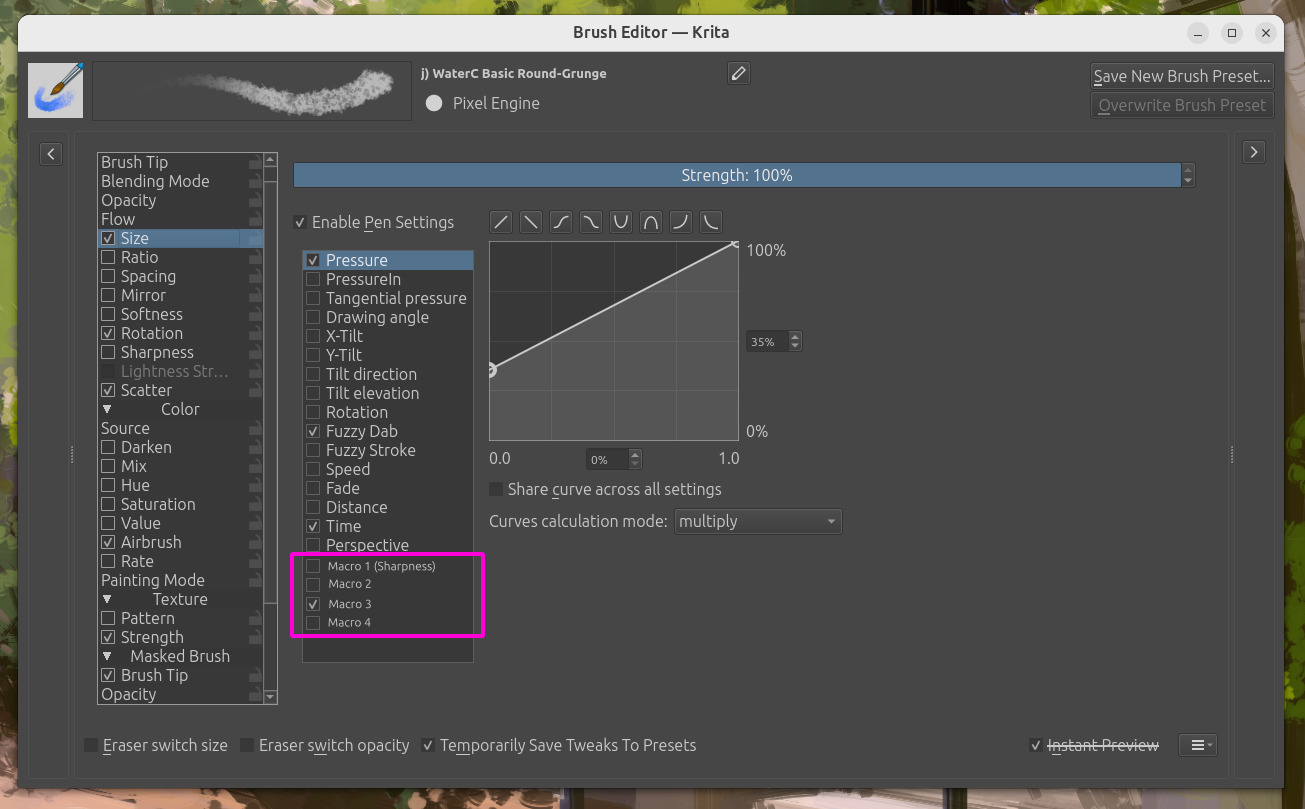
First, the person making the brush preset could enable a given macro for any brush parameter, giving it an appropriate name, and mapping it to a range that helps them create the desired effect.

(Please ignore the fact that the macro is named “sharpness” but the current preset is a watercolor brush! Also ignore the fact that these macros appear under the “pen settings” panel. I told you it was a quick-and-dirty mockup! :slight_smile: )

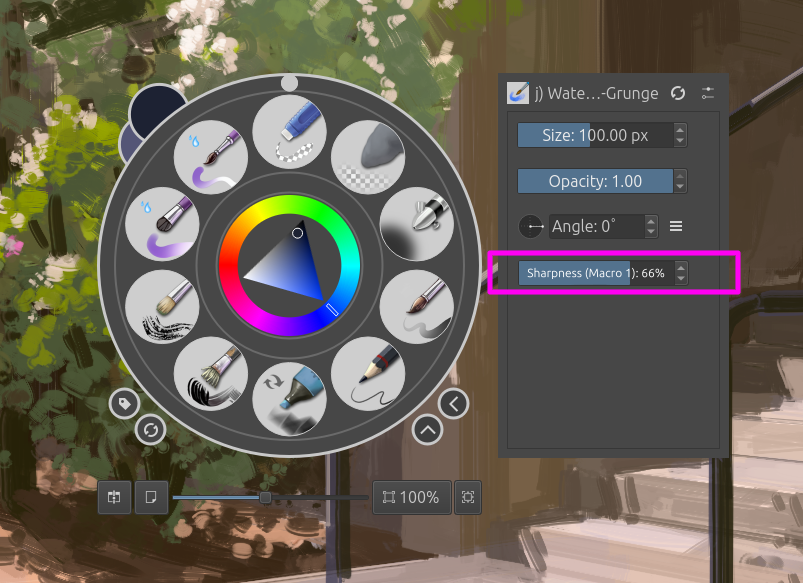
If a macro has been mapped for the current brush preset it will appear as a handy slider on the side panel of the popup palette, as well as in the tool options docker while the brush tool is active.

If no macro is assigned for the current preset, these GUI elements will be hidden and Krita will work and look just like it does right now.

And that’s the proposal!

Whether macros are used to emulate real life, create subtle changes to brushes, or do some weird funky stuff, the main goal here is to help make the experience of digital drawing and painting in Krita more dynamic, expressive and fun for real human artists.

I’d love to hear what you all think about this feature proposal. Do you like the idea? Does anything about it bother you? Do you have any other ideas or suggestions for how this could work?

Let me know and I’ll start coding. :slight_smile:

2 Likes

I have a general understanding of what was said. What I am more curious about is how to map with other parameters? If only setting a maximum and minimum value for linear mapping, I think this function is not very effective.

Perhaps a curve will be needed. In this way, we can set the maximum and minimum values, increase and decrease, non-linear amplitudes

This may be a challenge for UI

I changed the category to Feature Requests so that people can vote on it

1 Like

There’s already this request - should be merged, maybe?

[Moderator note added: The topic has been moved and merged]

3 Likes

@AhabGreybeard, @raghukamath, @Sooz, as @dreamkeeper mentioned in the post above this one, it could be good to merge this with the topic from @dreamkeeper’s posting:

Michelist

1 Like

Why not just save as different bushes :thinking:

I don’t get what the macro is supposed to do exactly except controlling a preset with a shortcut. Macro implies some kind of programming or custom logic. Perhaps I understand it wrong.

Imagine a fur brush utilizing the fade mechanic. You’d have to create a brush preset for every possible fur length. Having a slider would cut down on basically redundant brush presets and making it less cumbersome to change.

In this regard the proposal is similar to

1 Like

As I understood this request, you change settings of a brush, save those settings as macro and switch between them. A brush with different settings is for me a brush-preset. :thinking:

Yeah, I’m also a bit confused on what it’s supposed to do and work.

@emmetpdx, Please consider the other Feature Request topics mentioned above, i.e.

Bindable brush settings - determine the value of a setting by the value of another

and: Custom brush property input slider with shortcuts

Is your Feature Request fully covered by either or both of those and can it be moved to be incorporated into either of those?

Edit:Add: the topic has been moved and merged.

1 Like

Let us wait for @emmetpdx answer before merging.

1 Like

To be honest, it sounds super complicated for what it does, and I’m also not sure I understand it correctly.

So the idea is to have a meta value that affects multiple other values of a brush, right?
But the way this seems to work, I don’t see how this could really affect e.g. pressure curve in useful ways. It’s just a static value for which you can choose how to combine with the curves (multiply, addition, maximum etc.)
In multiply it’s basically equivalent to just moving the strength slider of a property (opacity, flow etc.), and for the other modes I can’t really imagine how you’d cobble something useful together.

I would keep such a meta system outside of the normal brush editor. Make an editor add-on that lets you define a meta property that links to the desired brush properties. Then you can see it all in one place, if there are meta properties, and what they do.

Like in this suggestion, you need to through each and every sensor list to see if some “macro” sensor is enabled…well thinking about it, this is a problem with our brush editor in general, it doesn’t give you a way to easily identify the properties linked to a specific sensor.

2 Likes

Check the mockup video in the thread of mine someone linked, it explains it pretty nicely.