So far, it seems like it only supports Deflate, which is the most inefficient way to compress nowadays. The library supports bzip too but appears like it was compiled without bzip support.
7z a -tzip -mpass=13 -mm=Deflate -mx=9 -mfb=180 out.kra spread/*
Appears to be the best squeeze I can get.
For an example 53MB file, I was able to compress to 10MB. However, if I were able to use zstd, I’d be able to squeeze all the way to 6.4MB. However, even though that’s lossless, krita is unable to open.
Maybe some luck will strike. However, just being able to reduce to 10MB from 53MB is already quite useful.
I hope these results are useful for some. I will use them to make the script
If we are talking about for personal use to archive, you can simply make a python plugin that compresses the files for archiving, and then uncompresses them into a kra and load that up.
The way to make command line calls is using python, here is all the options to do so:
Thanks for the suggestion.
BTW, I know python. What I don’t know is the krita plugin processing workflow (required to know how to do a plugin).
Is it possible to intercept the open process to use some alternative code which opens and unpacks the archive in quazip’s stead? Or maybe opens and repacks for quazip to open afterwards?
Does that imply it wouldn’t work to be opened from the file manager (as a command line argument)?
Do you know where can I find a comprehensive-enough manual for this kind of plugins for krita?
There’s the plugin section in the krita manual but it’s only comprehensive on how to create something that can run. From my perspective it misses the API parts to control Krita from the plugin
If you want to open it from command line, then you can make a wrapper that will convert the compressed to a kra then open it as a kra.
If you want to open it in the GUI, you just add the action to the menubar. It would open up the file manager and when you pick the file, you would check that file first, if the item is your compressed format or mime, decompress it as a KRA and open it.
I actually want to be able to open in multiple ways:
Dialog option (equivalent to ctrl+O or File->Open)
Drag+drop (Maybe a plugin can add an entry to the list?)
Open from command line (File manager double-click)
Nice. I’ll dwelve into this. Thank you.
BTW, just thinking in planning makes me think this can be too much and I’d rather just wait for quazip to integrate minizip-ng or even add support for bzip instead…
FYI, there exist ECT (Efficient Compression Tool) by fhanau on github.
It is roughly equal to pingo’s efficiency and can also (re)compress zip.
Pingo is great for png, maybe faster, but only Windows binary of it exists.
Last time I took a look at optipng, it used old classic zlib for trials.
And said zlib is not build for best compression. Rust fork oxipng is better.
It can use libdeflate (seems faster or better) and zopfli (slow, very good).
I do believe that ECT is (mainly) fork of zopfli, but faster & more Efficient.
Anyway, a little relevant example.
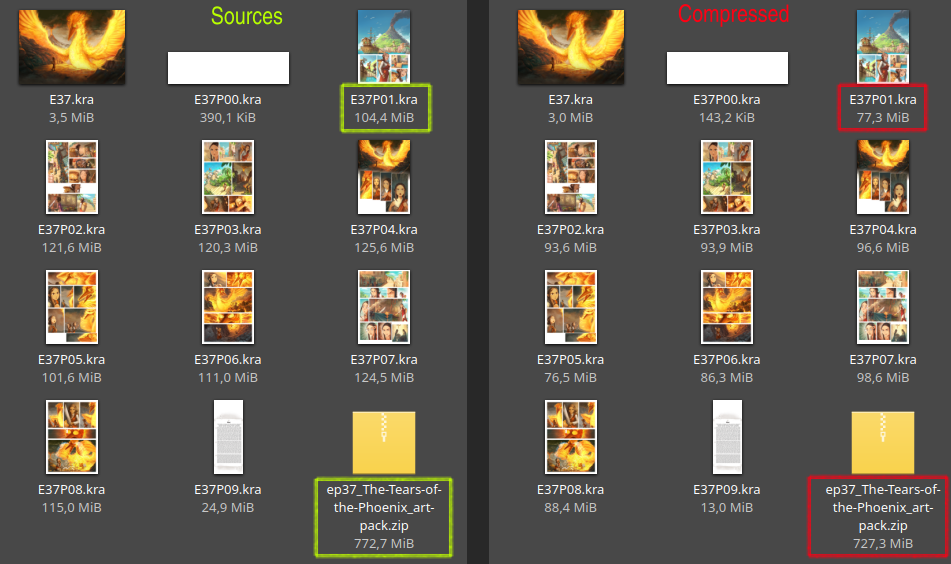
I downloaded zip with kra files of “The Tears of the Phoenix” & used ECT (0.9.3) on it.
Initial size of zip archive is 772,7 MiB (as downloaded from your website).
After “ect --strict --mt-deflate -zip” it’s 741,1 MiB (took 10m35s on Ryzen 3 2200G).
To be more precise, I also used Linux “time” command to measure, well, time it took ect.
Flag --strict stops stuff like deflate-compressing kra files inside or “same looks” png color spaces.
Flag --mt-deflate used here to give some amount of multithreading (“user time” here 13m).
If we give multiple files as ECT input, flag --mt-file is more efficient (thread per file).
For max-ish compression we can add flag -9, but it is slow, size 738,1 MiB (took 53m13s).
But hey, at least a bit crazy level 9 here utilized mt better (“user time” here 87m40s).
I do believe we can go fast by using -1, but at this point ratio is IIRC close to zlib -9.
ECT (hello 0.x.x version) is probably less reliable than something more established.
But than again, optimizing something is a bit of risk anyway (bugs may do files wrong).
The hardest part of that is done (took me quite some time) but I was unable to do it on my own. With the help I got I think that part is done.
Next will be adding that support in Krita which (hopefully) will just be changing the version of a dependency for what I need.
But first, I’m waiting a new stable version of quazip with support to bzip2.
Later on UI and other elements may be provided to compress kra files using bzip2 instead of deflate.
Bzip2 may be not the newest best thing (hi to zstd here), but it is surely stronger than deflate.
Did you know that for PNG spec bzip2 was considered for compression (instead of deflate)?
Yeah, but at the time long-long ago it was viewed as something too slow for PNG to do.
I wonder if the ultimate compression for kra/krz would be not generic, but specialized for images.
Specifically, JPEG XL for raster layers… it is very flexible, can be fast or very efficient & much more.
In fact, fresh Krita can even import/export jxl files, just not inside kra/krz, just on their own.
Thanks for sharing your tests and your results @Waterfall .
Also, very interesting to benchmark the KRA pack of “The Tears of the Phoenix” ( pack of Krita files here https://www.peppercarrot.com/0_sources/ep37_The-Tears-of-the-Phoenix/zip/ep37_The-Tears-of-the-Phoenix_art-pack.zip ) because these Krita files were not compressed with my script (I forgot), so they are ‘vanilla’ out of a regular Krita 5 save operation. I’ll keep them like that for the coming months, it can be a good for further test (eg. @brunoais 's bzip2, I remember the performances of bzip2 for Gimp XCF files when I worked with it, and it was wonderful for long-term archiving of work, or sending sources to clients.)
I decided to relaunch a test to see if I could get better results. I tried to use my script on individual KRA files (the one that decompress the KRA, optiPNG on the mergedimage, and then recompress with -9 flag), then I compressed all with zip -9 flag. It took in all around 12 minutes and I obtained that :
Color me surprised that ECT was of weaker compression than just ol’ zip & optipng.
But I think I know the cause, flag --strict was used to leave things as-is as possible.
Meanwhile, your script (to my understanding) compressed files inside archive as well.
If I forgo --strict flag & just use ect -zip --mt-deflate (for just lossless, no extra caution).
Result would be very much better (& a bit slower) ~ 694,1 MiB (took 14m15s).
Neither quazip nor minizip support the better zstd compression which was added to zip somewhat recently. minizip-ng supports it but it’s API is incompatible with minizip so it might never be incorporated to quazip.
I didn’t. However, in the end, PNG only supports deflate and I’m not going to change that. I’ve done tests by replacing it with other compressions and there’s no significant storage space wins. Probably now all PNG tools have been optimized to squeeze PNG to its maximum and maybe even push Deflate beyond what was ever expected.
Anyway, the bzip2 is for the contents inside the .kra archive except for the mergedimage.png file. Specially the layers files but also other metadata files will compress much better with bzip2
Maybe. Depends how well JXL matures. I’d say I’d wait, at least, 5 years of maturity before incorporating it like that. It’s for sure a very impressive image format that can already be used directly. However, as part of an official file format… Give it some extra time to mature well. For now, importing and exporting is a great status.
Awesome! I also know first hand how much savings can be gained by using bzip2 with gimp files. I’ve tried both the compression amount GIMP decides and also maxium compression with careful settings with 7z. I’m usually able to squeeze some extra 2-5% with 7z and bz2 (and take twice as long).
For now, quazip changes have been merged to master so now I’m just waiting for the new version to be released. When the new version is released, I’ll file a ticket with Krita so they update quazip version. With the new version, loading bzip compressed .kra files should just work. Later we can have a ticket to allow compression with bzip2.
Try also 7z. Try using ECT for the images and 7z for the compression. That way you can set a higher value for fast bytes and for even more passes, which should allow additional compression.
Neither quazip nor minizip… …it might never be incorporated to quazip.
I am not good at understanding programming things (sorry).
But I do understand that difficulty of doing things varies.
PNG only supports deflate and I’m not going to change that.
Even if you could, you probably shouldn’t. It will fragment format support.
Adding lossless & then animation to finished format didn’t go well for WebP.
I’ve done tests… …Deflate beyond what was ever expected.
That’s interesting. Thank you for the info.
Maybe. Depends how well JXL matures.
Well, that’s fair. JXL may be a standard, but its reference software is not even 1.0 yet.
Try also 7z… …additional compression.
I don’t think that 7-Zip is better at Deflate than ECT. But sure, I’ll try it a bit.
I’ll use “E37P01.kra” (104,4 MiB) from comic about Phoenix Tears mentioned above.
After extraction it’s 105,0 MiB, I use ect on “mergedimage.png” & “preview.png”.
After that (ect --mt-deflate), size is 99,8 MiB (pngs are 27% smaller now, yay).
And now, let’s compress folder’s contents back to zip via 7z Linux CLI…
78 226 586 b (took 32s) ~ after (from above) 7zzs a -tzip -mpass=13 -mm=Deflate -mx=9 -mfb=180
78 218 478 b (took 11m58s) ~ after changing to -mpass=99 -mfb=999 (hitting diminishing returns)
However, just using ECT is better here than many passes & fast bytes…
77 718 683 b (took 1m26s) ~ after optimizing kra file, no unpacking, via ect -zip --mt-deflate
addendum…
7-Zip may not have best deflate nowadays, but it does have nice lzma for its 7z files.
On average, I think lzma even a tad stronger than zstd (but lzma slower to decompress).
Also, that 7-Zip can squeeze a few % out of bzip2 for XCF is pretty cool, I didn’t know that.
Things obviously depend on the data set, but my conclusion so far:
If you are concerned about decompression speed, bzip2 seems to be the slowest.
Also bzip2 offers by far the least flexibility, neither copression ratio nor speed changes a whole lot between min and max. The main trade-off is that higher compression gives even worse decompression speed.
So I’m not sure it’s such a great choice, although the parallelized bzip versions are not in such a bad spot.
zstd offers a crazy range for speed vs. ratio trade-off, but trying to squeeze out bzip2 or LZMA compression ratio does not seem worth it, its sweetspot is clearly levels 1-7.
Easily beats DEFLATE variants across the whole range though.
LZMA compression basically goes from slow to extremely slow, but the ratio is top, and decompression is at least not slower than bzip2. Below level 3 bzip2 seems to make more sense, but above quickly gets to the point where you have to ask yourself if it makes sense to waste so much electric energy on it…probably only if it’ll be some popular download.
I agree. However, bringing bzip2 compression to .kra is a quick-win by comparison. Krita already have quazip into its workflow so changing that would require WAY more work than just changing a version number for a dependency.
For nowadays needs, ideally, .kra would be compressed with zstd only and its versatility in settings would determine if high compression is done at cost of time or if quick saves are done at cost of storage space. Unfortunately, quazip is already mixed into Krita in some shape or form. It would require changing libraries which would have a different API which might take months if ever approved or picked up by a dev.
Bzip2 only makes sense for .kra because it’s a quick-win development. Ideally, Krita would use a library such as minizip-ng which supports pretty much all algorithms of .zip and has been having a much more active development than quazip.
Belated reply: wouldn’t the optimal approach be to save with zstd, then save a second time with a more CPU-hungry compressor in the background, and move that save into place when it is finished? That way, the save completes instantly, but the file doesn’t take up much space on disk when the program is closed.