Hello! I use the text feature very frequently. I use hotkeys via buttons on my mouse for things like selecting the text tool. I find that I am spending a lot more time than I would like moving my mouse to save and then close the text box. Probably a few hundred clicks a day and the energy to move the mouse over the buttons. Kindly, I would like to request a hotkey feature for saving text and closing the text box. Ideally, a hotkey to both save and close the text box in one command.
Another part of the text feature that slows production is the “placeholder text” that must be deleted each time I would like to customize the textbox. Is there a way to combat this?
Thank you!
Separate “save” and “close” hotkeys are already there,
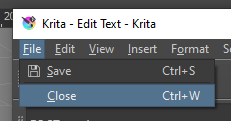
not difficult to press them sequentially, without releasing [ Ctrl ].
But it is worth considering that they are universal, and when pressed again, they will save/close the files of the Krita.
In general, I will support adding a third combined option, and the corresponding button to the interface.
Thanks for your response. I usually have 10+ documents open in the header and close them unsaved at end of day.
I tried the hotkey for save with the text box opened but nothing happened. Also, that would not stop the user from still having to press the close button on the text box. I believe that this feature would have to be added as “Save and close text” unless there is another way I don’t know about.
When the text editor is open, ctrl+S will only apply the latest text changes to the canvas
Related: I would appreciate adding a button to the text editor UI that would both save and close the text editor, since that would save me a lot of clicks as right now we first have to click “save” then “close”.
@darkhog
That’s exactly what @BiigTuna asked for five days ago.
No, he asked for a hotkey, i.e. keyboard shortcut. I am asking for the UI button, preferably next to save/close buttons at the bottom of text editor’s form.
1 Like
Ah, I misread, or didn’t read hard enough - sorry.
You might want to vote for this, the Vote button is at the top 
1 Like
