These are really nice. Tweaked a few, but they work really well.
Thanks for making them!
Bob
These are really nice. Tweaked a few, but they work really well.
Thanks for making them!
Bob
hello, im not used to downloading brush packs and only have one other. When I try to import this one Krita says it shares a name with an existing file. What should I do?
 Hello @Misstersheep, and welcome to the forum!
I guess you are doing something wrong, your description stems from an error Krita gives out when someone creates a bundle, but not when a bundle is installed, because it is not uncommon to have double resources in bundles from different creators.
So, you probably need to know how to install a bundle:
A bundle is installed in Krita via the menu ‘‘Settings’’ >> ‘‘Manage Resource Libraries…’’ and in the opening dialog you have to click the button + Import in the next dialog browse to the downloaded bundle, select it and confirm the selection. Now Krita imports that bundle, and you can use its content, so the brushes in case of this bundle.
In case this BUNDLE comes in an archive-file, like ZIP or RAR for instance, then you have to unpack the archive to get the BUNDLE-File it contains, then you can proceed as described above.
Michelist
Hello @postmax
I love your brushes; however, I keep running into something strange with them.
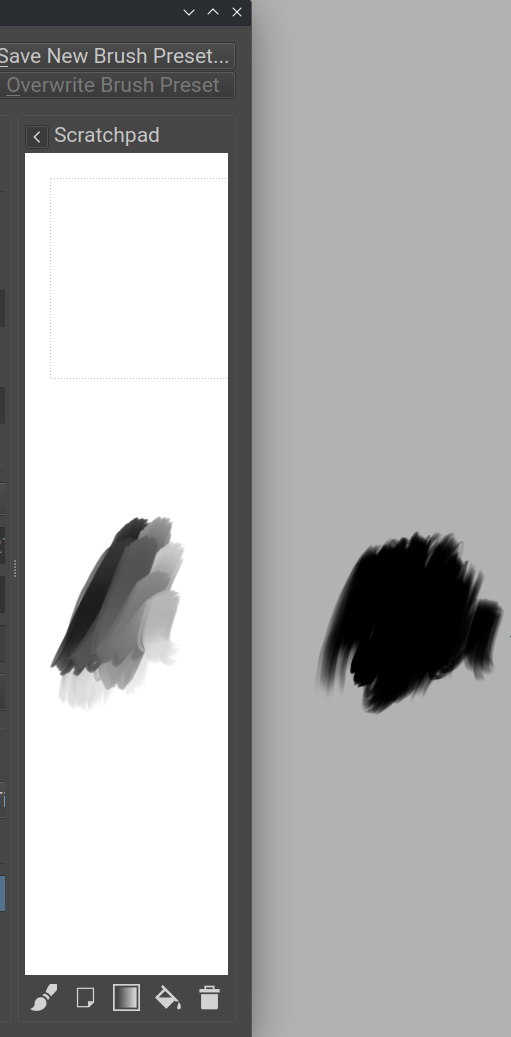
When I use the brushes, there is no blending and minimum pressure sensitivity in Krita but the scratchpad works perfectly with the brushes.
Is there a way to be able to use the brushes on the canvas in Krita that acts like how they work in the scratchpad?
On the left of the photo is the Brush Editor Scratchpad, and on the right is the canvas in Krita.
Thank you for your help and hard work, these brushes are amazing!
OpenSUSE Tumbleweed Kernel Version: 6.14.0-1-default (64-bit)
KDE Plasma 6.3.4
X11
Krita 5.2.9
Krita (5.3.0-prealpha-6e409adc56)
The latest Krita nightlies have not been tested since they do not open at all, I have tried to run them as executable to no avail and when I use the AppImage Launcher; I receive an error that states that the appimage failed to register on system via libappimage.
I was going to say it must be a bug but I tried and had the exact same issue. Found the answer here 4.4.5 and 5.0 Scratchpad and canvas have different effect of color smearing.
Try drawing on the initial white background layer, you’ll see you can get the same results. I will read on it a bit more to understand the reasoning behind it but I think it has to do with “Blending on Alpha” and painting over white fill layer interacts with the white of the layer, this should solve your issues.
Edit: Please let me know if this fixes it for you, I am quite certain it will but just as a confirmation for future readers as well
Hi @Typhoon,
Thank you for your help, you were absolutely right! When I set the Background Layer to White and as a raster layer, the brushes work.
The odd thing is that if I add a new layer, it no longer works and if I return to the background layer, it starts to work again.
Do you know if there is a way to be able to paint on other layers without the white background?
Thank you so much for your help!
Yes, you can enable “Overlay mode” for the brushes you want to reference below layers. I just tried it, the performance of brushes take a massive hit on my device but you may find it useful. Only other solution (without enabling Overlay mode per brush) is having some amount of paint on the layer you are on, in this case what brushes does is using the White of the background layer and blend with it. So if you paint long enough you’ll have a base for smudgin but each time you create a new layer you’ll start anew, unless you use Overlay mode within brush settings, which as I said might be a bit laggy but exactly what you want
I think the problem is the smear alpha setting. I don’t know exactly how this specific brush is set up, but if smear alpha (in brush settings, under smudge length) is disabled, it will give a flat look on an empty layer. Once you add some color and paint over it, it should blend with the other color. When you want the effect from the scratchpad, please enable smear alpha and it should work. Please let me know, thanks!
I go back and forth using this setting, because when painting with real paint on paper, the paint would not blend with the white. It would only blend because of the opacity of the paint. This is why I used this setting. I have since gone back to smear alpha, also because erasing with this setting disabled does not really work. I am working on a new and improved set of brushes since making these which hopefully work better.
PS Overlay mode is an amazing option if you don’t want to destroy work on a layer and still blend with this layer on a new one. But yes, it tends to be quite slow.