Hey everyone! Thought I would mention a little change I made to the code that I really like and hope other might like too!
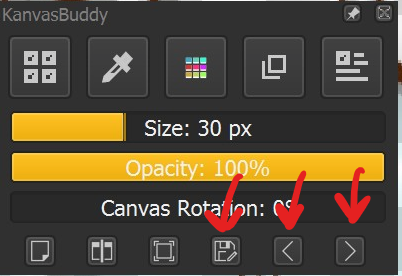
The following additions adds an undo, redo, and save button to KanvasBuddy (file paths and names that i’m using are for windows):
- Add the following to the [CANVAS] section of config.ini:
fileSave=1
editUndo=1
editRedo=1
(If you don’t want any of the three actions, set them to 0).
- In the file “data.json”, add the following entries to the json list under the “canvasOptions” object:
        "fileSave":
        {
            "id": "file_save",
            "icon": "light_document-save-as"
        },
        "editUndo": {
            "id": "edit_undo",
            "icon": "light_arrow-left"
        },
        "editRedo": {
            "id": "edit_redo",
            "icon": "light_arrow-right"
        }
Make sure that your brackets are alright, that the listed objects are separated by commas, and that the code won’t end up breaking!
- Restart Krita and start up kanvasbuddy.
I have my settings so that with these new options, file save, undo, and redo look like these. All of them do what they say on the tin!
Hope that helps! Thanks again to @Kapyia for this awesome plugin!