So the question for me is there a way to disable it? I have never needed that particular feature to the Color selectors and could just do without.
Well the bug i know is you boot krita then press ctrl+lmb on the dockers before clicking anything else and the square appears. Then you click around and it goes away feels like bad default values on startup. And this looks like an extension of that somehow. When i get qt6 to work i will try it out.
hello, i m testing 5.3 and i’ve noticed a lag in the cursor display when switching to previous brush. The cursor seems to be “stuck” waiting for a refresh of the canva… but you can paint with the new brush, just the cursor and outline are not update instantly (in the previous version, it is instant)
someone notice that too?
some changes have been made in this area?
should i report a bug?
Hello! I’ve just downloaded Krita 6 but I haven’t been able to open Krita since I did
I use a dell laptop to run the program and installed the 64bits windows version.
I use plugins for Krita as well
Have no idea, maybe hidden in kritarc config, or hard-coded?
Disable all external plugins in 5.2 and run 6.0 again to tryout.
1 Like
Problem is, Krita automatically uninstalled 5.2 when I installed 6. And when I tried to go back to 5.2 it said that I had to manually uninstall 6
Update on this:
I downloaded the portable version of 5.3 and that works fine. The new stabilize settings took some time getting used to but they work okay now
5.3.0 Android
Are we still able to reposition the toolbars?
In previous versions, there was a tiny area on the left ege that you could press and drag. In 5.3 Android there doesn’t seem to be any way to move the toolbars.
I put everything I need in Custom Toolbar1 and want to move it to the bottom of the screen, if possible.
It’s a new toggle in the Settings menu, Lock Toolbars (on by default). You should be able to move them after unlocking them.
Oh my gosh!!! That’s genius. Thanks for telling me, I totally missed that.
Congrats on the Beta releases! I’ve been playing with the Krita 6.0 Beta AppImage for a bit on Arch Linux with KDE Plasma for a little bit and it seems to work real well.
One thing I’ve noticed so far is that the the Specific Color Selector docker doesn’t seem to register any changes to Saturation or Lightness/Value that are made either through picking a color with the Wide Gamut Color Selector, or entering in a hex code while it’s set to HSL or HSV Modes. RGB, HSI and HSY modes seem to work as expected.
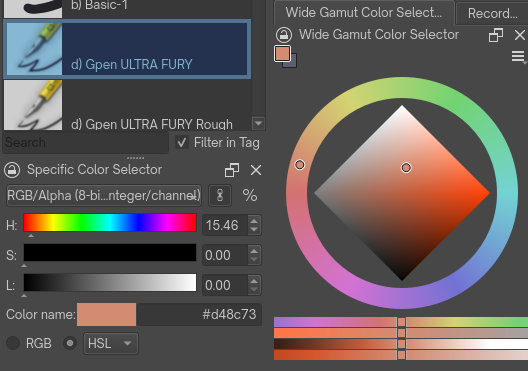
Also, if I run the AppImage with QT_QPA_PLATFORM=wayland, when I use my tablet stylus, Krita uses the Crosshair cursor from my Plasma theme, as someone else mentioned before in this thread. If i use my mouse, then it uses the cursor settings defined within Krita, as expected.
1 Like
Hi! I’m trying the new 5.3 beta (on Windows 10), and I came across what seems to be a bug with camera panning.
It’s a problem with panning while dragging a tool beyond the view limit. It seems that the panning starts not when you cross the view limit, but a little bit before it on the right and bottom sides. The problem is that this distance is fixed regardless of how zoomed in you are. It looks to be about 40 pixels.
This is problematic when working with pixel art, as any attempt to make a selection will drag the camera.
I can’t attach a video since I’m a new user, but it’s simple to recreate. Just make a small canvas of 100px by 100px and zoom in. If you try to make a selection near the bottom right corner, you’ll see that the view moves.
A fix for this is in progress here: Fix zoom being too fast when zoomed in (!2632) · Merge requests · Graphics / Krita · GitLab
1 Like
Hello ! It so nice to see our wonderfull software evolving 
I just installed it (i’m on Linux-Solus and it seems to work fine) and, as i was testing the new text-tool, i was wondering how to change the spacing between lines and paragraph above the others, and also spacing between letters ? i just find how to change width of each letters or tilt of italic. Thank you for your answers 
quick report, im having a crash on 6.0 specifically a little bit after the time i create a second project, seems to be a ticking bomb after i resize the image (part of the workflow)
heres what i believe is to be the most relevant part of the log:
QWidgetRepaintManager: skipped frames: 0 %
QWidgetRepaintManager: skipped frames: 0 %
qrc:/qt/qml/org/krita/components/ResourceDelegateBase.qml:39: TypeError: Cannot read property ‘modelWrapper’ of null
qrc:/qt/qml/org/krita/components/ResourceDelegateBase.qml:33: TypeError: Cannot read property ‘highlightedIndex’ of null
qrc:/qt/qml/org/krita/components/ResourceDelegateBase.qml:41: TypeError: Cannot read property ‘palette’ of null
qrc:/FontResourceDropdown.qml:17:9: Unable to assign ResourceView_QMLTYPE_0 to ResourceView_QMLTYPE_0
qrc:/qt/qml/org/krita/components/ResourceDelegateBase.qml:39: TypeError: Cannot read property ‘modelWrapper’ of null
qrc:/qt/qml/org/krita/components/ResourceDelegateBase.qml:33: TypeError: Cannot read property ‘highlightedIndex’ of null
qrc:/qt/qml/org/krita/components/ResourceDelegateBase.qml:41: TypeError: Cannot read property ‘palette’ of null
qrc:/FontResourceDropdown.qml:17:9: Unable to assign ResourceView_QMLTYPE_0 to ResourceView_QMLTYPE_0
qrc:/qt/qml/org/krita/components/ResourceDelegateBase.qml:39: TypeError: Cannot read property ‘modelWrapper’ of null
qrc:/qt/qml/org/krita/components/ResourceDelegateBase.qml:33: TypeError: Cannot read property ‘highlightedIndex’ of null
qrc:/qt/qml/org/krita/components/ResourceDelegateBase.qml:41: TypeError: Cannot read property ‘palette’ of null
qrc:/FontResourceDropdown.qml:17:9: Unable to assign ResourceView_QMLTYPE_0 to ResourceView_QMLTYPE_0
qrc:/qt/qml/org/krita/components/ResourceDelegateBase.qml:39: TypeError: Cannot read property ‘modelWrapper’ of null
qrc:/qt/qml/org/krita/components/ResourceDelegateBase.qml:33: TypeError: Cannot read property ‘highlightedIndex’ of null
qrc:/qt/qml/org/krita/components/ResourceDelegateBase.qml:41: TypeError: Cannot read property ‘palette’ of null
qrc:/FontResourceDropdown.qml:17:9: Unable to assign ResourceView_QMLTYPE_0 to ResourceView_QMLTYPE_0
qrc:/qt/qml/org/krita/components/ResourceDelegateBase.qml:39: TypeError: Cannot read property ‘modelWrapper’ of null
qrc:/qt/qml/org/krita/components/ResourceDelegateBase.qml:33: TypeError: Cannot read property ‘highlightedIndex’ of null
qrc:/qt/qml/org/krita/components/ResourceDelegateBase.qml:41: TypeError: Cannot read property ‘palette’ of null
qrc:/FontResourceDropdown.qml:17:9: Unable to assign ResourceView_QMLTYPE_0 to ResourceView_QMLTYPE_0
qrc:/qt/qml/org/krita/components/ResourceDelegateBase.qml:39: TypeError: Cannot read property ‘modelWrapper’ of null
qrc:/qt/qml/org/krita/components/ResourceDelegateBase.qml:33: TypeError: Cannot read property ‘highlightedIndex’ of null
qrc:/qt/qml/org/krita/components/ResourceDelegateBase.qml:41: TypeError: Cannot read property ‘palette’ of null
qrc:/FontResourceDropdown.qml:17:9: Unable to assign ResourceView_QMLTYPE_0 to ResourceView_QMLTYPE_0
QWidgetRepaintManager: skipped frames: 0 %
qt.qpa.xkeyboard: QXcbKeyboard::handleKeyEvent: key released, but it has no record in the registry code 37 qtcode 16777249
qt.qpa.xkeyboard: QXcbKeyboard::handleKeyEvent: key released, but it has no record in the registry code 54 qtcode 67
qt.qpa.xkeyboard: QXcbKeyboard::handleKeyEvent: key released, but it has no record in the registry code 37 qtcode 16777249
qt.qpa.xkeyboard: QXcbKeyboard::handleKeyEvent: key released, but it has no record in the registry code 54 qtcode 67
QWidgetRepaintManager: skipped frames: 0 %
QDomDocument called with unopened QIODevice. This will not be supported in future Qt versions.
QDomDocument called with unopened QIODevice. This will not be supported in future Qt versions.
QDomDocument called with unopened QIODevice. This will not be supported in future Qt versions.
QDomDocument called with unopened QIODevice. This will not be supported in future Qt versions.
QDomDocument called with unopened QIODevice. This will not be supported in future Qt versions.
QDomDocument called with unopened QIODevice. This will not be supported in future Qt versions.
QDomDocument called with unopened QIODevice. This will not be supported in future Qt versions.
QDomDocument called with unopened QIODevice. This will not be supported in future Qt versions.
The imageRectInWidgetPixels topLeft() does not match the documentOffsetF!
imageRectInWidgetPixels: QRectF(-0.6,-0.6 0x0)
documentOffsetF: QPointF(1,1)
qrc:/SvgTextToolOptions.qml:249: TypeError: Cannot read property ‘textType’ of null
qrc:/SvgTextToolOptions.qml:42: TypeError: Cannot read property ‘optionsModel’ of null
qrc:/SvgTextToolOptions.qml:337: TypeError: Cannot read property ‘showLineDebug’ of null
qrc:/SvgTextToolOptions.qml:342: TypeError: Cannot read property ‘showDebug’ of null
qrc:/SvgTextToolOptions.qml:327: TypeError: Cannot read property ‘showCharacterDebug’ of null
qrc:/SvgTextToolOptions.qml:332: TypeError: Cannot read property ‘showDebug’ of null
qrc:/SvgTextToolOptions.qml:321: TypeError: Cannot read property ‘showDebug’ of null
qrc:/SvgTextToolOptions.qml:317: TypeError: Cannot read property ‘showDebug’ of null
qrc:/SvgTextToolOptions.qml:124: TypeError: Cannot read property ‘showTextPropertyButton’ of null
qrc:/SvgTextToolOptions.qml:74: TypeError: Cannot read property ‘optionsModel’ of null
qt.core.qobject.connect: QObject::connect: No such signal WdgImageSize::okClicked()
krita.ui: WARNING: thumbnail generation for “Background” took longer than expected: 283 (timeout: 40 )
krita.ui:          This layer’s thumbnail will be rendered in imprecise mode from now on
WARNING: idle task consumed more than 200 ms, it can cause visible distractions to the user
WARNING: time consumed in “layer-thumbnails-stroke” is 285 ms
QWidgetRepaintManager: skipped frames: 0 %
QWidgetRepaintManager: skipped frames: 0 %
QWidgetRepaintManager: skipped frames: 0 %
QWidgetRepaintManager: skipped frames: 0 %
QWidgetRepaintManager: skipped frames: 0 %
QWidgetRepaintManager: skipped frames: 0 %
QWidgetRepaintManager: skipped frames: 0 %
QWidgetRepaintManager: skipped frames: 0 %
QWidgetRepaintManager: skipped frames: 0 %
QWidgetRepaintManager: skipped frames: 0 %
QWidgetRepaintManager: skipped frames: 0 %
Segmentation fault         (core dumped) /home/lucas/AppImages/krita.appimage
note: currently running fedora kde 43, with a gtx 1050 ti
Idk why but 6.0 or Qt6 ver of krita is buggy on Linux. But 5.3.0 works great.
The 6.0 versions has so much latency when i draw. The cursor lags behind alot. Krita 5.4 dosent have those latency
I made a 120 fps recording, hopefully it will be clear to see, but on 5.3 the cursor outline (big circle) stucks for a moment after I release the stylus, then teleports back to the cursor.
On 5.2.15 there is no such problem with the same settings:
@raghukamath / @sooz / @Takiro / @tiar: Can you please close this topic and move the initial post to the Krita 5.3/6.0 beta 1 released topic, where it belongs?
Thank you!
Michelist
1 Like
Adding vblank_mode=0 environment variable to force disable vsync seems to fix the latency issue for me with AMD integrated GPU.
1 Like