Yes, the tool takes GPU usage into account as well, but only the temperature.
Tool is called “MSi Afterburner”.
You did not tell, whether you have a dedicated GPU. Only that you have a 3rd gen i7.
In case you have a dedicated GPU, can you test to disable it in Windows → Device Manager? it will then be idle and can’t be used by Krita anymore. The canvas output will then be CPU integrated GPU only. Would be interesting to see, if that has an effect to the overall load.
I have an Nvidia GT640M dedicated GPU.
And an Intel HD 4000 integrated GPU.
I previously ran acceleration on the dedicated GPU.
But then I switched to software renderer and it decreased the
CPU load and heat temperature, still remaining about the same
as Photoshop.
Now I’m about to run on Integrated graphics. I’ll let you know about the outcome
once the test is done.
So after testing with my Integrated GPU(with OpenGL), it turns out that the temperature went up to 92°C from the monitoring app on average. And My CPU power usage was about 26 watts while painting. So very very hot in principle.
However something bizarre : when I put my hands around the fan, it was less hot than
expected and drawing in the software was not laggy as usual when the temp reaches 90°C+.
I suspect that there suddenly was an error with the monitoring app(MSI afterburner).
But yeah. Perhaps it’s just my body which somehow is magically resisting heat a bit more.
I don’t know.
Nevertheless, I can conclude that OpenGL rendering, consumes a lot of power in Krita.
After doing these tests, I am switching to software rendering, even if it’s slow.
It saves energy and prevents overheating.
Instead of Afterburner.
Ciould you have a look into Taskmanager’s CPU load?
Test on my side
6th gen intel notebook, windows 10, dedicated GPU disabled, Krita 5.3.
-
A4, 300 ppi canvas in Krita
-
Basic-1 brush in Krita @ 40 px
Making a single stroke for about 20 seconds
CPU load:
Around 8% (with short spikes up to 15%) (OpenGL acceleration active).
CPU temps 35 to 40 degree celsius. (measured with free HWINFO - https://www.hwinfo.com/)
Fans do not even spin up.
Your system should not have an issue like overheating in this test case.
I tested with a fresh clean install of Krita 5.3 (but i guess Krita 5.2.x would be similar). No custom settings except from setting to OpenGL acceleration. No plugins, no extra brush packs etc. I used the notebook’s touchpad, pen tablet was not attached.
EDIT: Same test but with 600px air brush:
CPU load around 20%
CPU temps around 45 degree celsius.
My CPU TDP is only 45Watts.
So it is understandable that it heats up with just 26 watts of energy consumption.
Without even using Krita, the temperature stays at around 60-66°C from
the HWinfo app.
You wrote, you have a 3rd gen core i7 with integrated intel 4000 HD graphics unit.
And you wrote your CPU is 45 watts.
My CPU is a Core™ i7-6700HQ Processor with 45 watts as well.
The lower the TDP the lower the average heat.
My system at idle has CPU temps around 38 degree at a room temp of around 24 degree.
I also checked another notebook (gaming type with a 10th gen intel core i7) which tends to be a bit hot. Even that one shows idle temps around 50 degree (painting with airbrush at 600px causes temps around 54 degree).
If your system shows idle temps in the 60th, than I think there is something wrong with your hardware (worn out thermal paste, loose contact between cpu and heat dissipation plate, blocked air flow, …) or your environmental temperature is very high.
If you watch the task manager and see a low CPU usage, but still get high temps, than that is another indication that something might be wrong regarding the pc cooling.
Regarding Krita, in my experience it has areas, where it is not as optimized as some other software, but I have not seen a situation causing overheating etc. by just doing simple brushing.
There was only one situation in the past, where I saw unusual cpu load. That was when I tested 5.2.9, 5.3 and 6.0 on the same pc without making individual appdata confing and resources sets for each version. Somehow that corrupted the configs and caused extra slow behaviour of Krita. But once I made clean installs for each version, that issue was gone.
My environmental temp is 28°C.
But I admit that it’s been at least 6 months already since I applied
thermal paste. Maybe I need to renew it.
Now if it’s only about CPU load.
It goes up to about 20+% while drawing in Krita.
So, I believe the clean install issue, isn’t the problem on my side.
Just that my hardware… has really outdated cooling solution.
It is just one fan and a small radiator.
As far as I know, even simple standard paste lasts for around 3 years.
Just one fan could be a limitation, but maybe also a loose contact of the cooler and the cpu.
Example: Intel’s Alder Lake CPUs on socket LGA-1700 had an issue with a bend surface once mounted. This caused an only partwise contact of CPU and cooler and in consequence a lot of overheating reports and RMAs.
But in your case it might just be a suboptimal fitting of the cooler mount screws, or maybe uneven spread of the thermal paste.
3 years is probably a high quality thermal paste. And
I doubt I have it.
I once applied the paste only to see it almost fully
dried after just a year.
Could be. But maybe you can solve your heat issue by reseating the cooler and / or checking if it is within the airflow of the fan.
A 3rd-gen i7 is over a decade old at this point. modern creative software isn’t designed around 2012-era hardware. It fair to discuss optimization, but its also important to keep expectations realistic for a system of that age. If a laptops is already running in the mid-60s at idle, it’s difficult to use it as evidence that a painting application is causing overheating. I have a t440p i7 4900mq I will test this on. It’s a laptop notorious for being hot
Here is the logic you forget :
“If it’s fast on a decade old hardware, it will be far much faster on the newer and
latest hardware.”
If an application is highly optimized for decade-old hardware, its efficiency scales exponentially on modern architectures. Legacy optimization is never obsolete; it is the foundation of high-performance software. Optimization 101
And also don’t fall into the trap of the years. Because at times, the upgrades
in hardware is not so drastically outstanding. Tiny percentages are gained
per year now. Additionally, newer hardware is somehow ridiculously
expensive( SSD, GDDR6, DDR5 RAM ). And are not right away globally
available. Global ubiquity is slow.
When a new hardware is released, wait at least 5 years before it becomes
fully available on most markets.
Old school optimization, if possible, and viable, should NEVER
be neglected.
That’s all I wanted to say.
I use a Core i7 3rd gen and run windows 10 on it.
Not a old Pentium 4 CPU.
This is a generalization and oversimplification that is simply not true.
Until evidence of the contrary, you can not simply say that it is not true.
Because it is scientifically backed.
The only case where there could be a problem would be when compatibility issues arise.
Otherwise, if the software is perfectly compatible on both the decade old hardware and the new
one, you can not convince me that the software, given that it was optimized to run fast
on the older, weaker hardware, will not be faster on the newer more powerful hardware.
You say otherwise without solid argument or evidence, then it would be nonsense.
It’s funny that you don’t have to prove your own claims.
I’m a software developer for almost 20 years. I have seen stuff go worse even on the supposedly same chips because some of them lost the silicon lottery. I have seen software suddenly perform less on newer hardware because all kinds of reasons. Newer chips calculate simple arithmetic wrong. Not to mention higher levels turning things inside out because of faulty drivers and stupid OS implementation. But you’re right, what do I know.
I still support that Krita consumes a lot of energy.
But, with time, optimizations will improve. Hopefully.
Now regarding overheating issues, I’ve realized that most of the time, it’s just because of my PC’s thermal paste wearing off.
“Until evidence of the contrary, you cannot simply say that it is not true.”
That’s backwards to me. The person making the claim that optimization scales exponentially is the one who should provide evidence.
This is a real-world test on a 4th-gen i7 4900MQ mobile workstation chip i did. its one generationnewer than your 3rd-gen chip and its notorious for being hot and power hungry. Just dragging a single modern 1000px RGBA Thickpaint brush across the canvas instantly spikes Krita’s CPU utilization to around 70% just for the active application state. Im not seeing seeing super high temps and high and hot power usage, it operates very good actually . its old yet could use this for production. Its well-optimized
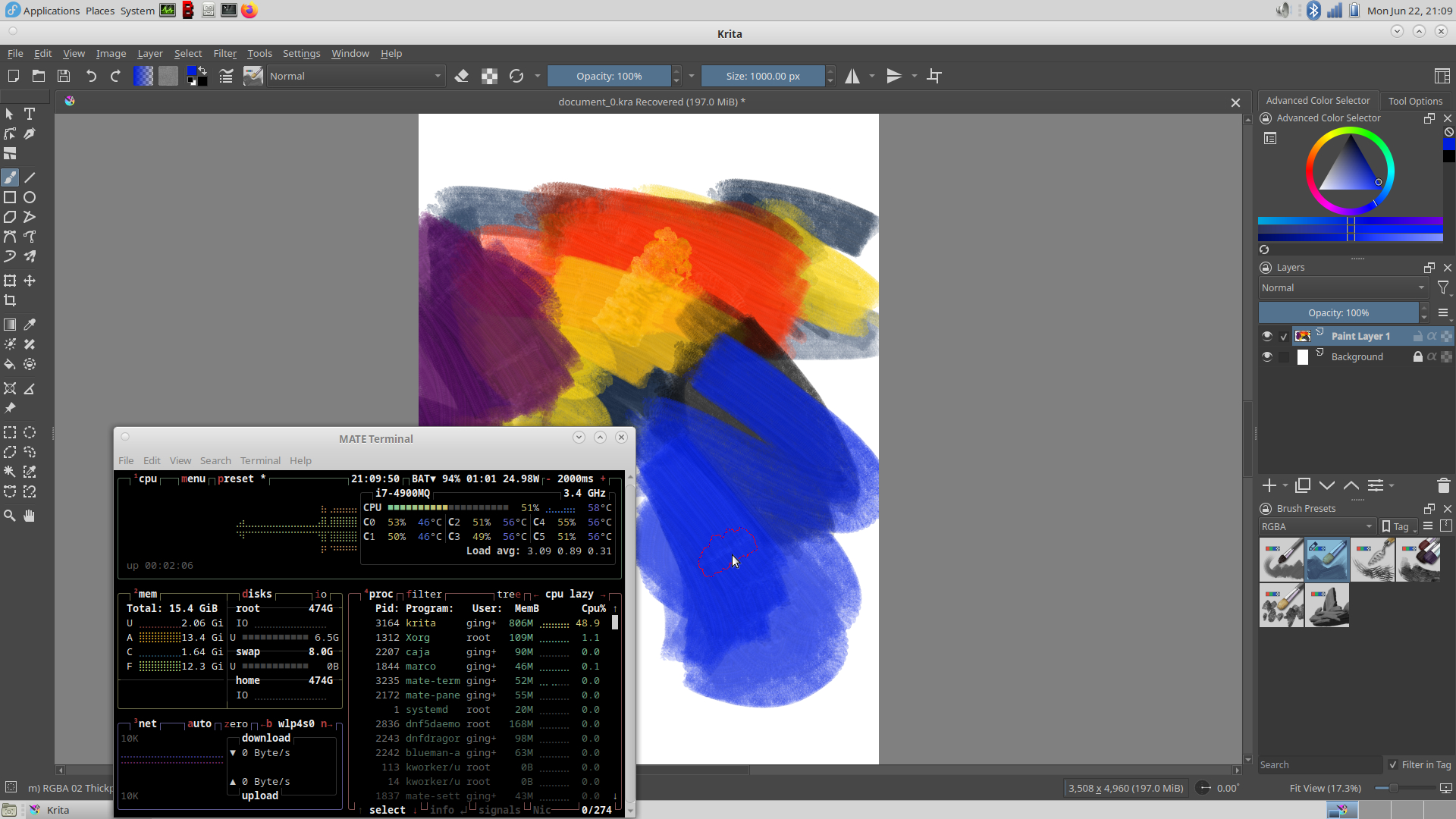
The thing is that compatibility is a concern all the time, not just occasionally. And algorithms don’t transfer from math to silicon in a 1:1 fashion, most of the time. A lot of software doesn’t even run directly on bare metal anymore. There are so many moving parts (figuratively). This is why I called it a generalization and oversimplification. Regarding heat, there is also the problem that transistors are packaged much more tightly nowadays which can lead to problems with dissipation. Like @Hewpow mentioned sometimes you also have hardware that is prone to overheating (or other problems) in certain scenarios, even when in the same generation. That’s just how they are built (even though not intentionally).
The evidence is that the newer, 10 years later released, more powerful hardware, will
handle bytecode at a faster rate than the 10 years old hardware of the same version.
But only at the condition that there is zero compatibility issue.
Practical example :
An Nvidia GT640M gpu(10 years old), vs an RTX 3080 Ti GPU’( newer, more powerful
hardware )
Stop saying it is backwards when it is not.