Krita crashes about every 5 minutes. It’s terribly hard to get any work done. I’m working on a kind of project I haven’t done before, but Krita has crashed once or twice when doing Render Animation (on a different project).
The crash: The program freezes, with the “this window is not responding” dialouge if I click the X. Waiting does nothing. Cpu at 13% (one core maxed out). krita.log doesn’t show anything; the last line (before ===== \n\n SESSION) is something like “loaded image” or “completed autosave”.
I think I have a rough idea of how to get it to crash:
- Create animation.
- Load audio file into krita. Mine is a 10kB .wav file, 50 seconds long.
- Give the animation like 1000 frames. It’s crashed with just 600, too.
- Maybe create a keyframe or two? Draw something on them? I’ve never had more than 5 keyframes when it crashes, so it can’t be keyframe overload.
- Scrub the timeline. I play/pause with my “e” keybind, and I click and drag with mouse on the bar with the little frame numbers. Maybe click on the keyframe.
- Play around with playing/pausing/jumping until it just crashes. Takes less than 5 minutes for me consistently.
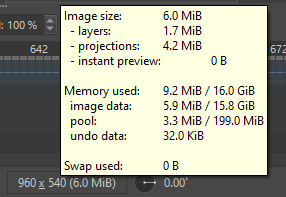
“1000 frames” made me think it’s a memory issue, but 960 * 540 * 1000 is just 500 MB. There’s 12 GB free RAM for Krita to use, according to task manager.
One time when it crashed with 600 frames, I checked task manager, and it said Krita used ~270 MB. 960 * 540 * 600 = 297 MB.
Examples of krita.log:
02 Sep 2024 19:59:07 +0200: Loaded image from application/x-krita. Size: 960 * 540 pixels, 4.16667 dpi. Color model: 8-bit integer/channel RGB/Alpha (sRGB-elle-V2-srgbtrc.icc). Layers: 4
02 Sep 2024 20:09:30 +0200: Loaded image from application/x-krita. Size: 960 * 540 pixels, 4.16667 dpi. Color model: 8-bit integer/channel RGB/Alpha (sRGB-elle-V2-srgbtrc.icc). Layers: 4
or
02 Sep 2024 21:12:18 +0200: Completed saving C:/Users/.kra-autosave.kra (mime: application/x-krita). Result: OK. Warning: . Size: 133117
krita version:
Krita Version: 5.2.3 (git 68d178c), Qt version compiled: 5.15.7, loaded: 5.15.7. Process ID: 40108