Type of device* : display tablet
Brand and version of the device: Huion kamvas 13
System** : Windows 10
Description of the issue:
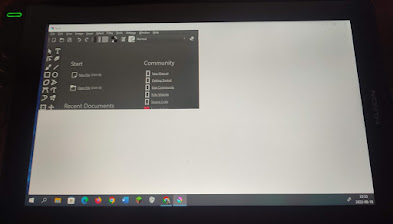
whenever i try to open krita on my tablet or drag it over to my tablet most of the program window becomes white except for a small rectangle (as it is in the photo below)
(when i open it on my monitor or drag it back there it seems to be working just fine)
I’m new to digital art and have no idea what to do. Tried reading tutorials, searching for answers on reddit, but so far nothing helped.
Does anyone have any suggestions for how to fix this?
Hm, sounds a little strange. You can try to “change” your main monitor. In Windows click on “Start Menu” >> “Settings” >> “System”, then you should be on the page “Display” (or “Monitor” or similar, sorry I have to translate it, so it has to be something like that) there you can make your tablet to your main display. I think the settings are self-explanatory, if you need help with these settings, please come back and ask.
I hope that this will fix it for you, if not please feel free to ask for further support.
Heyo @Candy_moth !
What video port is your tablet plugged into on the back of your computer? Do you have a dedicated graphics card? Is it plugged into that or the motherboard?
 Hello
Hello