Hi
Problem is the same for ALL image editors.
After, according to transformation algorithm applied, the result will be more or less blur/sharp.
Here Transform filters, what are the differences? - #2 by Grum999 I’ve provided some technical reference about transformation filters, most of them are very technical and needs some skills in algorithm and/or mathematics…
Links are related for scaling image, but rotation is the same as scaling/moving/shearing…
To simplify, they all use transformation matrix to process pixels associated with filtering to ‘smooth’ the result (or apply an anti aliasing if you prefer).
And all image editors use the same technical method to process pixels transformations.
Example, this simple image made without any anti aliasing (100% size and 800% zoomed version too see pixels  )
)

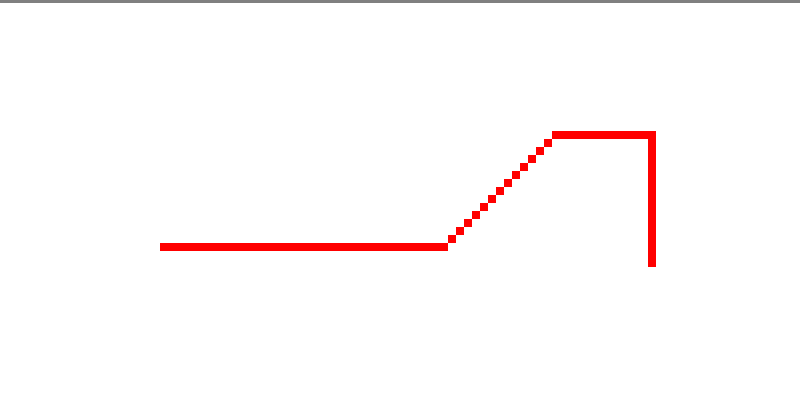
If you apply a rotation of 15°, without any filter, result will look like this:


If you apply a rotation of 15°, with a bicubic filter, result will look like this:

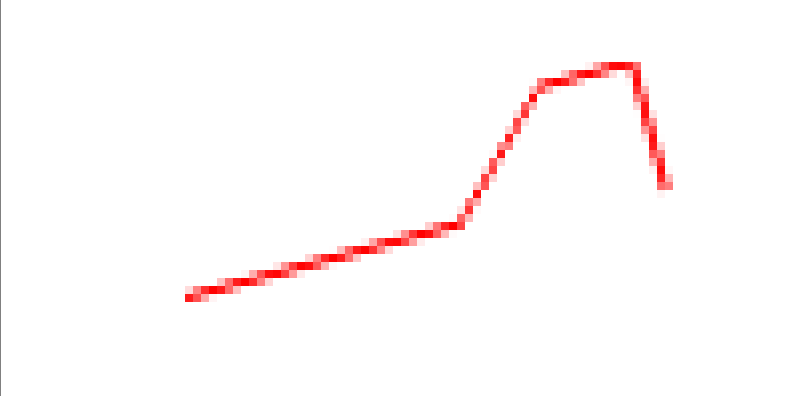
As you can see, the filter tries to smooth the result to get something less pixelated, this is why in your rotation you loose some sharp details…
So, Krita provides 8 different algorithms: according to the original image (a drawing with clean lines, a painting, a picture, …) you need to determinate which one will provides the best result for your case.
The bicubic filter is the most common filter I think and is applied by default in Krita.
Maybe photoshop use another algorithm than the 8 provided by Krita, and for which results are better than Krita’s filter(s), I don’t know, last time I used this software it was in 1998… 
If you take this picture and made a rotation of 15% with photoshop, I’m curious to see the final result to compare, but there won’t be any magical in the result: you’ll get something blurry
Grum999