The main purpose of the refactor was to resolve the touch-related issues and asserts when using Krita with Qt6 on Windows. But the project, in the end, included a lot more changes and fixes. I’ll try to list what has changed for every OS:
All Platforms
All three touch-driven zoom/rotate actions in “Canvas Input Settings” now work consistently with switching “continuous” and “discrete” modes:
“Rotate Canvas” and “Zoom Canvas” actions can now work in “continuous” and “discrete” modes when bound to “Touch Gesture” shortcut [1].
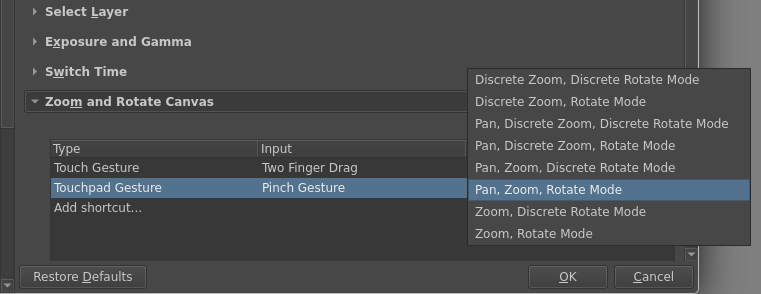
“Zoom And Rotate Canvas” action now has 8 modes for “continuous” and “discrete” switching. I guess “Pan, Discrete Zoom, Discrete Rotation Mode” will be the most interesting for painters, though I’m not sure (need your opinion on that!)
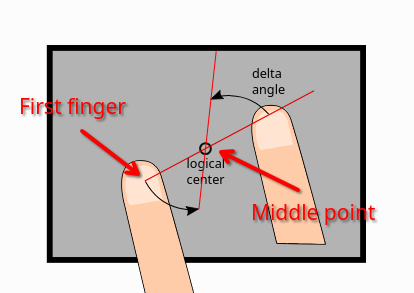
The patch also changes how two-finger zoom and rotate actions on touchscreens behave. Before the patch, some actions used the “first pressed finger” as a base point for rotation and zooming, but others used the “middle point between the two fingers”. This patch makes it consistent. Now all the touch actions perform transformation around the “first pressed finger”. It makes it possible to hold one finger and do multiple swipes with another finger to do the rotation, while keeping the canvas pinned to the first finger:
I need your opinion on this default choice! Does it look good?
you can switch all actions to “transform around middle point” mode by adding line touchGestureAroundTheFirstFinger=false into your kritarc file (needs restart)
NOTE: I guess that this option does very little for “Pan, Zoom, Rotate” action, because it performs its own panning. You can see the effect of it the most in “Zoom Canvas” and “Rotate Canvas” actions.
Linux and MacOS
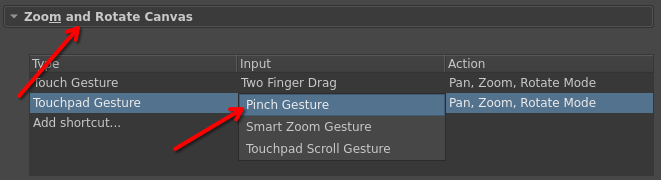
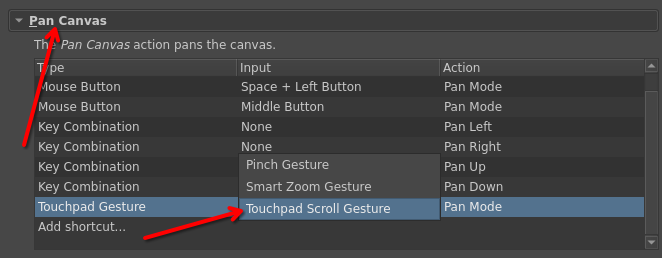
Both Linux and MacOS now properly support “Touchpad Gestures" [2]. These are the actions that one can trigger by performing a two-finger pinch-zoom or pan action on a normal laptop’s touchpad. These gestures are also supported by touch-capable Wacom Intuos tablets on Linux! [3]
if you start two-finger scroll action, the scroll action will start (MacOS and Wayland)
if you start a two-finger pinch action, a zoom/rotate/pan action will start (MacOS, Wayland and X11)
If you used “Gestures” on MacOS, then you should notice one change. There are no separate selectors for “Pinch”, “Pan” and “Rotate” gestures anymore. There is only one “Pinch” gesture, which can be bound either to “Pan” or “Zoom” or “Rotate” or “Zoom and Rotate” canvas action. You don’t need to set up three separate actions anymore.
(MacOS only) Smart Zoom Gesture should work as before.
Windows
Touch-screen support should now work correctly. You should now be able to hold one finger, then do multiple swipes with another finger, and the canvas should be rotated multiple times (instead of crashing or locking up )
Android
Nothing should have changed functionally, but a lot of the related touch gestures code has been refactored.
Test Plan
WARNING: this build of Krita will automatically convert your input actions configuration file to the new version! Please make a backup of your Krita settings! Namely, this folder:
Windows: %APPDATA\krita\input
Linux: ~/.local/share/krita/input/
Windows
On a touchscreen capable device
When touch-painting is on, painting with a single finger should work
When touch-painting is off, single finger drag should move the canvas (no additional setup should be needed)
Assign the two-finger touch gesture to “Zoom and Rotate Canvas” action. Check if it works as expected (should be the default setting).
Assign the two-finger touch gesture to “Zoom Canvas” action. Check if it works as expected. Also check with touchGestureAroundTheFirstFinger=false, which way is better?
Assign the two-finger touch gesture to “Rotate Canvas” action. Check if it works as expected. Also check with touchGestureAroundTheFirstFinger=false, which way is better?
Test if 3- and 4-finger tap gestures still work
Test on both Qt5 and Qt6 builds (Qt6 builds have higher priority)
Linux
On a touchscreen capable device
When touch-painting is on, painting with a single finger should work
When touch-painting is off, single finger drag should move the canvas (no additional setup should be needed)
Assign the two-finger touch gesture to “Zoom and Rotate Canvas” action. Check if it works as expected (should be the default setting).
Assign the two-finger touch gesture to “Zoom Canvas” action. Check if it works as expected. Also check with touchGestureAroundTheFirstFinger=false, which way is better?
Assign the two-finger touch gesture to “Rotate Canvas” action. Check if it works as expected. Also check with touchGestureAroundTheFirstFinger=false, which way is better?
Test if 3- and 4-finger tap gestures still work
On a device with touchpad or with a touch-capable Wacom tablet
Assign “Touchpad Gesture/Pinch Gesture” to a “Zoom and Rotate Canvas” action (should be the default). Does it work as expected? Please take into account that on X11 touchpad gestures may also generate “Mouse Wheel” events, so you may want to remove the “Mouse Wheel” shortcut in the “Zoom Canvas” section. Does this feature look useful for painters at all? [4]
If you are using native Wayland, assign “Touchpad Gesture/Touchpad Scroll”” to a “Pan Canvas” action (should be the default). Two-finger scrolling gesture should now scroll the canvas.
Test everything in native Wayland mode (Qt6 build, with export QT_QPA_PLATFORM=wayland). The patch also fixes a lot of cursor problems when using a graphical tablet device via a native Wayland protocol. There is only one known issue right now, the rest should be fine:
when you paint with your tablet and accidentally drag the tablet out of the canvas widget borders, the stroke will be stopped (and will potentially mess up with the rest of your DE by sending clicks everywhere the cursor moves over ). That is the problem of the Wayland protocol itself and cannot be fixed by Krita. KWin plans an ad-hoc fix, but that is still work-in-progress.
There is one particular test case that should be tested on Wayland:
Hover mouse over the canvas
Bring tablet into the proximity and hover/paint with that
Remove the tablet from the proximity
As soon as you remove the tablet, mouse should become available, not locked up. Ideally, the cursor should jump into the mouse location, where the mouse was left before the tablet arrived.
The behavior may also differ depending on whether the mouse was left within the bounds of the Krita window or not.
Test on both Qt5 and Qt6 builds (Qt6 builds have higher priority)
MacOS
On a device with a touchpad (trackpad?) or with a touch-capable Wacom tablet
Assign “Touchpad Gesture/Pinch Gesture” to a “Zoom and Rotate Canvas” action and “Touchpad Gesture/Touchpad Scroll”” to a “Pan Canvas” action (both should be the default). Does it work as expected? Does this feature look useful for painters at all? [4:1]
Check if “Smart Zoom Gesture” still works
Check if “Mouse Wheel” gesture on the touchpad doesn’t interfere with the zoom shortcuts. The real mouse wheel should still zoom the canvas.
Test on both Qt5 and Qt6 builds (Qt6 builds have higher priority)
Android
Test if touch-actions work fine
When touch-painting is on, painting with a single finger should work
When touch-painting is off, single finger drag should move the canvas (no additional setup should be needed)
Assign the two-finger touch gesture to “Zoom and Rotate Canvas” action. Check if it works as expected (should be the default setting).
Assign the two-finger touch gesture to “Zoom Canvas” action. Check if it works as expected
Assign the two-finger touch gesture to “Rotate Canvas” action. Check if it works as expected
Test if 3- and 4-finger tap gestures still work
If you are on Xiaomi, pay extra attention to how 3- and 4-finger gestures work. We have a special workaround for that.
before the patch, only tablet shortcuts supported discrete mode, not touch shortcuts ↩︎
MacOS already supported them as “Gestures” even before the patch. It was just renamed to “Touchpad Gestures”. ↩︎
I don’t know if Wacom Tablets support “Touchpad Gestures” on MacOS, please test it! They definitely don’t support that on Windows. ↩︎
Don’t forget to enable the touch support of your tablet in the system settings! I know that many disable it right away ↩︎↩︎
macOS with trackpad, local Qt6.10 build of commit cd884df3 (I’ll test the packages later) :
Touchpad Scroll Gesture defaults to “Pan Mode”, Pinch Gesture defaults to “Pan, Zoom, Rotate Mode”. Both work as expected- since there’s now a single Pinch Gesture for zoom and rotate rather than separate Pinch and Rotate gestures, it’s possible to switch between zooming and rotating without lifting all fingers. (They don’t happen simultaneously, just the one with the greatest magnitude, thus ‘switchable’, which is nice.)
But it’s now possible to rarely get in a state where moving fingers does nothing until lifting them all and trying again. Looking at the tablet log, it seems scroll events and native gesture events are mutually exclusive, but it can somehow begin a native gesture after a scroll begins, so nothing happens (since it’s in pan mode expecting scroll events but receiving only native gesture events)?
Portion of tablet log showing zoom gestures happening during pan mode
The cursor doesn’t switch to a zoom or rotate one anymore. I don’t have a strong opinion either way, just noting the change.
Smart Zoom (two-finger double-tap gesture) is not assigned by default, but works as it did before- which is not very well.
When assigned to Zoom Mode, the first gesture activates zoom mode, then subsequent gestures while in zoom mode zoom in or out. Then the user’s stuck in zoom mode until breaking out of it with a pinch gesture. This is made worse by the zoom cursor no longer appearing, giving no indication of being stuck in zoom mode.
The way smart zoom is expected to work is to zoom in on the first gesture, then zoom back out on the second gesture, a sort of temporary zoom. I guess this could be accomplished by creating a new toggle action and assigning the gesture to that.
But that’s not the only problem- when assigning Smart Zoom to something like Undo, it also doesn’t end the action until ending another native gesture event. I guess it’s expecting a continuous event instead of a discrete (single action) one.
Real mouse wheel works as before- left and right wheel don’t trigger their assigned shortcuts (none are assigned by default), but it’s not a regression.
Unassigning Touchpad Scroll Gesture causes scrolling the trackpad to instead trigger the mouse wheel shortcuts, which seems sensible.
Regarding the "first pressed finger” look, I think it looks fine personally! Works well in my testing. @dkazakov
You mentioned that the user can access “transform around middle point” mode by changing the kritarc file. I would probably suggest putting a setting for that in the app’s interface, since it’s not easy for Android users to edit the file, and maybe there is an Android user out there who might want to change the setting. (Android doesn’t like the user digging into where Krita stores the settings files…)
Normally the gesture seems to just get interpreted as whichever of scroll event or native gesture event is is currently active, and the inactive one doesn’t show up.
It’s just that NativeGestureBeginEvent can somehow appear and become active after the two touchpadScrollBeginEvents, before any touchpadScrollEvents. It’s difficult to reproduce, since usually a touchpadScrollEndEvent will get triggered before that.
The scroll phase of the wheel event matches that of the succeeding input matcher event- there’s two ScrollBegin and two ScrollEnd with ScrollUpdates between them.
Tested on Android, a Xiaomi Pad 7, a Wacom Movinkpad and a Samsung S6 Lite, as well as on Windows on a Surface tablet with both Qt5 and Qt6.
“Zoom Canvas” assigned to two-finger drag no longer pans the canvas. This is a regression.
Everything else works as expected, including the Xiaomi 3 and 4 finger tap gestures.
The behavior of rotation and zooming following the first finger is obviously wrong to me. The natural way to zoom or rotate something is to put your fingers around the thing you are interested in, so that you can, you know, actually see what you’re trying to manipulate. The new behavior requires me to put my finger on top of the thing, which means I can’t see what I’m doing. If I don’t do that, Krita just zooms or rotates way off to the side and the thing I’m interested in goes out of view.
The default “Zoom and Rotate Canvas” action doesn’t have this problem, it behaves sensibly. Setting touchGestureAroundTheFirstFinger=false on Windows also feels fine.
Putting down two fingers to zoom or rotate, then lifting one finger to continue panning doesn’t work. I have to first lift both fingers and then put one back down again to pan. Unless I have touch painting enabled, in which case I just have no way of panning without also zooming and rotating. This is not a new issue, the old system didn’t do this correctly either, but it feels bad all the same.
Also not a new issue, after assigning Zoom Canvas to two-finger drag, I can no longer delete it. Attempting to do so instead pops up the (nonsensical) message:
Deleting last shortcut for this action!
It is not allowed to erase some default shortcuts. Modify it instead.
Testing with an MPP Pen, KDE Plasma under Wayland, laptop touch monitor.
Haven’t had any of the issues previously described by others in the thread so far, so I’m guessing using the inbuilt laptop monitor + MPP Pen isn’t quite as troublesome as eg. Wacom in this area!
Honestly only having trouble with three-finger inputs, but that’s been persistent ever since I moved to linux, but I’m not really sure it’s really a Krita issue [and not just a touchscreen on wayland problem, since most of the time it’s very hard to trigger 3-finger gestures of any kind…]
Will return if there’s any odd touch input problems o7
We need your opinion. We have three different actions for finger-zoom and finger-rotate:
“Zoom Canvas”
“Rotate Canvas”
“Zoom and Rotate Canvas”
In the currently released version of Krita, “Zoom Canvas” and “Zoom and Rotate Canvas” also perform “pan” action when triggered. Should we make “Rotate Canvas” pan the canvas as well?
I like doing all 3 at once, but I don’t have any problems that make it hard for me to do precise gestures. I’d imagine that some folks prefer it separate if they eg. have shakey hands. Hard to say since I don’t have many people irl with hand mobility issues to test this on.
Well, yes, it would be nice to have a configuration GUI for touch actions, but I’m afraid I should keep it out of scope of this patch. It is already huge
It should have “most” of the tablet issues and “most” of the MDI issues resolved:
Tabbed GUI should now work perfectly
Subwindow GUI should work somewhat fine, unless you try to move or resize subwindows manually Activating subwindows and reordering them with “Window->Tile/Cascade” should work perfectly fine. But manual resizing and movements require a fix in KWin (and in the Wayland protocol itself)
I think rotation and zooming should be separated from panning… When I zoom or rotate I want my canvas stay at the center between my fingers. I mostly have panned before zooming in or rotating the canvas.
I very strongly disagree with this, it is not really possible to precisely pinpoint where you are zooming at or rotating about, so being able to simultaneously pan is the expected behavior to make adjustments. That’s how pinch zoom works on every modern mobile device, I don’t see why rotation would be any different.
that is me not really knowing anything about touch. I compared it to pc, where you use mouse and have the exact location. So I thought you can do that with touch, too. I don’t really mind the current behaviour.
I find myself often correcting my position after zooming or rotating, because I have to drag my hand out of the way to see, where I am zooming to/from or when I rotated at the wrong point. But that could also be just me.
Yes, the cursor is now expected to hide on any touch action started. The point is that OS does not move the cursor with the touch actions (at least on Windows and Wayland), so it is very confusing when the cursor is just stuck in the middle of the screen.
 )
) ). That is the problem of the Wayland protocol itself and cannot be fixed by Krita. KWin plans an ad-hoc fix, but that is still work-in-progress.
 that is me not really knowing anything about touch. I compared it to pc, where you use mouse and have the exact location. So I thought you can do that with touch, too. I don’t really mind the current behaviour.