this one as well
Of these three, I would take the Wacom, even if the XP-Pen is bigger. But this choice is due to my love of quality.
The tablets from Wacom and Huion are a good deal smaller, but Wacom has the advantage in terms of quality, and Huion has, I believe, just started to switch to the more modern sensor technology for its tablets and pens, the one you presented is possibly/presumably still one of “the old models” (would have to be researched), the XP-Pen already has this and would be ahead of the Huion.
Wacom, as the only supplier so far, has pens that map the rotation of the pen in addition to pressure and tilt angle, an extremely useful feature in my eyes, but also extremely expensive. I’m waiting for XP-Pen and Huion to offer this technology as well.
Edit/Add: These pens have to be purchased additionally. And for one of these pens you can buy three of my Huion Inspiroy H1060P.
Michelist
The terminology is a bit confusing now that with “tablet” people associate tablet computers, mostly ARM devices with Android and iPads, but “graphics tablets” ( now called “pen tablets” by vendors) exist since well before tablet computers became a thing, and are the plain digitizer boards with stylus, no display.
To not confuse further, Huion/Wacom now call their Kamvas/Cintiq devices “pen displays” rather than “display tablets” or similar, because these are not standalone devices like Android tablets, but literally just displays with pen input.
Though Fenix already mentioned, an Android tablet actually is an option, Krita does run on Android too and to my knowledge the Samsung S-Pen with pressure sensitivity works too, so something like a Galaxy Tab S8 may be interesting.
But with max. 8GB RAM it’s still a bit limiting, the pen has no tilt support, and I doubt it gives the same drawing experience as a “proper” pen display, but some people here have proven that you can do good artwork with it.
I don’t have any first hand experience with Krita on Android though, so I don’t dare to make a recommendation for or against it.
I am Wacom all the way. The extra buck you spend on it is literally good materials. I got the cintiq and I don’t feel I wasted any money at all it is worth it. Wacom one is like cintiq but super cheap and affordable.
Wacom one is an interesting product, the pen is compatible with Samsung S-pen since it use Wacom EMR2.0 licence. While the pen is not compatible on any other Wacom products.
Speaking of slight lag, if it only happen on krita canvas, try to set a “cursor” in krita setting general section.
If you;re going for wacom - i dont think wacom one will do. One it doesnt use the pro-pen 2 like its pro sibling also not laminated. If you are thinking geting wacom one , i think you are better off with a huion or xp pen.
I think desk tablet (no screen)- wacom intuos pro medium , if you can find that [even second hand is good option] (idk if its still what is called now)
as for Huion vs XP Pen, Huion’s pen is tad bit better than XPPen, (very little difference tbh)
The best pen is till Wacom Pro Pen 2. If you are going with wacom screen because you want the best pen, don’t take wacom one [again - its more expensive than huion / xp pen and doesnt even use pro pen 2, not even laminated]  Look for wacom screen with wacom pro pen 2 [that’s the best pen]
for reviews - ParkaBlog [Teo Yie Chie] Compare and contrast - his vid are pretty comprehensive [i.e like 30+mins] He also has written blog.
Also brad colbow has a list - [if youtube is not for you]
I agreed with you 100% on this, but I wanna add that Wacom one there is a bit more options to get in terms of stylus for the wacom one.
For example the Hi-uni Mitsubishi Pencil stylus (only compactable to Wacom one) and Staedtler Noris digital jumbo Stylus (can be compatible with other devices but only still on Wacom one)
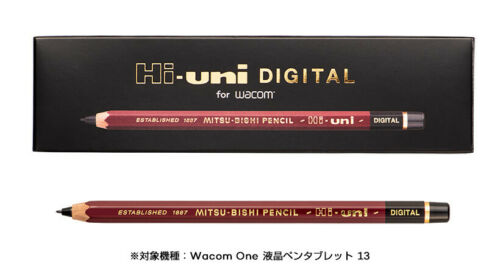

True, on a ergonomics side this pen would probably be better if you prefer that side.
OTH it still use the same tech as the default wacom one pen, which the same one as samsung spen (which also work on wacom one). Now that i think about it - would work in conjunction with samsung spens - if you already have that as well.
tablets is highly a self preference thing. I wish there are more physical store that let you try them out and see them physically.
For expensive display tablet it’d better try them out first. I used to want a display tablet or a cintiq so badly. But when I had chance to try it out at work, I actually hated it and went back to regular wacom tablet, a co-worker hated them too, some liked it. Everyone is different.
For me I feel annoying my hand covering part of the drawing, and my posture doesn’t feel comfortable at all, either my arm or my neck gets tired easily.