From what I understand your actual problem is you want to keep the proportions while resizing.
- Switch to the layer you want to transform.
- Activate the transform tool by clicking on it or press ctrl + T (or its Mac OS equivalent)
- Now you should see a frame around the layer content with a few little squares as handles. This frame only encloses opaque pixels because transforming transparent ones does nothing.
- Now click and hold on one of the corner handles and when you drag while holding ctrl (at least that’s how it works on non macs) it will keep the proportions.
- Resize to your desired size by dragging the corner handles while holding down ctrl.
As an alternative to 4 you can also click on “scale” (Skalieren) and then activate the “keep proportions” button indicated by a broken/connected chain-link icon in the tool options docker (Werkzeugeigenschaften). You may have to scroll down a bit since your docker seems too small.
When you do it that way you can only scale proportionally and nothing else.
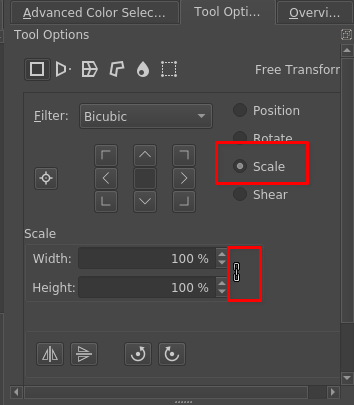
You can also click this chain link icon in the resize dialog you currently try to use and then only edit one of the input fields, the other one will be automatically set correctly so it wont get distorted.