Rest Note
A Krita plugin that enforces healthy work-break cycles to protect your eyes and reduce fatigue during long drawing sessions.
Rest Note combines two complementary timers: a configurable work cycle that triggers a fullscreen break, and an optional eye break reminder that surfaces a soft toast in the corner of your screen.
Features
-
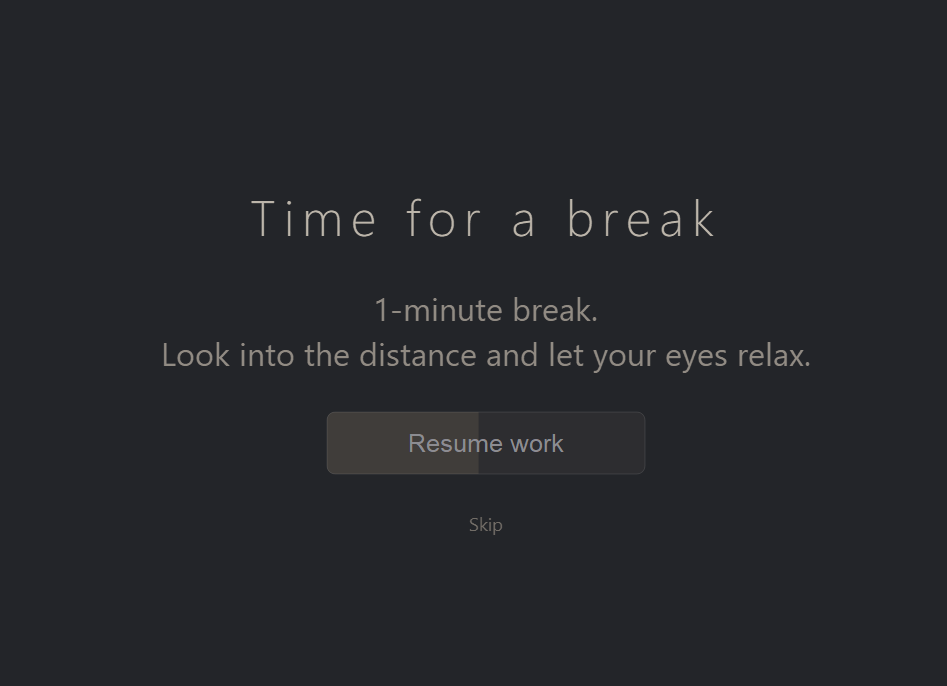
Scheduled work breaks — A configurable cycle (default: 50 minutes work / 10 minutes break) that takes over your screen with a slow-fading overlay. The “Resume work” button only becomes clickable after the full break duration has elapsed. A “Skip” button allows immediate dismissal.
-
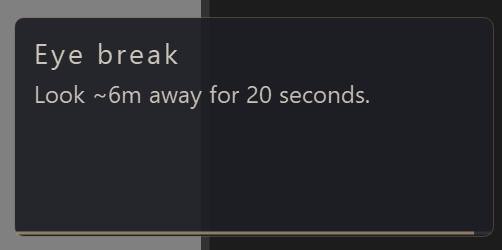
20-20-20 eye break reminders — Optional periodic micro-breaks following the 20-20-20 rule. A small toast appears in the corner of the screen without blocking input.
-
Idle detection — Automatically pauses the work timer when no keyboard, mouse, or tablet input is detected inside Krita for a configurable duration. Resumes seamlessly when input returns.
-
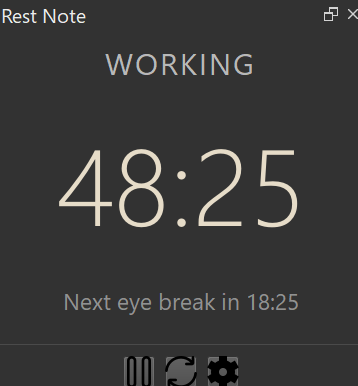
Responsive docker UI — Time and status labels scale dynamically with the docker widget size.
-
Pause / Reset / Config controls — Standard timer controls directly in the docker.
Screenshots
Docker panel — Compact display showing the current state, time until the next break, and controls.
Break overlay — A fullscreen overlay that fades in over 30 seconds, with a calming color palette and a progress button that becomes clickable only after the full break duration.
Eye break toast — A small unobtrusive notification in the corner of the screen, with a thin progress bar that drains as the 20 seconds pass.
Usage
Once enabled, the timer starts automatically when Krita launches. The docker shows your current state at all times.
Docker controls
| Button | Action |
|---|---|
| Pause / Resume | Freezes both timers. Click again to resume. |
| Reset | Resets both timers and cancels any active overlay or toast. |
| Config | Opens the configuration dialog. |
States
| State | Meaning |
|---|---|
WORKING |
Normal countdown to the next big break. |
PAUSED |
Both timers are frozen. |
ON BREAK |
Fullscreen break overlay is active. |
EYE BREAK |
A 20-second eye break toast is currently shown. |
IDLE |
No input detected — work timer is paused until activity resumes. |
Configuration
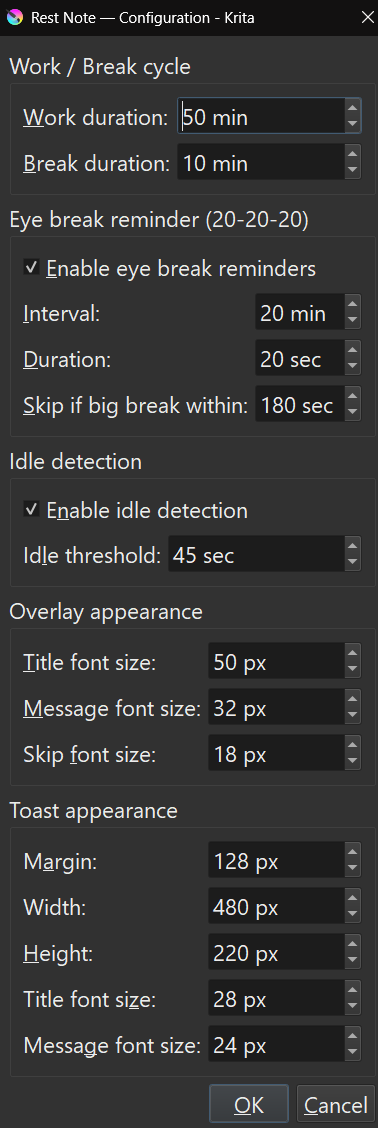
Click the Config button to open the settings dialog. All settings are saved to <krita resource folder>/rest_note/config/main.json when you click OK.
Work / Break cycle
| Setting | Description |
|---|---|
| Work duration | How long the work timer runs before triggering a full break (default: 50 min). |
| Break duration | How long the break overlay stays active before the “Resume work” button becomes clickable (default: 10 min). |
Eye break reminder (20-20-20)
| Setting | Description |
|---|---|
| Enable eye break reminders | Turns the 20-20-20 toast on or off. |
| Interval | How often the eye break reminder appears (default: 20 min). |
| Duration | How long the eye break toast stays visible (default: 20 sec). |
| Skip if big break within | Suppresses the eye break toast if the next full break is sooner than this threshold, to avoid back-to-back interruptions (default: 180 sec). |
Idle detection
| Setting | Description |
|---|---|
| Enable idle detection | When enabled, the work timer pauses automatically if no input is detected inside Krita. Resumes when activity returns. |
| Idle threshold | Seconds of inactivity required before the timer is paused (default: 45 sec). |
Overlay appearance
| Setting | Description |
|---|---|
| Title font size | Font size of the “Time for a break” heading in the break overlay (default: 50 px). |
| Message font size | Font size of the break duration message below the heading (default: 32 px). |
| Skip font size | Font size of the “Skip” button that dismisses the overlay immediately (default: 18 px). |
Toast appearance
| Setting | Description |
|---|---|
| Margin | Distance from the screen edge where the toast is positioned (default: 128 px). |
| Width | Width of the eye break toast window (default: 480 px). |
| Height | Height of the eye break toast window (default: 220 px). |
| Title font size | Font size of the “Eye break” heading inside the toast (default: 28 px). |
| Message font size | Font size of the instruction text inside the toast (default: 24 px). |