Code to run an external Python script from Krita
import subprocess

def execApplication(address):
    subprocess.Popen("python " + address, shell=True)

script = r"C:\XXX\XXX.py" # input address of your python script
execApplication(script)
Code to run an external Python script from Krita
import subprocess
def execApplication(address):
subprocess.Popen("python " + address, shell=True)
script = r"C:\XXX\XXX.py" # input address of your python script
execApplication(script)
Here’s a snippet to apply a transform mask affecting a group to all paint layers inside it.
Let’s say you got a group with lineart, another with colors, several layers inside. You used liquefy on a transform mask applied to one group contents to push the stylization and you’re satisfied with the results, and copied the transform to the other group too, but the performance isn’t great and Krita keeps doing that thing of updating the mask.
You’d like apply the changes to each child layer if you could without having to do it manually or merging the group. You can:
from krita import Krita

# HOW TO USE
"""
    Select transform mask inside group and run script.
    The mask will be copied to every paint layer inside the group,
    and those layers will be flattened to apply the transform directly to them.
    The original mask will then be hidden.
"""

print("\n > Preparing to transfer transform mask")

app = Krita.instance()
doc = app.activeDocument()

mask = doc.activeNode()
parentGroup = mask.parentNode()
siblings = parentGroup.childNodes()

window = app.activeWindow()
view = window.activeView()

def showWarning(msg, duration = 3000):
    if view is not None:
        view.showFloatingMessage(msg, Krita.instance().icon("16_light_warning"), duration, 1)

def applyMask(siblings, mask):
    type = mask.type()
    if type != "transformmask":
        showWarning(f"Layer must be a transform mask inside a group")
        print(f"Invalid layer type: '{mask.name()}' is {mask.type()}, not a mask layer")
        return False
    elif parentGroup.type() != "grouplayer":
        showWarning(f"Parent layer '{parentGroup.name()}' is not a group")
        print(f"Parent layer '{parentGroup.name()}' is not a group layer, it's a {parentGroup.type()}")
        return False

    # Duplicate mask or filter to apply to layers
    if type == "transformmask":
        dup = mask.duplicate()
        if not mask.visible():
            dup.setVisible(True)

    for layer in siblings:
        # Validate layer type
        if layer.type() == "paintlayer" and layer.visible():
            layer.addChildNode(dup, None)
            doc.setActiveNode(layer)
            Krita.instance().action('flatten_layer').trigger()

    # Hide mask so it doesn't affect siblings twice
    mask.setVisible(False)

print(f"> Applying mask '{mask.name()}' to all siblings in group...")
applyMask(siblings, mask)

# Force final visual update
doc.refreshProjection()
doc.waitForDone()

print("> Done applying mask to siblings.")
Word of caution: I currently don’t have the time to make it recursive, think of corner cases or do more than a cursory validation. Because it’s flattening layers to apply the mask other masks and filters layers might have will also be applied.
It’ll apply the selected mask even if it’s originally hidden for performance reasons.
It’s not recursive, layers inside groups inside the parent group won’t be affected. It also only affects visible paint layers.
Also, their names are getting “Merged” appended.
This is a gem
Switch to the brush preset with the specified name
app = Krita.instance()
window = app.activeWindow()
view = window.activeView()

targetPresetName = "***"# input the name of the preset

allPresets = Application.resources("preset")

for preset in allPresets:
    if preset == targetPresetName:
        view.setCurrentBrushPreset(allPresets[preset])
        break
The sample of the vector shape positioning, transform inheritance by shape.absolutetransformation() . SVG scaling setting.
from krita import *
from PyQt5.QtCore import QPointF
import re
import math

def add_rect_to_nearby(shape):

    svg_data = shape.toSvg()

    print("original element:")
    print(svg_data)

    print()
    p = shape.position()
    print(f'position {p.x()},{p.y()}')

    absolute_transform = shape.absoluteTransformation()
    abst_mat = qtransform_to_svg_transform(absolute_transform)
    print(abst_mat)

    # Blue rectangle: Place new svg element on near of the shape.
    # this rect far x=10 y=10 from  the shape
    # This position will inherited from the transform of the layer and shape.
    element = '<rect transform="'+abst_mat+'" x="10" y="10" width="180" height="80" fill="blue" stroke="black" stroke-width="2" />'


    # inherit of transformation or keep position
    pos = f' x="{p.x()}" y="{p.y()}" '
    print(pos)

    # inherit of transformation
    element +='<text style="font-family:Arial;" '+pos+' font-size="36" fill="purple">Hello Krita!</text>'

    # keep position
    element +='<text style="font-family:Arial;" transform="'+abst_mat+'" x="10" y="20" font-size="36" fill="red">Hello Kiki!</text>'

    return element

"""
QTransform(a, b, c, d, tx, ty)
matrix(a b c d tx ty)
a = scaleX
b = skewY
c = skewX
d = scaleY
tx = translateX
ty = translateY

transform = QTransform(1, 0, 0, 1, 100, 200)
svg_transform = qtransform_to_svg_transform(transform)
print(svg_transform)  # "matrix(1 0 0 1 100 200)"
"""

def qtransform_to_svg_transform(transform: QTransform):
    return f"matrix({transform.m11()} {transform.m12()} {transform.m21()} {transform.m22()} {transform.m31()} {transform.m32()})"

# -------
# main
# -------
app = Krita.instance()
doc = app.activeDocument()
view = app.activeWindow().activeView()
selected_vector_layer = view.selectedNodes()


# Set corrected scaling. 1pt = 72 dpi
wpt = doc.width()*0.72
hpt = doc.height()*0.72
svg_scale = f' width="{wpt}pt" height="{hpt}pt" viewBox="0 0 {wpt} {hpt}" '

output_shapes = []

# Get selected shapes and apply path effect to the shapes
for node in selected_vector_layer:
    if node.type() == "vectorlayer":
        shapes = node.shapes()
        for shape in shapes:
            if shape.isSelected():
                # main (get an output_element string)
                output_elements = add_rect_to_nearby(shape)

                # When adding to Krita vector layer, you don't need to describes the DTD or XMLNS parts.
                output_shapes.append("<svg "+svg_scale+">"+output_elements+"</svg>")

# Add shapes to the layer
for s in output_shapes:
    node.addShapesFromSvg(s)
Was going to make a topic asking how to get current node before/after actions are triggered, but after some back and forth with copilot apparently using lambdas containing a tuple (expression) can work. There are a couple downsides like variables being local to each expression, but you could use functions instead and time them in a similar way. Probably solves the global variable issue but then you got to edit the function names in multiple places. I’ve not tried using doc.waitForDoc() here but if this allows mixing api/actions then maybe it will work now…?
from krita import *

inst = Krita.instance()
doc = inst.activeDocument()
def func():
    if not doc:
        print("no active document")
        return
    if not doc.selection():
        print("no active selection")
        return

    steps = [
        lambda: (
            print("convert_selection_to_shape"),
            inst.action("convert_selection_to_shape").trigger()
        ),
        lambda: (
            layer := doc.activeNode(),
            print(layer),
            svg := layer.toSvg(),
            print(svg),
            inst.action("deselect").trigger(),
        ),
    ]

    delay_per_step = 100  # milliseconds
    for i, step in enumerate(steps):
        QTimer.singleShot(delay_per_step * (i + 1), step)
func()
Here is how I (and many others apparently) assumed it would work, but doc.activeNode() gets the previous node. This has been discussed over a bunch of topics.
from krita import *
inst = Krita.instance()
doc = inst.activeDocument()
def func():
    if not doc:
        print("no active document")
        return
    if not doc.selection():
        print("no active selection")
        return

    inst.action("convert_selection_to_shape").trigger()
    inst.action("deselect").trigger()
    layer = doc.activeNode() #active layer is not the new vector layer
    print(layer)
    print(layer.toSvg()) # AttributeError: 'Node' object has no attribute 'toSvg'
func()
edit:
Here is a version that a list of functions. For whatever reason the prints go to the command prompt (I launched krita from there). the dictionary var is used to store values.
from krita import *
from PyQt5 import QtCore

inst = Krita.instance()
doc = inst.activeDocument()
var = {}
def func():
    if not doc:
        print("no active document")
        return
    if not doc.selection():
        print("no active selection")
        return

    def func1():
        print("convert_selection_to_shape"),
        inst.action("convert_selection_to_shape").trigger()
        # var['var1'] = "hello"

    def func2():
        print("func2")
        layer = doc.activeNode()
        var['svg'] = layer.toSvg()
        print(var['svg'])

    def func3():
        print("func3")
        inst.action("deselect").trigger()
        pass

    funcs = [func1,func2,func3]

    delay_per_step = 100  # milliseconds
    for i, func in enumerate(funcs):
        QTimer.singleShot(delay_per_step * (i + 1), func)
    #
func()
2025-06-09
I’ve been testing this for a while, now I’m using yield for each delay, it’s much more easy to read, variables are all in the same scope, and loops even work. Save your work before trying this  Not all commands will undo!
Besides the decorator function, the script I included here will select pixels from a transparency mask and apply it to a group above, then delete the layer and deselect.
from krita import *

inst = Krita.instance()
doc = inst.activeDocument()
node = doc.activeNode()
view = inst.activeWindow().activeView()

def async_runner(func):
    """Decorator to automatically handle function execution with pauses."""
    import functools
    @functools.wraps(func)
    def wrapper():
        generator = func()
        def step():
            try:
                delay = next(generator)
                QTimer.singleShot(delay, step)  # Schedule next step
            except StopIteration:
                print('--- DELAYED EXECUTION COMPLETE ---')
        step()  # Start execution
    return wrapper

@async_runner
def func():

    layer_type = "transparencymask"

    if len(view.selectedNodes()) != 1:
        print(f"must select only 1 {layer_type}")
        return

    if node.type() != layer_type:
        print(f"need to select a {layer_type}")
        return

    parent_type = "grouplayer"
    parent = node.parentNode()
    if parent.type() != parent_type:
        print(f"parent node must be {parent_type}")

    mask = node

    yield 10

    inst.action("krita_filter_invert").trigger()

    yield 25

    inst.action("selectopaque").trigger()

    yield 25

    inst.action("remove_layer").trigger()

    yield 50

    doc.setActiveNode(parent)

    yield 25

    inst.action("clear").trigger()

    yield 25

    inst.action("deselect").trigger()

    yield 50


func()
Depending on document size and complexity of layers obviously it will not always work, maybe this can be mitigated with a function that tweaks the delay based on document size… I would really like to be able to call other functions with their own delays so I can reuse some of these, but it seems tricky. Maybe inspect the function and count the values of yields? I think I might have tried it and it didn’t work 
2 posts were split to a new topic: How to script left click anywhere on UI
doc.extendImage() is like crop, but it doesn’t delete pixels outside the canvas. Could be a useful option in the crop tool 
from krita import *

def msg(msg, duration=500):
    Krita.instance().activeWindow().activeView().showFloatingMessage(msg, Krita.instance().icon("16_light_warning"), duration, 1)

def func():

	inst = Krita.instance()
	doc = inst.activeDocument()
	if not doc: return

	sel = doc.selection()
	if not sel:
		msg("Nothing is selected")
		return

	x = sel.x()
	y = sel.y()
	w = sel.width()
	h = sel.height()

	doc.resizeImage(x,y,w,h)

func()
“Bonsai” scripts: 100 UNDO and 100 REDO
Sometimes in sketches or brush tests, I’d love to delete all undo stack returning to a blank canvas (EDIT: and not have the old stuff appear when I go back a few undoes in the new drawing).
I didn’t find how to do this (EDIT: with a hotkey), so, despite it’s not the same thing, I use this little workaround:
# "Bonsai" script 100 UNDO
# Executes 100 undo (can be changed in "range(100)" part as desired)

from krita import *

for x in range(100):
    Krita.instance().action('edit_undo').trigger()
I didn’t find also how to get how much undo actions are in the stack, so I decided to do 100 undo, but it can obviously be changed as desired.
WARNING: when you do something after that the undone stack will be lost!
Since there’s the risk to “delete” a good part of the work calling the script inadvertently, I’ve set also the redo.
WARNING: it must be called without doing other actions otherwise all the undone stack will be lost!
# "Bonsai" script 100 REDO
# Executes 100 redo (can be changed in "range(100)" part as desired)

from krita import *

for x in range(100):
    Krita.instance().action('edit_redo').trigger()
FIRST USED IN → Krita 5.2.9 Portable - Win 11
Advices and improvements are super welcome!
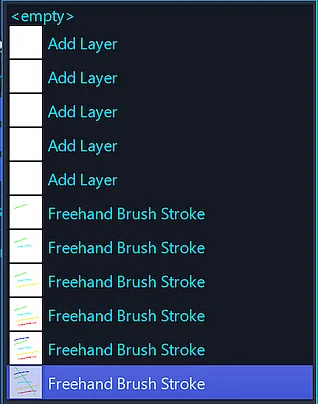
We got the Undo History Docker where you can go to every single step you made so far, even back to your empty canvas, at least if you have set up enough possible undo steps.
Michelist
Yes, but it requires a lot of clicks and scrolling, it’s better to have a hotkey to do this, really quick and not distracting for me.
I didn’t find “Undo History” hotkey possibilities to go to the first, or other things… am I wrong 
Why should you be wrong? It is only another possibility, nothing more, and since your question above sounded as if that and other possibilities were completely unknown to you, I made my post.
What I like with the docker, is the ability to pick out the point in history where I want to go. If scrolling here or in another app is too slow for you, simply drag the slider on the scroll bar to speed it up. This isn’t a problem for me because my mouse has a free-running flywheel that allows me to scroll at lightning speed. Of course, a mouse wheel with detents is an obstacle.
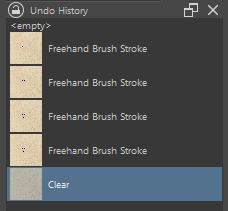
Another way to clear all undo steps at once is Krita’s Clear Button:
Michelist
AFAIK the “Clear” toolbox action (“Del” hotkey) adds the “Clear” action in the undo stack, it doesn’t delete the previous stack, so if you then go back with some undo the old things are all there.
EDIT: I’ve added in “Bonsai” scripts description a little explanation cause it was not very clear:
“Sometimes in sketches or brush tests, I’d love to delete all undo stack returning to a blank canvas (EDIT: and not have the old stuff appear when I go back a few undoes in the new drawing).
I didn’t find how to do this (EDIT: with a hotkey), so, despite it’s not the same thing, I use this little workaround:”
Oops, you are right!
I must admit, I did not check that, because I did not have the issue that let you write your scripts, as I wrote, I can navigate extremely fast because of my mouse.
But your scripts are definitely a good way to revert 100 steps, or whatever you set up in the script, at once.
So, thank you for them, the day may come when I’m in need of them, without me knowing right now.
Michelist
Also @Michelist the “Clear” action works only in the current layer, but my “Bonsai” scripts work EVERYWHEEEEEERE (  ) → EDIT: everywhere in the current document.
Go ahead and finish me off! Boo-hoo…
Michelist
Oh wow ! that topic is neat!
Am not the best in coding but am definitely interested in this. I was looking a way to get rid of my input-remapper because I use the freehand selection tool as an eraser and right now i make it with a macro.
Do you think, i could use a script into krita instead of the macro? Like do the krita script can use key automation or only action in the software?
And if it’s only action is this reproducible?:
1. delete key # it’s the clear action layer, this macro is intend to be used after the freehand selection tool
2. Ctrl+shift+A # to deselect
3. wait 0.020 sec # to let the computer breath
4. B key # to select my brush again.
is this macro scriptable?
Most of things can be done with scripting. (sometimes there are issues on execution order, giving bad time)
from krita import Krita

# cut, deselect, activate brush tool
app = Krita.instance()
app.action('edit_cut').trigger()
app.action('deselect').trigger()
app.action('KritaShape/KisToolBrush').trigger()
/AkiR
That’s amazing thanks.
Hello all!
I’m currently working on a set of scripts to automate simple animations.
The subject I’m working on is for an internship, and the intent is to develop a plugin that allows for a set of commands to automatically make animation frames for simple things.
In the case of the below code- this was/will be used to move a cloud across the screen, to the right.
Although, you’d have to set the tool options to adjust the incremental rate of your current layer’s translation. I recommend setting the units from mm to Pixels.
from krita import *


def layer_duplicate():
# Get the Krita application instance
    application = Krita.instance()
# Get the active document
    currentDoc = application.activeDocument()
# Get the active document and node
    document = Krita.instance().activeDocument()
    activeNode = document.activeNode()

#The initial value of f is the starting frame, the <= value of f is the upper bounds (the end point)
    f = 0
    while f <= 30:
        currentDoc.setCurrentTime(f)
        Krita.instance().action('movetool-move-right').trigger()
        Krita.instance().action('add_duplicate_frame').trigger()
        f += 1
        currentDoc.refreshProjection()

layer_duplicate()
My next main goals are to make a similar setup for rotation, and, if possible, create a script to adjust the tool options (so that they may be adjusted by a user from a dialogue when it’s set up through a plugin).
Much of my progress thus far has been reviewing the action-dictionary as well as these forums, and some older posts have left me questioning the current access I have to configure the program through the Scripter and whether or not that’s possible.
Per each of these goals, these are my questions for those of you who use the program on a more in-depth or technical level:
I can check and print the name of the activeNode in the Scripter, but this isn’t the same as clicking on it to create the free-transform box. Is there a command that I’m missing that could be added where the movetool-move-right action currently is?
I will continue to look at the API and also futz with the manual timing of the pieces I need.
My hope is that since the topics that said that this type of configuration wasn’t an option were posted, this might’ve been approached by a developer or fellow user.
Best Wishes, and Be Well,
-RC