Oh! I forgot that I need to change the .action file to make it appear.
Besides, I made a mistake about the comma, and the shortcut key is invalid…
Did you make it work then?
I already managed to find a workaround to allow adding tools easier, without defining them in .actions by the user, but this time I’ll wait with comiting before I’m happy with how it works
Yes.
I am looking forward to it! 
Apologies if I missed it by skimming over the thread, but I wanted to mention that Krita 5.0 will have new options for temporary tool invocations, which adds all selection tools, fill tool and a few others.
Though things like temporary brush preset or painting mode switching is still not available without plugins.
Oh, never heard of it! Could you elaborate on that? There is no information in krita 5 changelog about it, and I can’t see anything like that in keyboard shortcuts or canvas input settings on master…
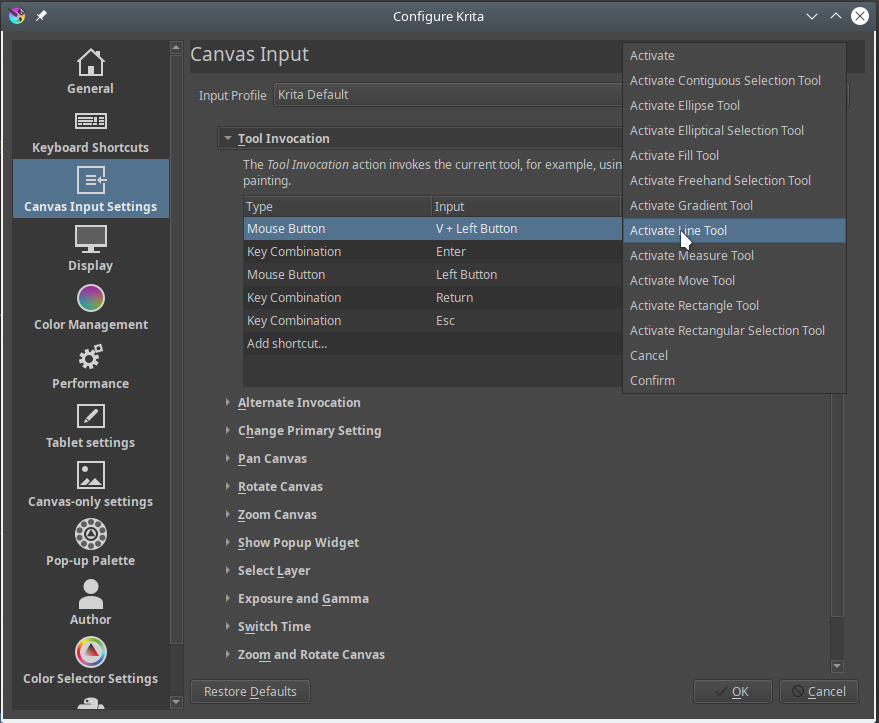
Oh, thank you - that changes the script of my next youTube video a bit 
That’s a well hidden feature - thanks for pointing it out to me. Luckily my plugin still is a bit different than that, but it’s great there is something like this in the default krita now.
Hey, sorry for thread resurrection, but Lenovo pens don’t seem able to map modifiers to barrel buttons so I’m stuck trying to get ‘p’ to work as a colour picker. YOur plugin gave me hope but I can’t find the Krita name of the colour selection tool, and I don’t think you ever published your list of tool names?
Any chance you could point me in the right direction?
Cheers!
The ‘P’ key is a keyboard shortcut that switches to the Colour Sampler tool and stays there.
You can use a free keyboard key as the modifier for the Canvas Input colour sampling functions:
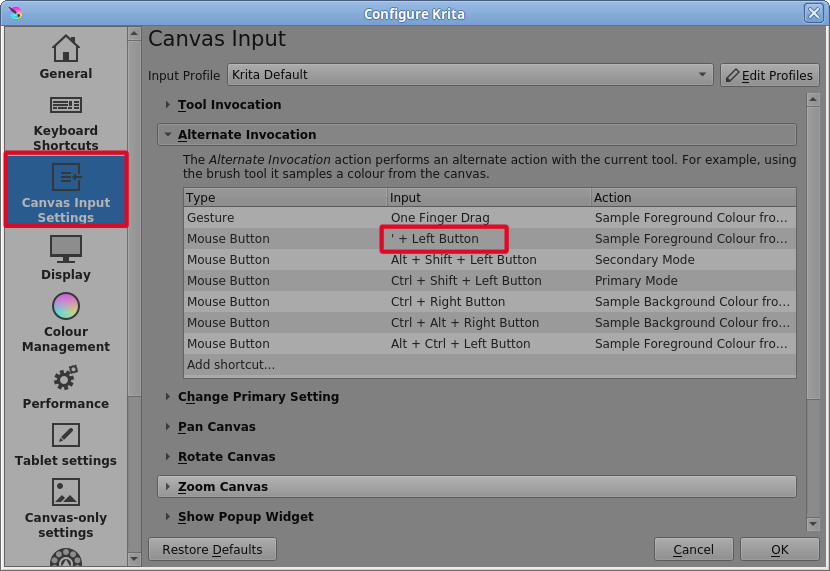
Here, I’ve used the ’ key (because it was the first one I tried that was free for use) instead of the usual Ctrl key for that action.
This works with a stylus as well so maybe map your stylus button to the ’ key or whatever is free.
You can delete the ‘P’ keyboard shortcut from the Keyboard Shortcuts so that it’s free to use as P+left-button in the Canvas Input Settings.
Hi,
@MarDeSean
How do you mean that?
“However, with the functions in the toolbar that I have tried, it works perfectly.” I know what you mean, also use CSP, it’s a good feature. But in this conversation I have not yet read out whether this is now possible, and who … ehm how? 
@Alles
is it possible, however, what postmax writes there?
Have
Installed shortcut composer but didn’t see this feature.
Best regards
DAB
Hello, could you direct me to the temporary brush plugin you mentioned?
Apologies for replying so late in this forum
I’d like to discuss specifically the switching between eraser and brush.
Since the “eraser mode” is actually a “blending mode” of the brush, I think it’s reasonable to merge the “eraser mode” into the brush, by long-pressing the “brush key” to temporarily use the eraser, and release to go back to brush. This also saves a button.
Now in version 5.2.2, Krita has the “Toggle eraser preset”, as a individual eraser mode “brush”, you can set a different size, opacity, texture, etc., very convenient. If the “eraser mode” with the same parameters could be temporarily invoked by a long press, then it also could be a modification of brush in some painting situation.
Subtle, logical, natural and quickly, it’s really a high-frequency operation in painting, and would be great to have in Krita.
In fact, in Photoshop & CSP, any tool can be invoked temporarily by long-pressing. Although Krita has the “Tool Invocation”, the tools are few. besides, the invocation and toggle can not coexist, which is a bit of a waste of button.
SAI \ SAI 2 have a similar switching tools function as well.
This is a vital tool for most artists. I gather its not simple to do else Krita team would have implemented it considering how many people are asking for it.
Hopefully a solution can be found. 
IMO the eraser tool at the moment is kind of strange to use as well. Especially for those of us with brains hardwired to the older painting tools.
The plugin “Shortcut composer” has this feature in it and works great.
Seems promising. Thanks for the link.
I haven’t tested it yet, but reading the documentation it only seems to work on just 3 tools?

Temporary keys:
Pressing a key temporarily activates the move tool which goes back to the freehand brush tool after the key release. Short key presses allow to permanently toggle between those two tools.Currently predefined values cannot be modified without editing plugin code.
Pressing a key temporarily activates the eraser mode which gets turned off after the key is released. Short key presses allow to permanently toggle between those two states.Currently predefined values cannot be modified without editing plugin code.
Pressing a key temporarily activates the preserve alpha mode which gets turned off after the key is released. Short key presses allow to permanently toggle between those two states.Currently predefined values cannot be modified without editing plugin code.
It adds many more settings. The one I find the most useful is the cycle selection setting. When you hold it you can make a selection and when you let go you go back to the brush tool. I highly reccomend you check it out. You can also configure the Ten Brush plugin that comes with Krita so switch back to a previous brush on a second button press, which makes switching to an Eraser and back to the brush you were using very easy. Just a few recommendations.
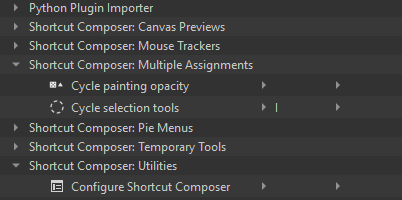
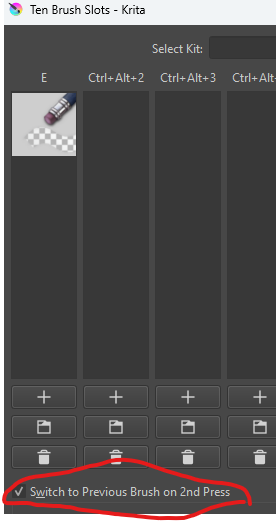
To not confuse someone, you should use the full, or correct, name of the plugin you mention if there exist plugins with a similar sounding name like the stock plugin Ten Brushes every Krita has.
The plugin you presented is the Ten Brush Slots plugin, which you have to install first before you can profit from it, and it can be a great addition!
Michelist
While Shortcut Composer has temporary eraser already (great plugin btw), I really hope Krita to consider supporting temporary tool officially.
It has so many use cases beyond just eraser. For example, I might want to quickly select a region with lasso tool so I can use a texture brush to paint it while keeping the edge sharp. It’s an extremely common operation when doing environment (esp. rocks and mountains). With a temporary lasso tool we don’t need to manually switch back to paint brush.
Plus it fits Krita’s existing design perfectly: Krita practically already has temporary “Color Sampler”, “Rotate Canvas” and “Zoom” tools. Why not more?
I can achieve this function via AHK when I am using PC. But tablets can’t do it.
I simply can’t make the SPen’s side button temporarily act as an eraser by long-pressing like in the CSP or Samsung Notes. Even tapping to persistently switch to eraser has a problem: it triggers the floating command.
Furthermore, Android does not support Python scripts, so plugins cannot be used.
Hope that temporarily switching by long-press will be available in the future 
I use the Shortcut Composer plugin only for the option Temporary eraser (hold to erase), but the plugin is quite big. I wish this was in Krita proper. I mean the functionality is there with the toggle, why can’t I hold too. Seems like a programmer will take 10 minutes to do it…