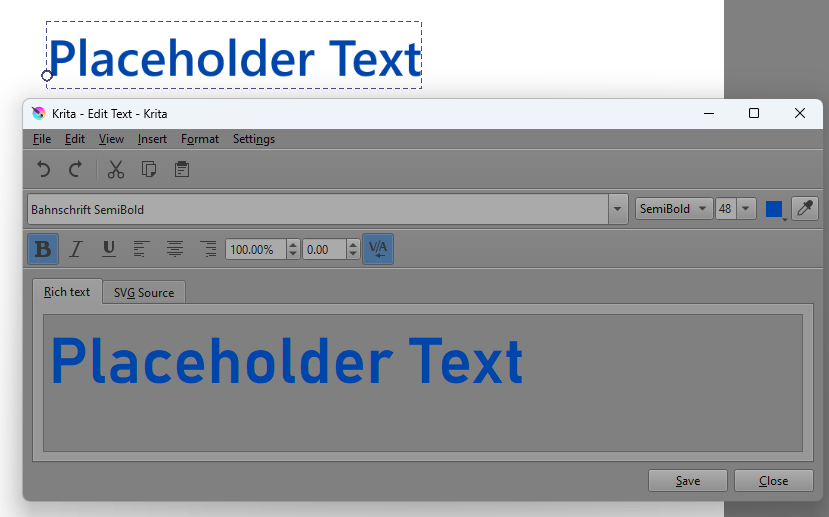
Did anyone stumbled upon Edit Text appying different font to canvas than one choosen in Edit Text window?
Maybe just Rich text displays wrong font x_x

Im on w10
Did anyone stumbled upon Edit Text appying different font to canvas than one choosen in Edit Text window?
Maybe just Rich text displays wrong font x_x
I don’t have an answer for you but wanted to check whether you’re using 5.2.2. A lot has changed with the text editor in recent versions.
Yes im using 5.2.2
Can you check font displayed on screen if it works for you?
“c” is completly different. Seem like Subfonts of this font(Bahnschrift) are not loading.
It’s not only the “l”, look at the other letters, like the “t” and “d”. Bahnschrift is also buggy on my side. Wasn’t last version, so it’s probably a new version bug.
The bug is even more striking when deactivating “bold” it becomes a much different font.
As a person who uses free, 3rd party programs to imbed writing onto krita artworks because the inbuilt writing system just seems too complex for me, I chuckle
It’s weird though, hmm… have to say, from the n’s, the g’s, and even the r’s, it shows that vectorially it is a different font (text is seen as a vector in krita… riight? I’ll … I’ll just call it font like everybody else)
It also seems to not be bolded, hmmmsx2
also+also, the text which that is written out seems to be Arial, if I am not mistaken
There are a lot of font that look really similar, so it’s hard to tell wich one it is. But what was weirder, was that when using the problematic font (in this case bahnschrift), different fonts appeared when using either bold, italic or normal.
After a little cheeky digging, I it might be:
Nah, look at the “r”
No wait I think you’re right. I looked at the bold version, which is also another font 
 sactly
I think maybe, maybe, with my armchair, unasked, not tech-savvy (I am able to only write hello world in C#), very yappy opinion, that there are 3 ways this could be explained, (which is really dependent on the code used for choosing fonts and OP’s copy of krita/pc):
Disclaimer: I haven’t checked any of this hypotesis, which is actually so easy to do, because I am rather lazy and quite sleepy in here so hope this ain’t minded
a) There is only a problem with this specific font, because of some tech wizardry, this font accidently is assigned to an other
b) All fonts were decalated by a specific number, so if font x was font 1 and font y was font 2, then maybe, if by accident all fonts were decalated by a digit, font x would then be font 2, and font y would be wont 3 and so on, this case happens when all the fonts are dependent on eachother/on only one piece of code that assigns thieir value to all fonts
c) Maybe, for some reason, all fonts are acting right now in this way, or that this unmatched font is by somekind, by some accident or by deliberate choice, a base font that is choosen whence something happens and the font still needs to be assigned to something visiual, but does not have the capability to do so
awight, I am out ya’ll, I am going to the nap realm, see ya on the flip side was a pleasure to talk with y’all, and excuse my rambles
∩――――∩
|| … ∧ ヘ … ||
|| …(* ´‿‿) ZZzz
|ノ^⌒⌒.づ` ̄ \
( ノ ⌒ ヽ \
\ .,|| ̄ ̄ ̄ ̄ ̄||
. \,ノ||
Probably a because it’s the only font that’s buggy (from what I know, at least). Others work perfectly.
I think the bug might already be worked on, though, so maybe it’ll be solved in the next update?
Good night! 
This topic was automatically closed 30 days after the last reply. New replies are no longer allowed.