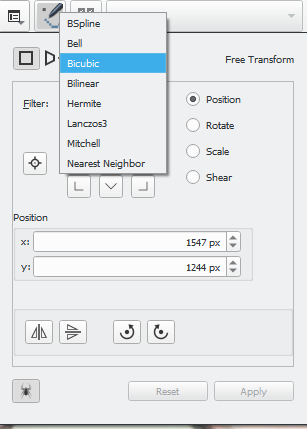
So, just recently, i needed to change the “image interpolation” (? I was coming from Photoshop) to nearest neighbour, I found it under the tool option when you select the transform tool. I was surprised because I was hoping for just Bilinear, Bicubic and Nearest Neighbour but Krita offers other options with, tbh, strange names I haven’t heard before like Lanczos3, BSpline, etc. So what are these? How are they different from one to another?
I am sticking with Bicubic atm, because that’s what Photoshop use (probably they went pass it sometimes ago, I remember seeing new options but never use them). So, should I use or even care for other option or are they experimental stuffs? Sorry for lack of technical terms, I hope it’s clear enough.
EDIT: I consulted the Krita Handbook and found nothing. That’s why I am asking here
So, I think I wasn’t clear… What I am actually asking for is some practical usage advise, like when to use it and why. So yeah, you’re right! I don’t think I’m gonna read all of that. Lol. But thanks for the resources!
I was contemplating on putting it in the manual, but i haven’t had time to research about all of them. May be with community help we can write something in the manual.
Edit: these scaling algorithms are suited for various types of transforms, for example nearest neighbor will help when you have to scale up line arts while retaining the crispiness. Some add blurriness when scaling up some sharpen the edges. It depends on the use case
There used to be a short description of the interpolation filters in the manual. I rememeber reading it about two years ago. The next time I tried to find it, it wasn’t there. Maybe it got lost in an editing process?
I think that section was written by @Wolthera (but I can’t be sure).
If the manual could plot the filter kernels like on that linked Pantheon page, that’d be nice, some of the names are quite ambiguous
But in practice, the differences are usually very subtle for image resampling (especially when it’s not even HDR).
The biggest difference comes mostly from the negative parts of the filter function. Lanczos3 may, by theory, preserve the most image information, but that doesn’t mean it’s the most visually pleasing. It tends to not only give visible jaggies but even introduces rippling artifacts, pretty much what you see when you apply the “sharpen” filter.
“Bell” is the other extreme, no negative parts at all and is the softest curve, it’s basically a small radius Gaussian blur, so it’s very smooth at the cost of losing a lot more image information.
Everything else is somewhere in between. Hermite is more triangular than Bell, so sharper but consequently gives more jagged diagonal lines. BSpline (if it is what I think it is), is between those two.
Mitchell and Bicubic are again very similar variants, they have a small negative swing, aiming at a good compromise between preserving image information without the visible artifacts of Lanczos. So that’s why Bicubic is the default or even the only “advanced” filter in many applications.
Thank you! I’ve been wondering for years and Googling has not really helped, since most information is about technicalities and science papers. You could actually describe it in a few sentences.
Usages, as well as I understand them: Nearest Neighbour - when you need a pixel-art type of scaling or sampling (with transformation for example) Bilinear - it’s like a bit worse Bicubic, I think, faster though Bicubic - default The rest - if you resized and you want some more quality, you can check out all of those, maybe it will look better than Bicubic, maybe it won’t When you’ll use them a few times, I guess you’ll start noticing and remembering the differences @Lynx3d is talking about.
@Lynx3d - Thank you for the explanation, I think I understand it better now and can begin to imagine when to use them.
@tiar - Yeah, the options you highlighted are the ones most practical for most user, while the rest are only matter once you after specific result. They’re very case specific, but it’s nice to have them in case we need them. At least that is how i see it.

 )
)

