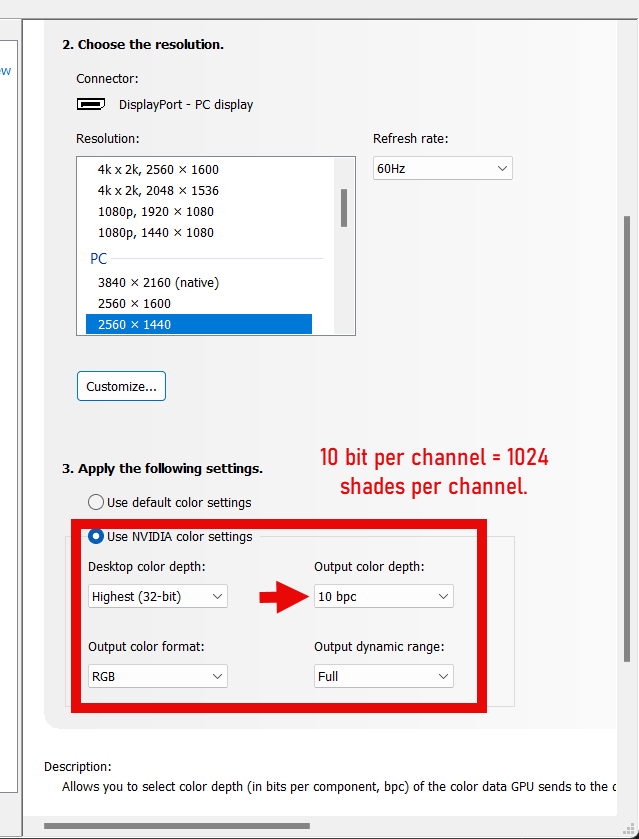
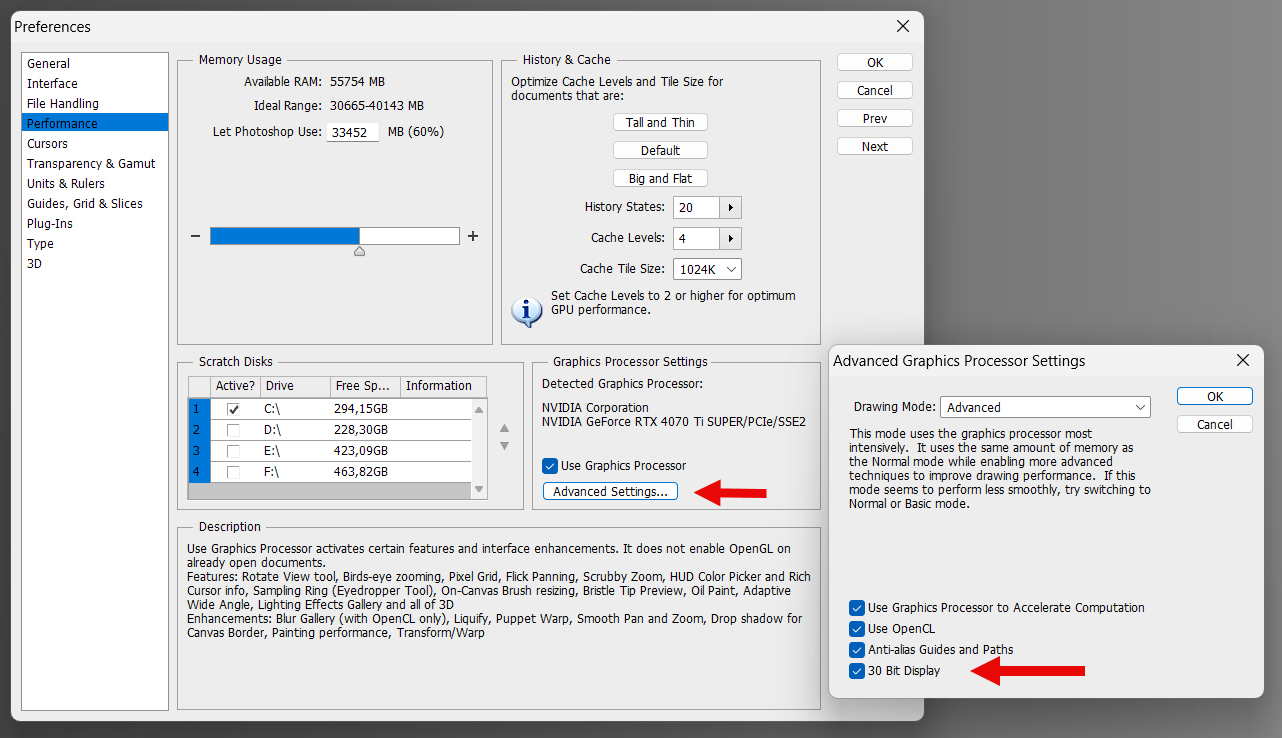
My system is capable of using 10bit display output.
That means: Instead of sending 256 shades per channel to the monitor it can send 1024 shades. The monitor is able to display those shades.
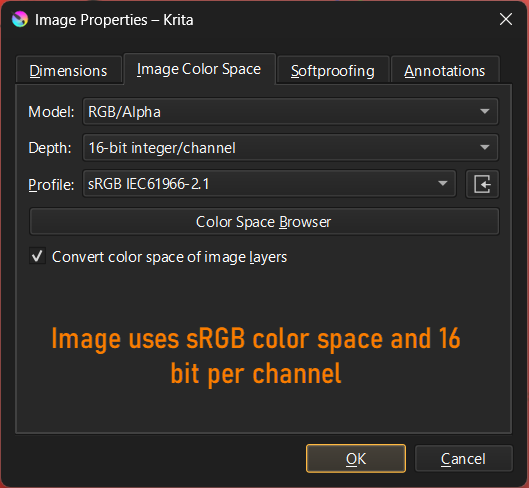
If I create a 16bit rgb image in Krita (meaning 16bit per channel) it has 65536 shades per color channel. With this it can for example encode a very smooth gradient.
When sending this gradient to a 10bit monitor it can not show all 65536 shades per channel but at least 1024 (which is enough for a nice smooth gradient compared to the banding shown on an 8bit monitor).
Now back to the question:
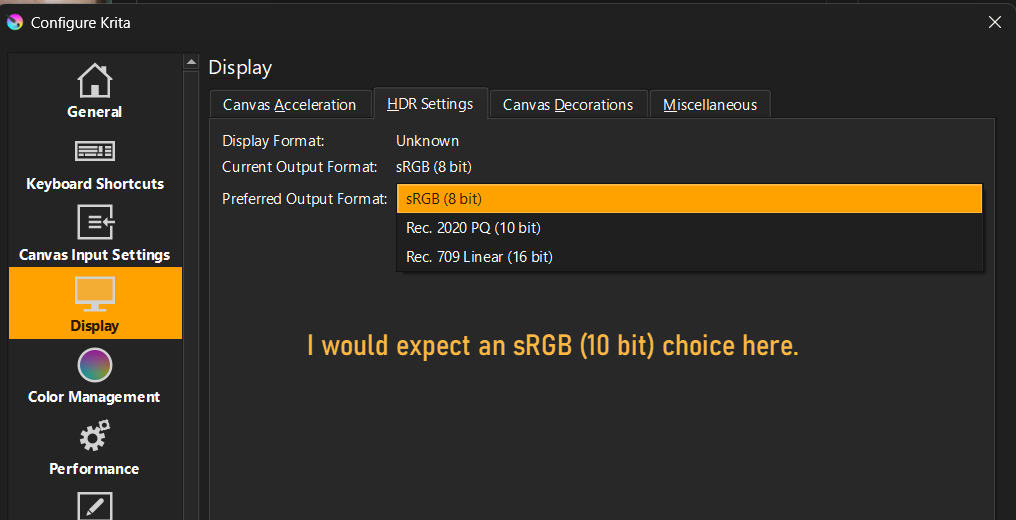
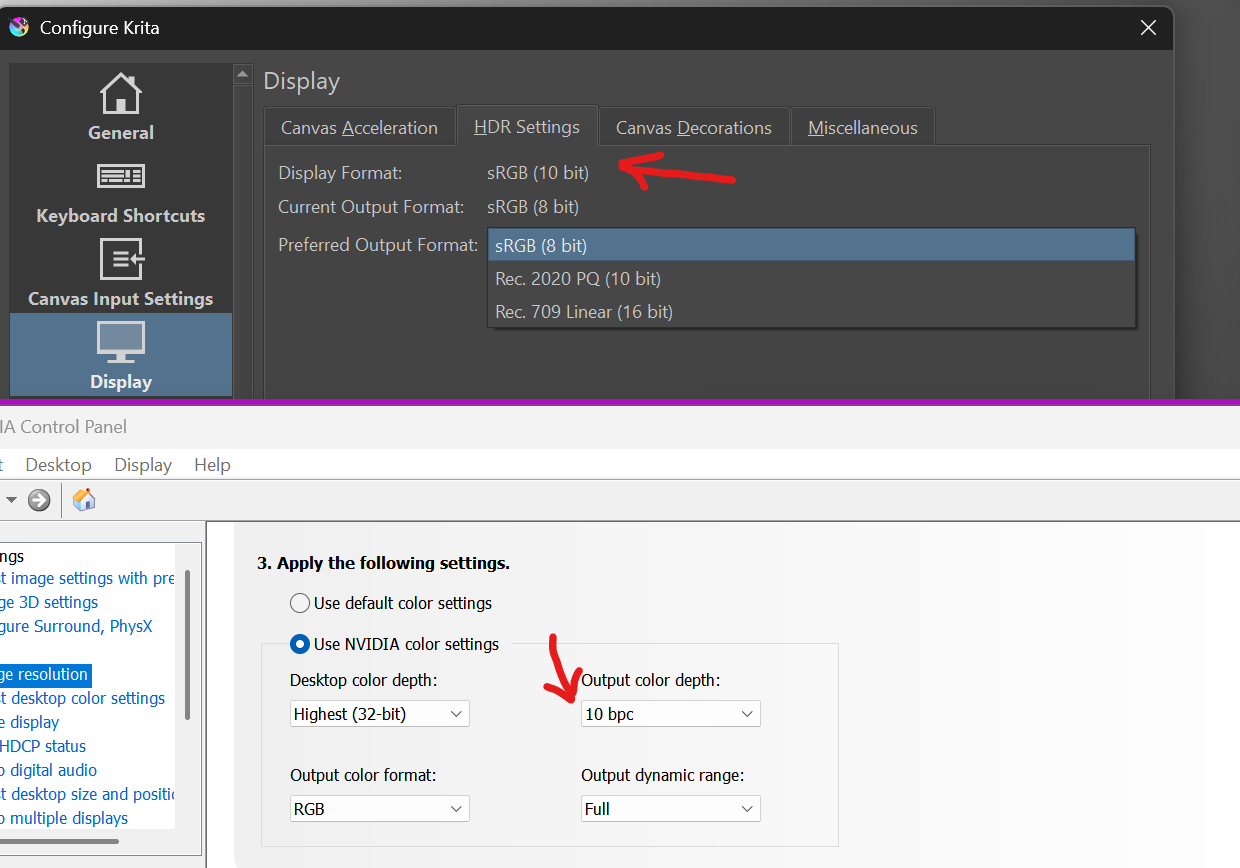
In the preferences of Krita I can choose from three “Preferred Output Formats”:
sRGB (8 bit)
Rec. 2020 PQ (10 bit)
Rec. 709 linear (16 bit)
Those are in the HDR Settings tab.
But Rec. 2020 is an HDR standard which I don’t need and Rec. 709 Linear is normally used for linear HDR / EXR color grading.
What I am missing in this dialog is the choice sRGB (10 bit).
And I am confused that the bit depth is linked to the color space - at least the three choices in the dropdown indicate that. As far as I know, a color space is independent from bit depth. E.g. sRGB does define Red, Green, Blue and a gamma curve but it does not contain a definition of bit depth.
This is more an academic question, as everything works ok, I am just confused about this preferences dialog (the manual is not of much help here).
Creating an image with 16 bit depth = enough steps (shades) to create a smooth gradient (color gamut is not relevant only the steps possible within the gamut).
Output to the monitor with 10bit to get at least 1024 shades per channel, to “see” the smooth gradient instead of the banding on a 8bit monitor chain.
For this 10bit monitor chain I would expect Krita to offer a 10bit output - but for some reason the output dialog indicates the bit depth is linked to the color gamut.
But it might be that I missunderstand the purpose of this dialog.
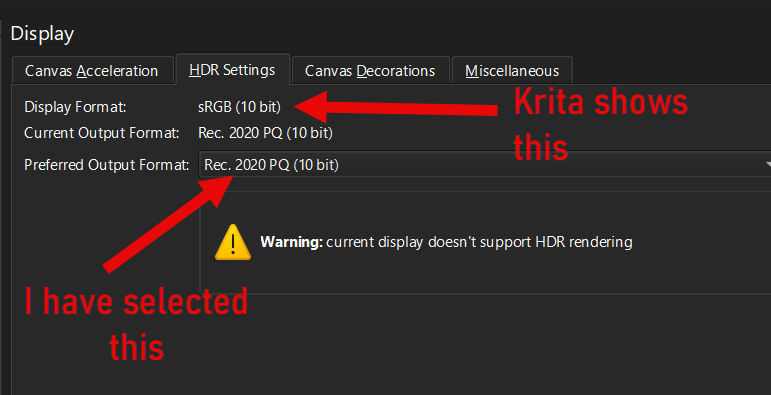
I just checked it again. I created a gray gradinent and viewed it with sRGB (8 bit) setting. As a result the image on the monitor shows banding.
I then changed to Rec. 2020 and suprisingly Krita now tells me Display Format = sRGB (10 bit). Viewing the image with this setting shows a smooth gradient.
So I guess this dialog controlls the bit depth of the output to the monitor. And, as I can see, there is something like sRGB (10 bit) it just isn’t selectable by the user.
16bit and 10bit in this case is about the data we sent via opengl (which only supports a limited amount of tags). Your graphics drivers should be able to take 16bit sRGB and downsample that to 10bit sRGB.
Thanks for chiming in. I am still confused about the naming of the dialog entries.
What is “16bit sRGB” in the case of Krita Display HDR Setting?
The dialog says: Rec. 709 Linear (16 bit)
But:
A.
The Rec. 709 Spec. is not linear - it has a gamma curve defined. So, Rec. 709 is never linear.
(of course one could do some color grading or use OpenColor IO tricks etc. to make it linear but that has nothing to do with the output to the monitor).
B.
Rec. 709 has no bit depth defined. What does it mean if the Krita dialog say Rec. 709 … 16 bit?
Example: I set the image color space to sRGB and the bit depth to 16 in Krita.
In that case I have the RGB primaries as defined in the sRGB spec. and a bit depth of 16.
Now I choose Rec. 709 Linear (16 bit) in Display settings.
What happens with the image data when sent to the monitor?
The RGB primaries of sRGB and 709 are identical but the gamma curve is not. sRGB uses the sRGB curve (not 2.2. as many think) and 709 uses 2.4 (if I remember it correctly).
If the Krita dialog says Rec. 709 Linear (16 bit) I would assume it changes my sRGB gamma curve to linear (meaning no curve at all) and then outputs that to the graphics driver. But, this would be totally wrong and luckily it does not happen if I can trust what I see on my displays. Krita does not change the gamma curve and, I think, also not the primaries (in case of BT 2020).
But this is all guesswork at the moment for me. I would be happy to get information about what those settings really do (my assumption so far is, they do not do what their naming indicates).
Windows supports three output modes for graphics data:
sRGB 8-bit
scRGB 16-bit (we call that “Rec. 709 Linear (16 bit)”). This is a widely hated colorspace, which is probably the best choice for you task. You can read about that here: scRGB - Wikipedia
Rec 2020 PQ 10-bit, which is a color space, specifically designed for HDR output. If you use it for normal SDR data, you will lose some precision in comparison to scRGB 16-bit. You can read about that here: Rec. 2100 - Wikipedia
Example: I set the image color space to sRGB and the bit depth to 16 in Krita.
In that case I have the RGB primaries as defined in the sRGB spec. and a bit depth of 16. Now I choose Rec. 709 Linear (16 bit) in Display settings.
What happens with the image data when sent to the monitor?
There is a bit of an issue with how all these HDR modes are defined in Windows:
if you have the newWindows 10 advanced color management feature enabled, and have a specifically crafted ICC MHC profile generated (I know no tools that are capable of that, btw), then Windows will apply this calibration and profiling data to the output data and send it to the display. Mind you, that color proofing feature of Krita will not work in this case.
if you don’t have the new color management feature enabled, then the data of your image will be delinearized with srgb-trc, downsampled to 8/10-bits (depending on the driver implementation) and sent to the display directly without any color management (that is how HDR functionality is currently supposed to work, I’m afraid). If you have legacy vcgt tag loaded into GPU, then this trc will also be applied in the process. What happens in this case is basically a mess, not standardized and should be tested on specific hardware/driver combination individually.
If you don’t have any HDR features enabled in Krita or Windows, don’t have Advanced Color Mnaagement feature enabled, and have “sRGB 8-bit” selected, then Krita performs the entire color management itself: converts the image data to the monitor profile selected in Krita and sends this data directly to Windows (in 8-bits), where Windows passes this data directly to the display (applying vcgt, if present)
Many thanks, that explains how it works.
But there seems to be a difference to my old CS6 Photoshop.
There it is possible to enable 10 bit output that works without affecting the color management. Maybe there are two different concepts about 10bit output. One that is related to HDR and one just to get the available data (in case of 16 bit) to the graphics driver.
And the question was related to “classic” color-management. Display calibrated to sRGB, all HDR disabled, display ICC profiles set in Krita (and Windows).
Yes, because Windows’ 10 new color management pipeline didn’t exist when photoshop CS6 was released, so likely they are using an old method that we’re avoiding because it might be removed on a future windows update.
Are you sure that that PS actually uses 10-bit output and allows you to change the display profile internally (inside PS)? Do you actually see the difference in how the image is displayed when you change the display profile in PS in 10-bit mode?
As far as I know, doing that would require to perform fake-srgb-linearization of the data before uploading to the GPU (to compensate delinearization that Windows would do later), which sounds a bit weird thing to do
PS CS6 allows to activate 10 bit per channel output (they call it 30bit) independently of display ICC profile or image color mode.
Changing the 10bit mode on / off does not change color gamut or display ICC.
E.g.:
I have 10 bit output disabled
I create an sRGB 16-bit image
I save the image
I enable 10 bit output in PS and close the app (this is needed because output bit depth changes need a restart)
I restart PS and load the image
Result: everything is like before (image is still sRGB-16bit), display profile is still the same in Windows color management, but the display output is now 10 bit per channel.
PS CS6 does not offer to chose a display ICC profile within PS itself - it relies on the Windows colormanagement settings. It uses the ICC profile that is assigned to the display there.
I am not changing the display ICC in PS CS6, I am changing a PS preference.
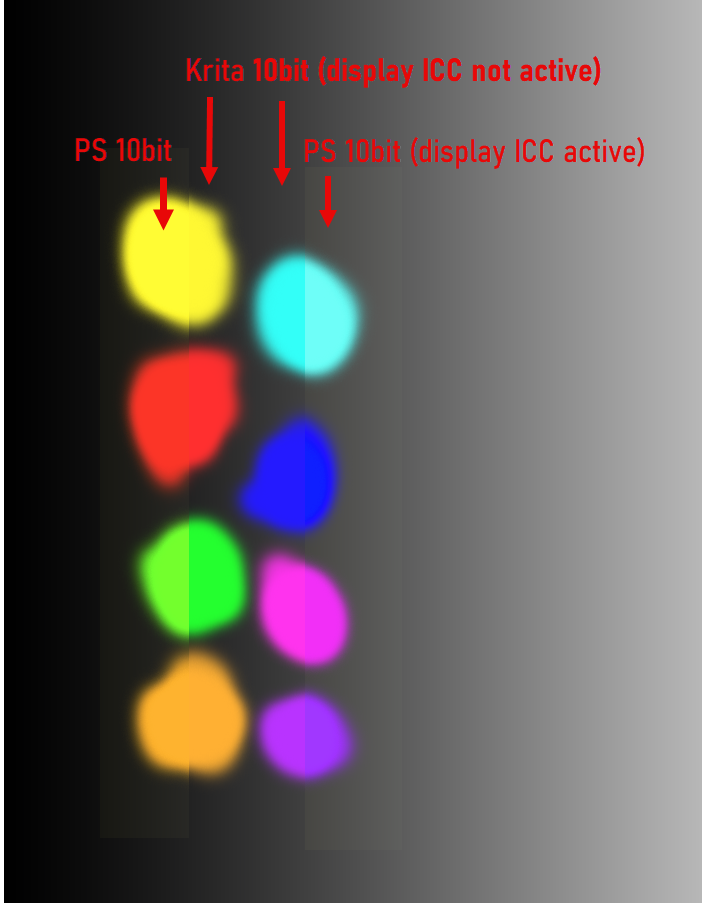
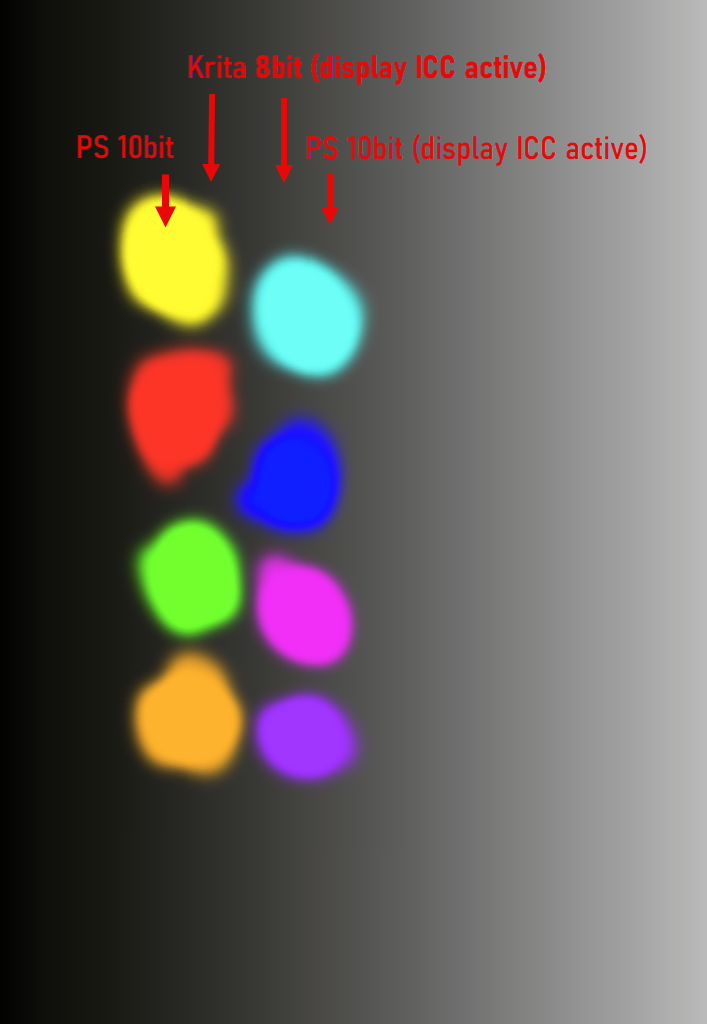
Yes, there is a difference of how the image is displayed:
the colors stay the same but I get a smoother representation of gradients (less banding - this was the purpose of 10bit output at the time it was introduced)
Note: in the screenshots you can’t judge the banding of the gradient because webbrowsers, as far as I know, are all limited to 8bit output.
EDIT:
I am not a developer; so what I write is all an assumption.
This is an academic discussion - in the real world I would either enable “dithering” if available or add some kind of noise to smooth gradients. This normally compensates the banding issue good enough in 8bit scenarious.
For me it is only relevant if I have to deal with textures for 3D rendering. If for example I need a “metallic surface texture” I like to “see” if the image data is smooth or not (dithering or noise would change the way how the render engine interprets the texture).
EDIT 2 - a tool to check 10 bit effect:
In case somebody like to see the difference of 8bit vs. 10bit output, there is a free little software from NEC:
At the bottom of the page is the 10 bit Color Depth Demo Application available for download (no installation needed - it is a stand alone exe).
It opens two windows showing animated geometric objects. One window sends 10bit data to the gpu the other one 8bit data. If you see banding in both windows, your 10bit output chain is not working correctly or the monitor is not a 10bit one. Make the windows as big as possible to see the difference more clearly.
I too would love for this to be possible. I have an 8-year-old 4k monitor but the colors are great, and it supports 10-bit (8+FRC), which just would be really nice.
It’s obviously not a deal breaker, though it’s a little frustrating seeing the steps in a gradient when I know it doesn’t have to be that way. Obviously, having a full HDR monitor would be even nicer, but (as might be obvious) I’m not currently in a financial state to upgrade my monitors and/or PC.
Anyway, this is something that I could potentially help with, as a jack-of-all-trades developer, although I’d rather spend the time it would take to learn about Krita’s source code and various OS’s (and card and driver) output options if it’s something that would be considered useful.