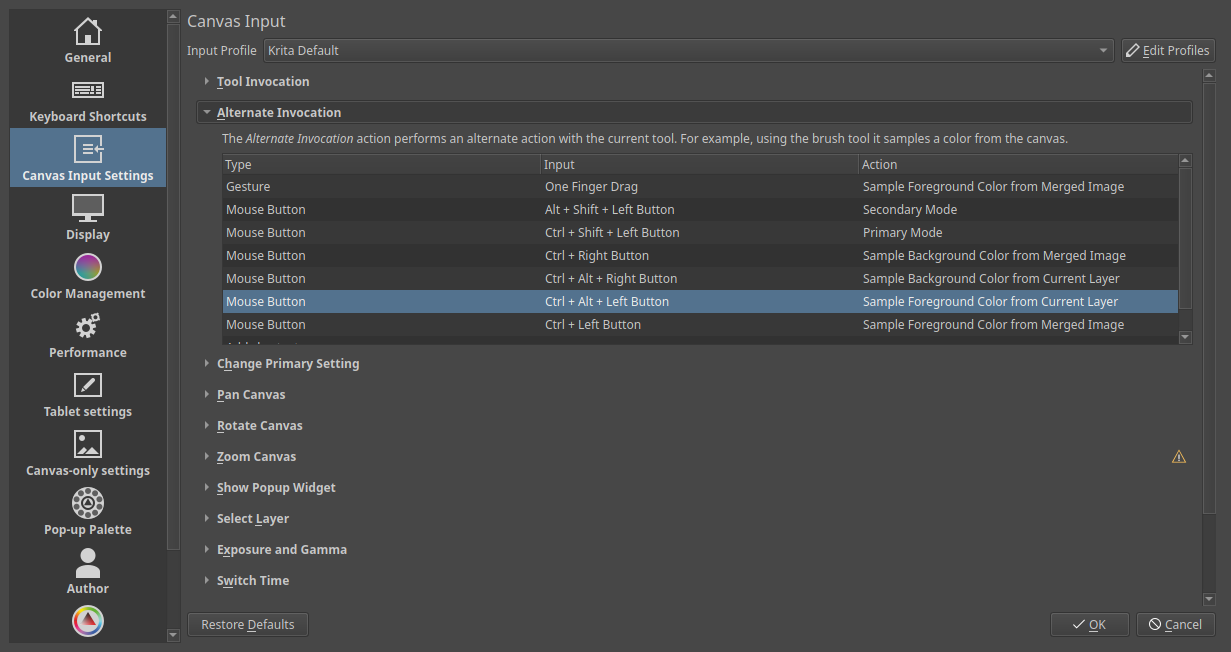
Is blowing away my shortcuts to get the new rotate bounding box option to work, or is there a manual switch for this in the Tools Option tab to switch it on and off? If not, can someone please tell me what it is called in the Keyboard Shortcuts/Configure Kita window so I can assign a new shortcut to it? This was one new feature I was really excited about, but I can’t seem to use it with the Ctrl+Alt shortcut keys.
Thanks. The Ctrl+Alt shortcut keys arent working for me becoz theyre were assigned to other commands. Id like to change it to other keys. There was some discussions about resetting shortcuts to default to get it to work but I’d like to avoid doing that.
Ah, I see. If you have already used ctrl+alt you would only need to change that one shortcut to something else (which would release it) and then probably the new bounding box shortcut would work. No need to reset all settings/shortcuts. Would that be possible for you?
I dont have a shortcut thats connected to both the Ctrl+Alt only on the Ctrl which is weird. I had hassles awhile back with the clone tool picker not working with Alt coz Im using the Photoshop shortcut keys. It was advised to change it to the Ctrl key, now it’s works. But with that removed still im not getting the go ahead with the bounding box option.
Great thanks. Ive had mine on the Photoshop profiles and had to make changes in that window to get the clone tool to work correctly. It was the clone tool or bounding box option, not both. So i’ll drop the Photoshop profile and go hassle free with the Krita profile. Just need to reassign some shortcuts again. Cheers for that.