6.1 HDR development thread

So, during the roadmap discussion we concluded that I’ll be tackling HDR stuff for the coming year. Generally, I’ll be working on the usability side of things, as the deep display pipeline stuff is tackled by DmitryK. I am tracking the majority of the work in this issue. I’m doing this alongside the text tool work, so you will see me switch between the two over the course of the year.

To summarize, Krita’s HDR and scene linear tools are used today by game and VFX studios to prepare textures for 3d rendering. There’s also artists that illustrate in scene linear as it allows for less muddy color mixes at the expense of more ram.

I’ll be working on…

  1. UI issues.

    • Particularly, in some places we render directly onto the canvas, and we don’t take HDR into account when doing so, which leads to overly bright output. The tool decorations and reference images are both affected by this. I have already fixed this in krita next, as it was distracting me from other bugfixing.
    • General polish like the histogram needing to work with floating point, or making the preferences easier to understand.
  2. Auto-generating metadata – A big part of what makes HDR different from SDR workflows is that it takes into account the brightness of the screen. Because different screens have different brightness, displaying an HDR image involves a little bit of adjustment (tone mapping), and to do that adjustment correctly, metadata needs to be stored into the image, in particular the maximum brightness. I want to autogenerate this data so it doesn’t need to be typed in manually.

  3. Fixing filters to work with HDR, in particular the curves. This will require a full rewrite of the curves, but I’ll be double checking every filter.
    There’s basically two ways of approaching this, the simpler one is to take the linear data and put it through PQ curve, and then use that as the basis to do curve-adjustments on, but I worry that this might lead to you, as artist fighting with the PQ curve too much.

    Instead, what I’d like to do is the more complex approach: Allow setting the range in which the curve applies, and having this auto-filled with the data we get from the auto-generated metadata.

  4. Tone mapping/Gamut Mapping filter/Lut Baking of OCIO lut. This one is mostly interesting for generating final SDR images, which might not be interesting in a studio context, but should be very useful for independent artists.

  5. Doing more CICP value handling. We typically use ICC profiles everywhere, but in some cases, like for HDR images, CICP are used instead. Now, Krita handles CICP values pretty well already, but I’d like to make it so you can write it to PNG, or recognise it from the ICC profile metadata.

Stuff that is in limbo:

  • Saving/Loading gain maps – Gain maps are a new way of saving HDR, which works by taking an SDR and HDR version of the same image, and then calculating the difference between them, and encoding that as an extra bit of image data. This is a very new standard, and I don’t have access to the ISO standard itself, so I can’t even formulate much of a plan to tackle this. However, if you look at the list above, many of it contains the basic building blocks for gainmap support. Meaning that once we have more information on gainmaps, it should be relatively straightforward to implement.
  • HDR color selectors – This one is because we’re currently in a technology transition (QtWidgets to QML, new Windows color management, new Linux color management), and we kinda need to wait around till we have a clear idea of how we’re going to display a HDR color selector without getting a ton of bugs and crashes, which is what we’re getting right now.

Updates

Anyway, feel free to ask questions, comment on the plans, or talk about your workflow and what you’re missing from it.

Remind me, why do artists need HDR? What industry is this for? Games, movies? I don’t understand HDR at all.

I looked it up and found this:

This is an excerpt from that page:

“(Standard Dynamic Range) is the current standard for most video and cinema displays. It’s reliable but limited, only capable of representing a small fraction of the dynamic range that HDR can achieve.”

“High Dynamic Range (HDR) is the next big leap in color clarity and visual realism in images and videos. From vivid highlights to rich, shadowy depths, HDR makes every scene pop with jaw-dropping contrast and more lifelike hues.”

Do I understand correctly that you need an HDR-enabled display on both sides? From the side of the creator and the viewer? Or in Krita, it can be used between, for calculations, etc.

@wolthera would know… I’m guessing yes.

@CrazyCatBird: Good ping, she will know best. I’m only a layman in this topic.
But anyway, here’s what I think is right (broadly speaking):
Yes, both sides need this hardware to fully profit from this technic. Without it, the creator “can’t see” how it would look in HDR and is not able to create its work, and you, the viewer, can’t fully profit from HDR pictures or videos, without hardware that is able to display them. However, it’s not impossible to view an HDR image on a standard screen. In fact, it often looks (very) good (to me). But on an HDR screen, the difference becomes clear, figuratively speaking, you could say: “then you’ll see the sun rise!”.

Perhaps you also want to take a look into these chapters of our manual that correspond with this topic:

Michelist

Ok, so there’s basically 2 parts to HDR:

  1. working in scene linear floating point. That is, a space that uses no gamma correction, and uses a floating point bit depth. This is frequently used for textures and anything that touches a 3d renderer. There are also people who prefer painting in this space as it makes colors less muddy when mixing them, and some image operations work better.

    And yes, the traditional industries for this are anything that also does 3d modeling, so games, film, but also advertising and concept art.

  2. Displaying on a HDR device. This one is rather new, but they’re becoming more and more common. Basically, HDR displays can get anywhere between twice to ten times as bright as a regular display. The majority of this brightness is not very useful for simple reading of text, but it can make anything with graphics (movies, games, comics, etc) look really stunning, specifically because of the really good contrast.

Krita already has support for both these things. I’m going to add some missing things and fix bugs.

That’s the HDR display bit.

And that’s the Scene Linear Floating Point bit.

What I’m hoping to add is the Gamut/Tone Mapping filter. When we have a Scene Linear image that looks good on a HDR display, and convert it to sRGB (so regular displays can show it) it’ll cut off in weird ways. The gamut/tone mapping filter will allow making it look good for sRGB.

This is also a bit of a “rising tide lifts all ships” situation, as a good gamut mapping filter is also super useful for people working for print, as that’s also a situation where you start in a larger gamut (the display) and move to a smaller gamut (the printing cmyk space).

I still don’t understand how to deliver hdr content to the viewer. What percentage can watch it at all? And most importantly, who wants to watch. I tried to turn on hdr on my monitor now. It literally hurts my eyes from such brightness. There’s no way I’m going to use this mode all the time. Watch on TV? But what does Krita have to do with it?..

What’s the deal with the images offered as HDR on some image platforms, like Pixabay, PxHere, and Pexels? To me, they looked (and still look) great on my old standard monitor, but on my new HDR monitor they’re simply stunning. How does that work? I just don’t get it.

Links to HDR tagged photos on different services, Pixabay, PxHere, Pexels, Flickr, Tumblr

https://www.pexels.com/de-de/foto/stadt-himmel-bewolkt-skyline-695/

20160508-151722LCAnd2morePainterly | Luc Coekaerts | Flickr

HDR photo | Tumblr

20180421_170833-1LCAnd2morePainterly4 | ?glise Saint-Jean-Ba… | Flickr

Free Images : atmosphere, galaxy, night sky, nasa, outer space, astronomy, illustration, universe, starry sky, all, emission nebula, space travel, astronautics, astronomical object, trifid nebula, messier 20, ngc 6514, reflection nebulae, constellation sagittarius 867x1412 - - 1262120 - Free stock photos - PxHere

Free Images : architecture, structure, night, building, palace, cityscape, dusk, opera house, plaza, autumn, landmark, goal, capital, gold, germany, berlin, historically, columnar, brandenburg gate, quadriga 3413x2261 - - 1164606 - Free stock photos - PxHere

https://pixabay.com/de/photos/irland-die-schafe-lämmer-vieh-1985088/

https://pixabay.com/de/photos/london-england-großbritannien-1758181/

Michelist

So, I don’t have any percentages for you, but I can tell you these devices are becoming more and more common. I keep seeing them at my local electronics store, and in listings on electronics eshops.

What operating system are you on? Because I know that on Linux, HDR support is only possible for wayland right now, and you need a really up-to-date wayland compositor that supports it (I had the same when I was still using my own HDR device on x11, it was at 5% brightness all the time, so I do recognise it).

Krita is actually used today by VFX and Game studios because it can paint scene linear images. It’s one of our unique features.

Yeah, that’s one thing I’m going to fix. There’s ways to store HDR in PNG, there’s ways to store it in avif, heif, jpegxl, export it as a video animation, and I’m going to improve all that and make it less hard to use.

So, those are… yet another description of HDR. Basically, that takes a scene linear image and tone maps it into a smaller range, to get the effect of better contrast. It doesn’t always work, but there’s different algorithms available.

That was the place to start. Because at the beginning it wasn’t clear who it was intended for. Simply, in my understanding, Krita is primarily for digital painters and somewhat for animation. Is anything planned for us artists in the roadmap?

Ah, I’ll add that to the top post then.

If I’d had to chose, the gamut/tone mapping filter. It’s not very useful if you just create images to put on the web, but it’s very useful if you do any kind of color management work, like preparing for print, or converting HDR images for displaying on a regular screen.

There are also artists that illustrate in scene linear, so for them basically anything on my list is useful as well.

I’m interested in painting/sharing HDR artwork, my main issues are compatibility when sharing online..

(discord on chrome browser works very well with 16bit PNG’s (I think its tonemapped with windows or something but preserves info/colours/peaks surprisingly well and is instant easy to share/cross compatibly with sdr) - Wish this forum allowed HDR pngs without converting them to jpegs, or avifs! - But thats another problem!

Also theres some great discords that show some really nice HDR game screenshots/scenes, specialK and HDR den are good!

If you ever want me to test stuff out Wolthera, or paint some scene lmk - feel free to add my discord: 58again - always down to chat/test stuff (also can send hdr images/effects there)

Yeah, Chromium on Linux (with wayland) now also shows HDR, so if I can make it work on there, it’ll prolly work on discord as well (Though jpeg isn’t in the cards right now: the only hdr support in jpeg is gainmaps, and well, that stuff is behind an ISO paywall).

Well, I’ll be sharing my progress in this thread, and given Krita is a free open source software project, you will typically be able to test whatever I have concocted quite quickly after I have written about it. :slight_smile:

I’ll probably also be asking on how the UI should look. Especially with the metadata generation stuff, because we might want to set dummy-data so that the screen doesn’t try to update its tonemapping too quickly (that can look like flickering, and some people find that flickering like visual nails-on-a-chalkboard). But first I am going to finish up some of the simpler UI quibbles (and do text bugfixes).

text fixes?

Yes, I am doing this simultaneously to text fixes. This is possible because Krita development happens in chunks that get reviewed. A simple bugfix can be done quickly, but a bigger one will have to wait on review. While a fix in a particular area is waiting for review, I can’t continue work in that area until it’s reviewed, so I need to switch to an unrelated area. Text and HDR are very unrelated.

Technically, you don’t necessarily NEED an HDR monitor to create HDR content. It does help in making sure things look good, though. But I was painting scene-linear for years, and even created some HDR images and tested them on my phone, before I had an HDR monitor. In fact I still do a lot of my work on my SDR drawing tablet.

I’ve had a working workflow that can produce these Gainmapped JPGs for some time now. It’s VERY convoluted and is composed of multiple programs and conversions between formats. Basically, I create my image in Krita, export it as an EXR, bring that EXR into Blender to do any final compositing work, then save both an SDR version and an HDR tiff as temporary files. These files are converted using an ffmpeg command into file types that will work with a program called Libultrahdr, which takes the SDR and HDR and generates the final gainmapped JPG.

Example Image, assuming this site doesn’t strip the metadata (it does \[RIP\])

I’ve had a working workflow that can produce these Gainmapped JPGs for some time now.

Yeah, gainmaps in jpeg are handled via a special library by most implementations, because what it does is that the gainmaps get stored as a blob inside the exif metadata.

This is also immediately what is going to be the biggest issue for HDR images on the web: All social media sites convert incoming images to jpeg and strip all the metadata by default. This is to avoid stuff like geolocation info from doxing you, but for some reason, imagemagick and similar programs also consider the color space as metadata that needs to be stripped. And I’m slightly worried, because this means that even if JpegXL gains traction and replaces JPEG, that doesn’t prevent the color space information being stripped.

Hopefully we’ll see this problem go away soon.


So, first update on the work I’ve done:

Blog post

Basically, I’ve now managed to finish a couple of smaller UI fixes. The first of which is that the canvas decorations now don’t get blown out anymore when using HDR display.

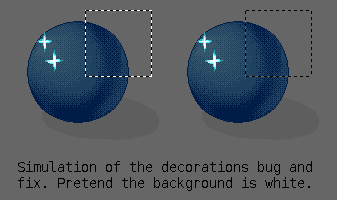
Because I can’t take screenshots of HDR display, I instead made this simulation. With HDR display, regular diffuse white looks greyish, while the HDR whites show the brightest your screen can handle. This is somewhat similar to how many pastel artists work on a grey cardboard, so they can use their white pastels to indicate highlights.

We do this by taking the whole canvas area, and defining it as rec2100 PQ (an HDR color space), and then sending it over to the display. This however gave some trouble, as we previously assumed our display was a regular SDR sRGB space. Which meant that if we said “make this white”, we’d get the brightest white your screen was capable of, which on an HDR display is too bright (this is the left image). So what I did was convert every single canvas decoration (selections, assistants, reference images, tool outlines, etc.) to the canvas colorspace (rec2100 PQ in this case) before we start drawing them, making them a little bit more normal.

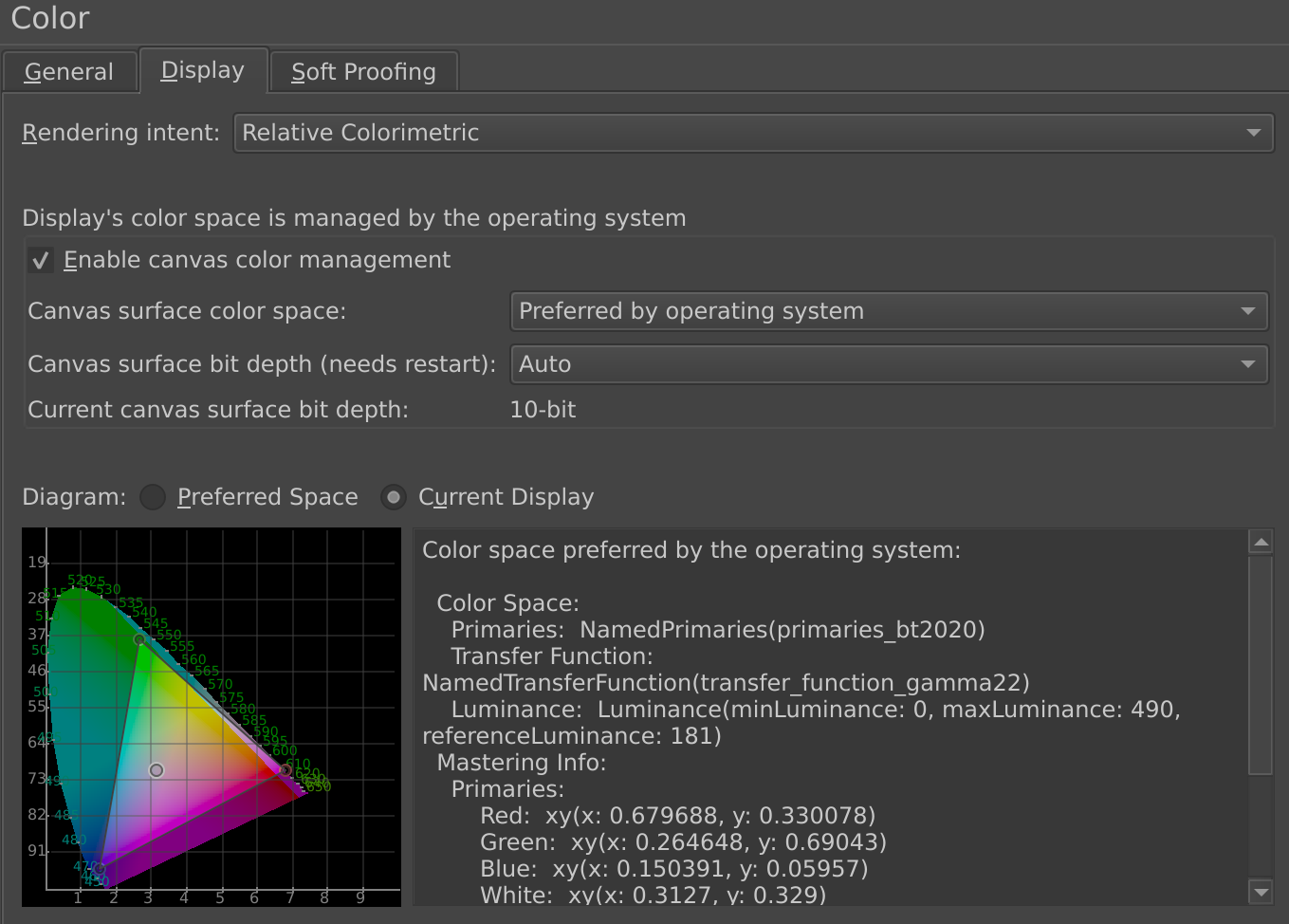
The second thing I did was a little simpler, but basically, the color management page under wayland now shows the colorspace inside the CIE-widget.

Wayland sends us two colorspaces. One is the preferred space, for my device that’s rec 2020 (same colorants as rec 2100 pq), and this is the space we’re supossed to send to wayland. The other is the current display space, which is different depending on which screen the widget is located. This is because on Wayland, we aren’t supossed to know too much about where our windows are located, so instead we need to ask screen information from Wayland directly.

We can then choose to send data in the display color space, but this often requires custom transforms. It’s easier to send data in the preferred color space, as these are predefined color spaces, and therefore we only have to keep track of a minimum amount of transforms.

Anyway, I added these widgets because I wanted to make the numbers a little more tangible.

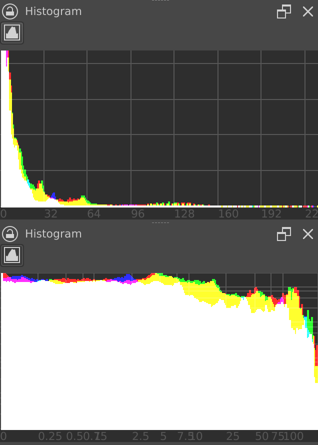
The final thing I did was extend the histogram docker, so it can now show colors beyond 1.0 in the floating point spaces. There’s now also a logarithmic mode, so that you can better see the spread of values. This is right now log10. I’ve considered log2 here, as HDR stops are calculated in log2, but then I realised that HDR stops need a cd/m² value, and furthermore, I’ve never seen a log2 graph, so now I’m very unsure about using log2 for the logarithmic mode.

Some other stuff got in as well, like all the cursors are now vector-based, which should be nice on high dpi displays, and I fixed HDR video export with ffmpeg 7+.

Because of the deps update we’re doing, the histogram patch took a while to be reviewed. I’ve already gotten very far underway with improving the situation with our default profile so it stores CICP data, also got very far with generating HDR metadata, and made some initial headway in getting PNG to use CICP instead of ICC. I hope to be able to make another update wherein I explain what all that means :slight_smile: