In digital painting (not the traditional-like painterly styles), the lasso tool is very important in shading/lighting and especially edge control. But Krita’s lasso tool lacks many features. If you want to erase a soft edge with a hard eraser using the lasso, you always have jagged lines/edges. In Paint Storm Studio, the lasso tool has its own stabilizer to draw more straight lines and you also have the “Refine Edge” option that includes (real-time) smoothing (decreasing the “jaggedness” of lasso lines, straightening them) and the same option can both soften the edges of the selection (feather) and harden it (contrast). I think Krita is great in many aspects but its lasso leaves much to be desired. I believe this is one topic that needs care and urgency.
Note: I believe the better outcome in PSS comes from the stabilization and smoothing, which doesn’t blur the edge but reduces the jaggedness. Feather is already present in Krita but if you want very crisp edges that “contrast” is ideal, since it gives razor sharp (not blurry) edges. So it’s more abouth fixing jaggedness of lines/edges beforehand with the lasso tool.
I like the Gimp lasso which allows the plotting of points as well as free drawing and also allows the feathering of the selection to a user-chosen number of pixels. In Krita, I like the vector option which probably deals with a lot of the jaggedness. I don’t know because I have never actually used lasso in Krita, I just think it’s a good idea.
Actually, the vector option just lessens the problem a bit but doesn’t solve it, a second “correction” phase is needed for the lasso (as in Paintstorm Studio).
You can Feather a selection and using the painting tools you can paint a selection with all the smoothing and edge softness available in the characteristics of the brush presets.
I made a lasso selection then looked it the tool options and I don’t see the ability to feather the selection there. How do I do it?
Yes, that’s about softness and I’ve tried everything possible including those. What I mean is drawing the lasso shape with the help of its own stabilizer and decreasing jaggedness even further with refine edges. This leaves no need for feathering and the “contrast” helps those crisp/straight lines in the edges afterwards. I know that you can use a selection mask and paint your own selection but that’s not it since that’s time-consuming. And softening an already jagged line/edge is not the thing since it loses its sharpness when feathered/blurred.

It’s in the menu (select).
Thank you. I actually just found it a second before you posted this. 
Thank you.
You can also set it in advance in the tool options
For Contiguous Selection and Similar Colour, yes, but not for the Freehand Selection and other selection tools.
Actually that has changed since a number of versions ago, all selection tools have feather options now
It’s something I requested myself, and fortunately got granted
I’m using 5.2.2, which is what my comment is based on. So I’m puzzled by what you say.

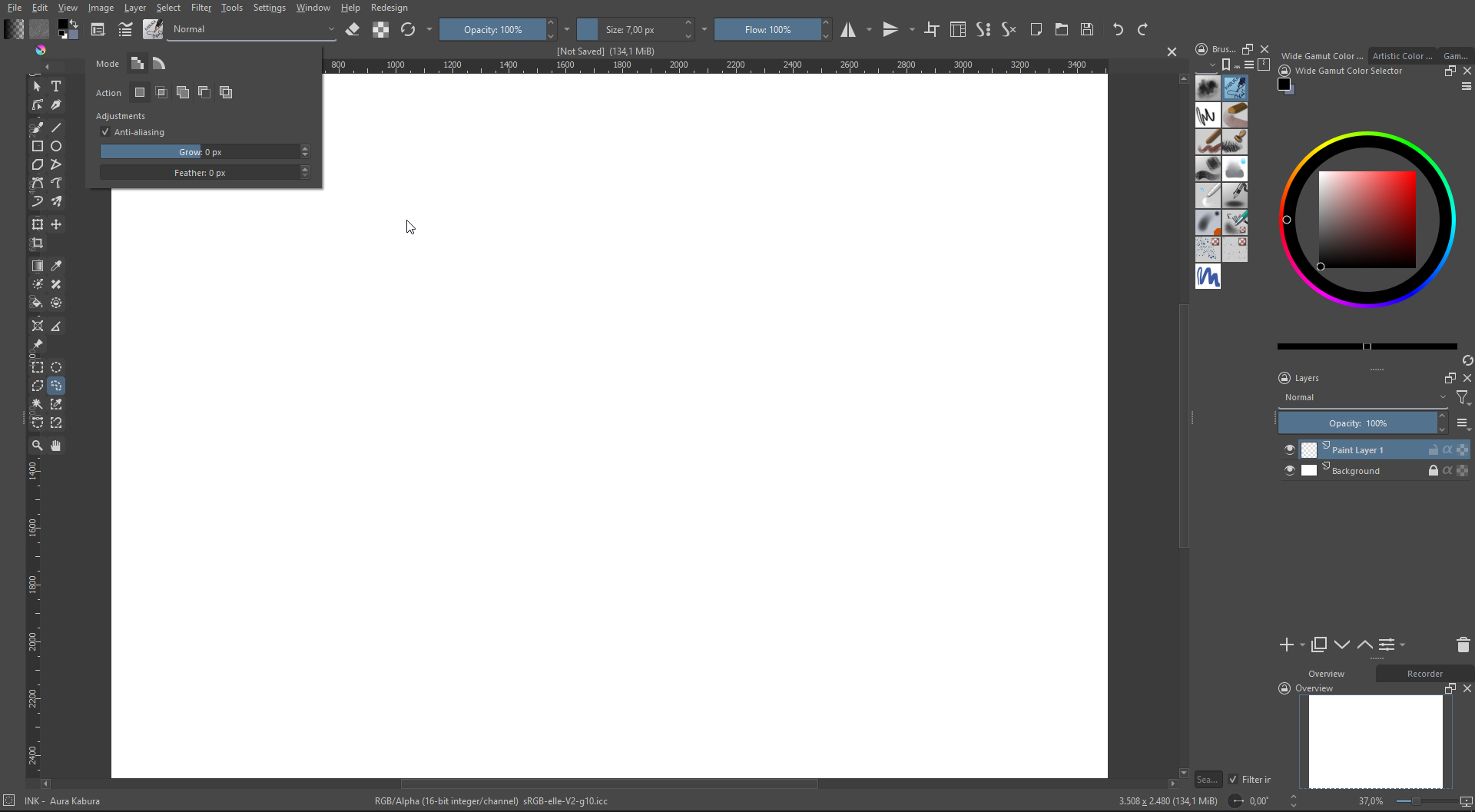

I’m starting to think that I should have stayed in bed this morning:

Also, I’m wondering why your Tool Options docker has no label on it.
What? That is uncanny!
Maybe it has to do with you using the docker tool options.
All I can tell you is that I have this functionality both on my home pc and in my workplace.
Also, that I can’t quickly find it but that this is the result of a feature request I made, I think for 5.0.
My tool options may look different because I use a UI plugin.


You do not have feather because you are using vector selection while @Konstrukto is using raster selection. Change the mode and you will see the feather sliders