QWERR
November 23, 2025, 11:58am
1
from krita import Krita

from PyQt5.QtCore import QCoreApplication

i = Krita.instance()
doc = i.activeDocument()

node = doc.activeNode()


def t(name):
    a = i.action(name)
    if a:
        a.trigger()
        # **Kritaのイベントキュー処理を強制実行**
        # これにより、UIの更新やアクションの実行完了を待機します。
        QCoreApplication.processEvents()
        # 処理が重いアクションの後には、念のため短い sleep を残します
        time.sleep(0.01) # 短い sleep は任意

if not doc:
    raise SystemExit('no document')


t('split_alpha_into_mask')
# --- 3. 新しく作られた透明マスクを取得 ---
# マスクはターゲットレイヤーの子ノードのリストから取得できます
t('activateNextLayer')
#t('switchToPreviouslyActiveNode')
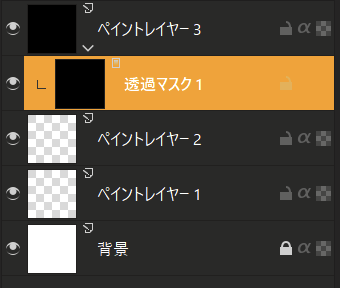
透過MASKを作成後、一つ上にアクティブレイヤーを移動したい
私がやりたいのは2枚目の画像の状態です。
cowc2
November 23, 2025, 12:50pm
2
Please use translation service.
QWERR
November 23, 2025, 1:01pm
4
After creating a transparent mask, I want to move the active layer one level up.
What I want to achieve is the state shown in Image 2.
1 Like
AkiR
November 23, 2025, 2:47pm
5
This script triggers first split_alpha_into_mask action and calls doc.setActiveNode(...) tiny bit later.
from krita import Krita
from PyQt5.QtCore import QTimer


app = Krita.instance()
doc = app.activeDocument()
old_current_node = doc.activeNode()
split_alpha_into_mask = app.action('split_alpha_into_mask')

def _do_later():
    doc.setActiveNode(old_current_node)

QTimer.singleShot(1, _do_later)
split_alpha_into_mask.trigger()
/AkiR
2 Likes
QWERR
November 23, 2025, 2:57pm
6
Using QTimer.singleShot(10, _do_later) made it work perfectly. Thank you.
2 Likes