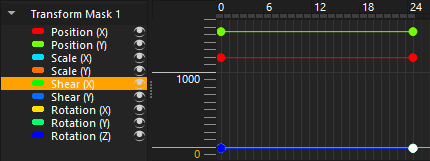
When add keyframe on transform mask only 3 keyframes are appear. Position X and Y, and Rotation Z. I have modified shear with transform tool but it did not create new shear keyframe.
Hello @HeartAnima and welcome to the forum 
Was the animated transform mask selected when you used the transform tool?
It should have been the layer that was selected.
Those are not keyframes’ they are parameter curves. Your screenshot shows that there are two keyframes at frame-0 and frame-24.
The initial values of Shear are 0.0 and the initial values of Scale are 1.0 so they overlap each other and may overlap with Position and Rotation if those values are also 0.0.
The vertical scale of the docker in your screenshot goes to nearly 2000 so you won’t be able to see such low values clearly.
You can change the vertical scale by using the up/down vertical arrow icon at the top of the docker or by grab-dragging vertically up and down on the left side scale.
Use the ‘+’ and ‘-’ icons at the top of the docker to add and remove keyframes after selecting the frame number along the top of the docker.
Use the visibility icons at the left to turn off the visibility of parameters so their curve is not hiding any other curves.
When a parameter’s keyframe value is selected and shown as white, you can change its value by typing in the Val box.
You can also grab the points on the curve and drag them up and down and also to a different frame position.

The Animation Curves docker is the most complicated docker and takes some time to learn how to use it. Please be patient and explore all its control functions.
2 Likes
Thanks, yes what i was looking is shear parameter curves. So it basically hidden behind other parameter I just need to turn of the visibility of other parameter. Also its fascinating the shear parameter are on 0-1 which need lot of zoom in while the other parameter are on thousands.
Anyway the shear parameter doesnt seem work for me. Another parameter work just fine. Personally I didnt need shear for now. I just want to able to see all the parameter, which I got it now.
Actually, there is a problem with Shear.
If you Save the image as a .kra file, then Close it then Open it again, the problem seems to become fixed and you can scrub along the Animation Timeline or along the Animation Curves frame indicator.
Please try that.
1 Like
This topic was automatically closed 4 days after the last reply. New replies are no longer allowed.