As far as I see, there’s no way of adding extra vanishing points to the same horizon line (eye level). You have to add a new horizon line to add a new pair of vanishing points and you may not align them correctly. Wouldn’t it be nice if we could add more vanishing points on the same line by choice since different objects may have multiple vanishing points? Like such an option: “add VPs to the horizon line.” And sometimes when you draw slanted objects, “a second, vertical horizon line” (a ‘vanishing trace’) is used to add VPs on the Y axis. Adding a new horizon line vertically is not easy as doing it horizontally, maybe that could also be added for them to work in unison (like two perpendicular lines having their own VPs.) Note: These concern “the 2 point perspective” in the assistants.
I normally use the duplicate option on the assistant I’ve already created. So, I’ve placed my two-point perspective assistant. Then, when I want another pair at the same angle, I click the duplicate option on my first assistant. I can then adjust as needed.
(EDIT) - Also… If you have trouble getting Krita to ignore one set of points over another, while using the Snap feature, just click the eye icon on the assistant you don’t want to snap to. This will hide that set of points and won’t let you snap to them while drawing, until you show them again.

the thing is...
I don't have that duplicate option there?
I don't know why but I don't! :(
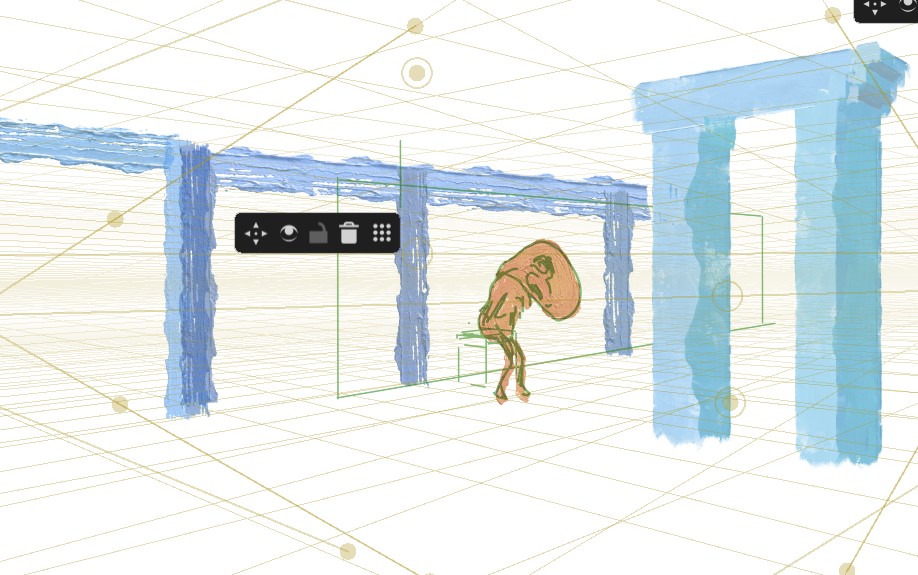
Because it is a Krita Next feature currently, so 5.3.x, it will be in a future version of Krita.
Michelist
Ok, thanks. I think I’ll check it out and see if that serves my purpose when it’s out. There’s just one question on my mind, does it duplicate exactly on the first one, so that vanishing points could be moved on the same line (and angle)? If so, that’s a good workaround. Alas, I can’t try it.
I have not tested it so far. But you can simply download a portable version of it and test it, the only thing you may want to do before you start the portable version, is to create a backup copy of your resource database resourcecache.sqlite, at least if you have a large collection of additionally installed resources. Then you can save yourself the time Krita needs rebuilding it, by exchanging it before you change the version of Krita you use..
You can find it via Settings → Manage Resources... → Open Resource Folder at the very end of that folder and have to remember the path to it. That is, because you can only copy/move/rename/delete … it, when Krita isn’t running, since a database in use is locked.
By the way, even in topics where your OS probably isn’t important, you should name your OS, as well as your version of Krita in your first post. You are long enough in the forum to know this. Because if you had done that, I had been able to simply tell you the path to your resource database, now you have to find it out by yourself.
Michelist
My apologies. I’ve used the Nightly Next version so long, I sometimes forget which features are unique to it.
Yes, duplicate assistants do appear directly on top of their originals. You may not even realize you’ve done it, unless you move one of the nodes or move the entire rig with the control panel. You can also snap their horizonal and vertical movement by holding shift.
This is an exciting update, any idea when this might be available in the stable version of Krita?
No, I don’t know when it will come.
Michelist
Nice to hear that cos’ it’s definitely what I want. But I think I’ll wait for it to come out since I don’t like two versions of Krita clashing on the same computer.
This topic was automatically closed 30 days after the last reply. New replies are no longer allowed.