I’m trying to create an airbrush effect brush like gimp has without success, in fact on gimp the difference between brush and airbrush is that the brush has the chosen opacity not changeable if you keep the mouse or the pen pressed, to increase you have to click several times (this is easily reproducible in krita), while the airbrush if you draw a line where you stop you have greater opacity, even if you set a low initial opacity, by pressing and staying still you will reach 100% opacity without clicking continuously.How do I set krita to have a changeable opacity if you press with mouse or pen?What engine do you need?


I had seen it, but if I lower the opacity and hold it down it doesn’t trace the color up to 100% opacity like it would if I were in gimp, I have to point to increase the opacity,
Keep the opacity at 100% and play with the Airbrush setting rate. Make sure you check Override Spacing to get a better control on opacity
I’m trying with the mouse without having mounted the tablet; my impression is that it doesn’t change opacity when standing still but the hardness of the brush changes if it’s soft it becomes hard, practically without blurring but the opacity doesn’t add! Maybe there’s some other option!?
in the image in my first post i used a mouse to get the result in the scratchpad. you can leave the opacity settings at Off and 100%. Just make sure you lower the rate of the Airbrush setting and Check Override spacing! I found a rate of 5 to be similar to what was on the right screen of your video. I could click & hold in place to add opacity while keeping a soft brush.
I saw that in addition to that “Airbrush” option you have to adjust the flow and you get the desired effect! However, can you confirm that if I lower the opacity from 100%, without detaching the pen there is an option to get to 100%? Maybe it is useless in fact …

Congrats on finding a setting that works! To answer your question a single stroke will never be able to go over the opacity%. its part of what makes it different from flow.
An extra tip.
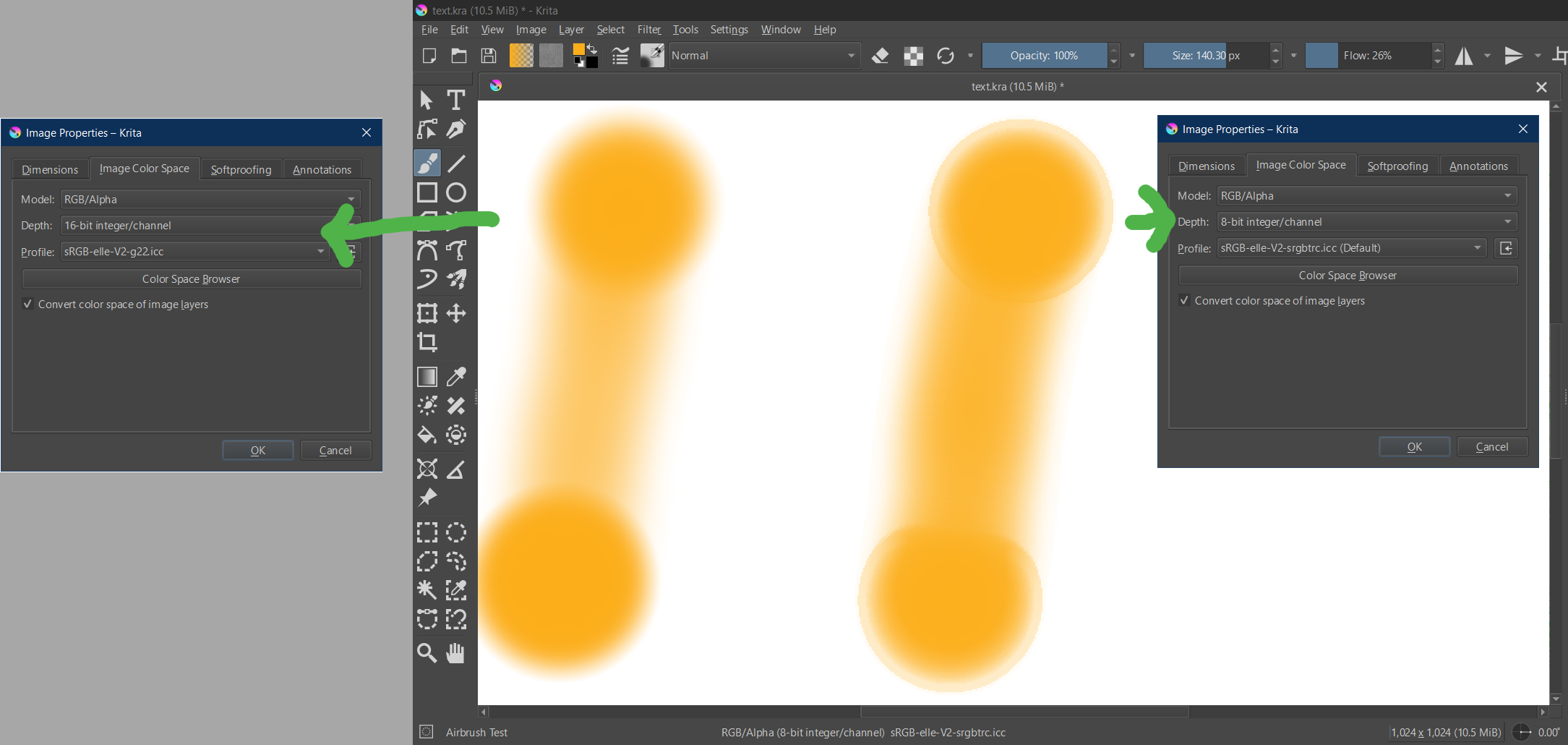
It can happen that you get banding when using airbrushes.
To limit those you can change your document to e.g. 16bit integer instead of 8bit (Menu: Image → Properties → Image Color Space) before using the airbrush.
1 Like
This topic was automatically closed 30 days after the last reply. New replies are no longer allowed.