Using windows 10, the problem is 100% with krita as i have 0 issues with other programs like clip studio paint. The weird thing is that there seems to be no issue when i am using the scratch pad inside krita (the one inside the brush editor) theres no lag at all. However in the canvas it lags. I have disabled brush smoothing, and i am using one of the smallest canvas sizes (940 x 540) so its defintely not a resolution issue either. I have 16GBs of ram and a 6 core 12 thread cpu (i5 10400)
This is super weird and is literally the only thing keeping me away from using Krita. Unfortunately it doesnt show up on video for some reason so i cant record but i swear the issue is there.
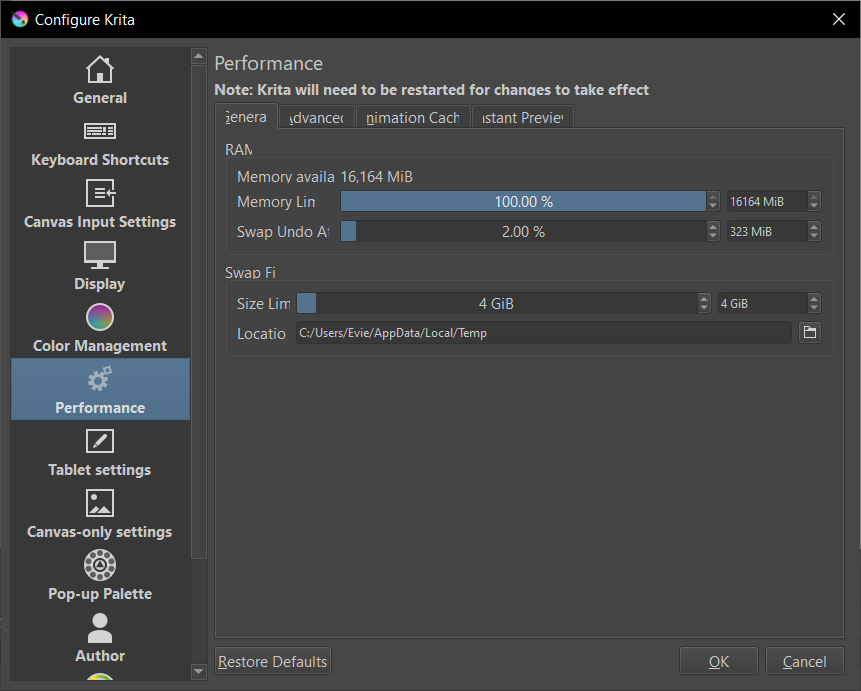
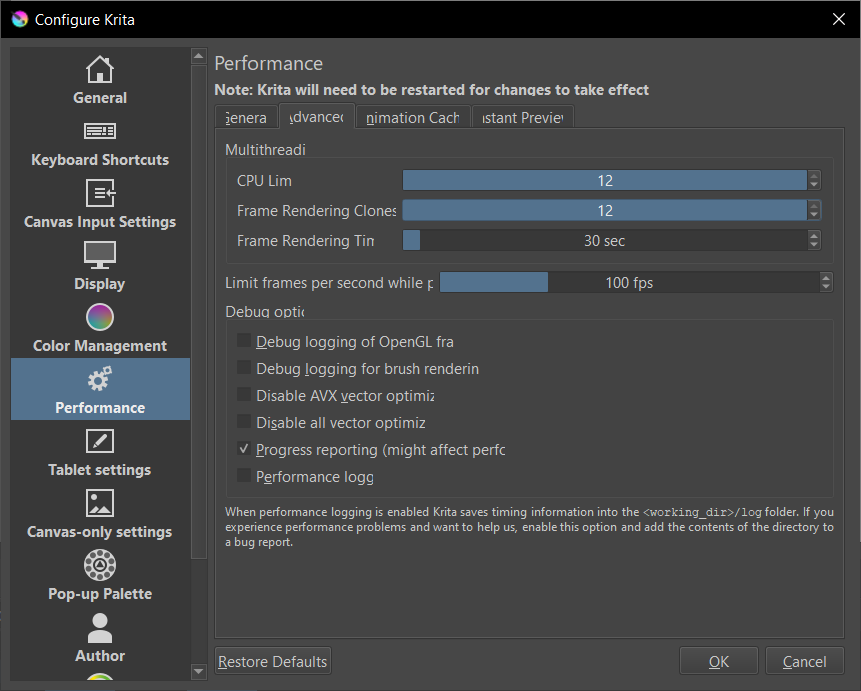
Did you already check Krita’s preferences and cranked all the settings to maximum? Max Memory, Max CPU Core usages, Canvas acceleration, OpenGL/Angle Graphics-API and so on. Krita is by default configured to bey quite modest to also run on a potato without grabbing all the system resources.
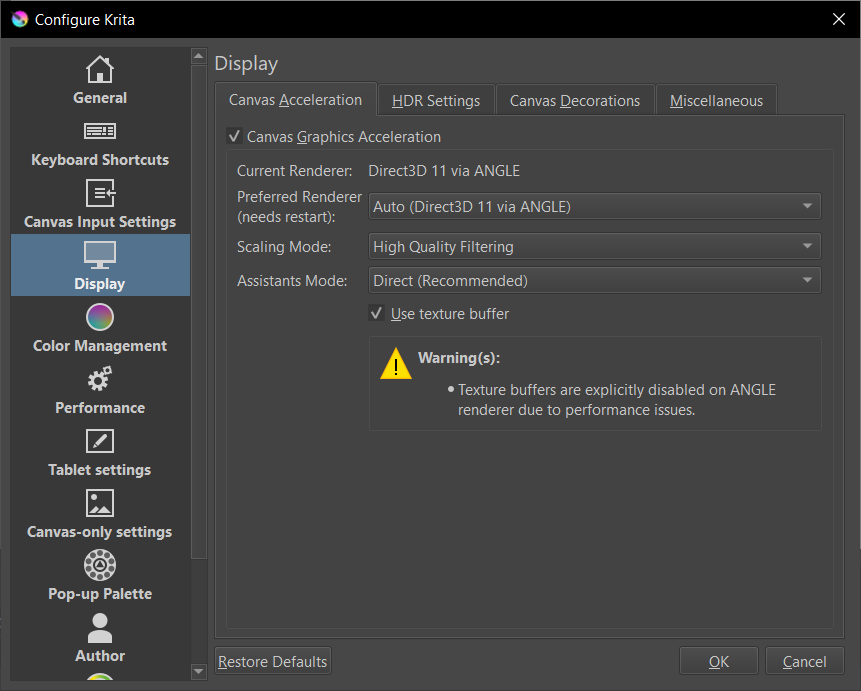
Did you try if OpenGL perhaps works better for you? Changing the renderer requires a Krita restart.
Is your CPU limit also at max?
Can you tell us if the tablet’s driver is updated and which Input API you are using in Krita (Windows Ink or WinTab) and whether your tablet is set to match that selection?
Im using WinTab and it does match what my tablet uses i believe (In my drivers it has a checkbox for windows ink, i did not enable it) And yes my drivers are the latest. I use an XP Pen Artist 12 (2nd Gen) display tablet
Hmmm. I wonder if your setup is one of the few that works better with both set to Windows Ink? You should be able to open the tablet interface and change it only in the Krita profile so you don’t affect any of your other apps.
When you change it in Krita, you’ll have to restart Krita for the change to take effect.
Did you restart Krita after making the change to OpenGL? It is not seldom forgotten.
By the way, if you have plenty of free space on your SSD, then you really should increase the amount of swap space for Krita. In case you got 2 or more SSDs in your PC, then you should create the swap space on one of the non system SSD’s so they don’t battle for accessing your drive in case Windows and Krita are swapping simultaneously. This won’t help extremely, but it helps.
Michelist
With a 1024 x 1024 canvas, RGB/A 8-bit default colour space and a 75px Bristle Texture brush preset, I have no lag when the CPU limit is set to 1.
Frame Rendering Clones is only for generating the animation frame cache and for animation rendering.
For the RAM Memory Limit, the test described should be a very small RAM load.
Also, you should not set the limit to 100% because Windows needs about 3GB of RAM to run itself and its bits and pieces.
The Task Manager will tell you how much it actually uses when ‘doing nothing’.
Will try this and update tommorow, as im currently out right now. but honestly i dont think it will change much? as i’ve said i encounter 0 issues using the brush scratchpad in the brush editor. theres no lag whatsoever which is the weird part, theres only lag in the canvas. Also i think i can show the issue more clearly if i record it using my phone, i’ll update the post with the video when i get the chance to
i see, i will reduce the ram percentage then. it should be fine considering i have 16gbs of ram and the reccomended specs for krita is 4
Yes, i did restart krita when i changed it to use OpenGL, it still didnt do anything.
And as for storage space i only have 1 ssd and an external harddrive i use to store other files, so i dont think i can make use of that(?) thanks for the tip though!
An external HDD wouldn’t be a good choice for speeding up these special cases.
But as said, in case of plenty of free space on your SSD, you can raise the size of Krita’s swap file.
If you have ~70GB free, you can assign 20 to Krita’s swap file, if you have ~90GB free you can raise that to 40 GB and if you got 110GB free you can assign 60GB and if you got more than 120GB free you can raise it to the possible 64GB max Krita can assign. All these settings are in an area that can be said to be safe. It would be very unlikely to have collisions between Krita and Windows using them. The rule of thumb to apply on this scenario is as follows:
Free disk-space - (existent RAM-size multiplied with 2) = space that can be safely assigned to Krita as possible swap file size.
And you have also left 10GB for things to safe to your drive (e.g. pics, videos, documents, etc.).
Michelist
4 GB is the minimum required and the recommended amount is 16GB
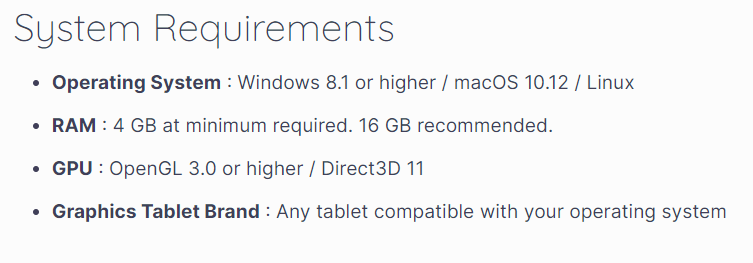
If you have Linux installed then 4GB should be ok for medium size paintings of medium complexity or even simple animations, with no other applications running.
If you have Windows 10 installed then 8GB is almost mandatory as a minimum.
For Windows 11 then 8GB is borderline (in my experience) and 12+ GB is needed.
Just tried to use windows ink, it did not make a difference unfortunately. I took this video which should hopefully help to showcase the issue? 20240327_204010.mp4 - Google Drive
you can see the difference when i draw on the canvas vs. in the scratchpad. There is noticable lag / brush smoothing being applied
Ah i see, my mistake, however i do have 16gbs of ram as such it shouldnt be the cause of this issue.
In your initial post you wrote it is disabled, here you wrote it is enabled? What do we have to believe now?
Does it lag too if your smoothing is set to none, or does it lag always?
Michelist
i meant the effect of brush smoothing is being applied, despite in the program i have it turned off. My bad for poor wording
Now I’m even more perplexed than before. How can the effect be applied by Krita if it is not activated?
For me, this is a miracle of computer science. Something that is not activated cannot be used by the software, unless there is a bug, but then it would already be known, because Krita has a few too many users for such a bug not to have been reported already.
You’re not by any chance pulling our leg here?
Michelist