All of my issues with Krita, a powerful app, an amazing brush engine, brought down by unnecessary innovations

Krita’s zoom is not linear(specifically relative zoom). I can’t seem to change this no matter how much I change my settings, It seems to be working off a circle or an invisible circle, it jumps weird and is not consistent if you use it like a linear zoom. I believe what I am asking for is known as scrubby zoom in photoshop, and if you have used that zoom you would know that this is a minor but a very real issue that is ignored? I dont see anyone ever mention this. You might say yes it has a scrubby zoom just use relative zoom, fine, unfortunately while similar it seems to be hard coded very differently from any other zoom ever that ive seen, and youll notice the difference very clearly if you simply use it for more than 2 minutes. I tried turning this off through everything possible, just does not happen.

This is on top of the fact that zoom is inversed for some reason, another change only to be different I presume, only gatekeeps people who are coming from literally any other image or drawing app. Yes this is changable but thats my next issue, its about the defaults making no sense.

Ctrl+D does not deselect, E does not erase, R does not rotate, M does not pull up select, Zoom works on a circle for some reason, B goes to brush (The only shortcut thats the same as all the other popular drawing programs).

I really do not see why the krita team decided to make all the shortcuts different from every single industry standard program out there? It has one of the best brush engines though this part just geniunely does not make sense to me.

One more thing, I did mention a lot of these problems on the subreddit related I do not know if official or unofficial, where people said oh just use photoshop compatible to fix all of those shortcuts you mentioned. A really bright light in the dark tunnel however completely false, the whole photoshop compatible page and the option seems to be lies? I could not for the life of me find what it changes, it definately did not change anything ive mentioned above.

I really do like Krita, Craig mullins loves it too for a reason, the app is amazing, the brush engine? One of the best out there, second only to rebelle and procreate maybe.

However, the zoom being weird really does pull me out, along with the fact that you need to spend 2hours just to get all the default shortcuts which are all, by the way, exactly the same through like the 10 drawing programs out in this world but Krita here decided to innovate and change to random things, so you enjoy the 2hour configuration. Thx for reading.

2 Likes

Why do you have such a strong urge to complain? All the things you mention can be quickly configured to work like in other programs.

2 Likes

Krita exists for about 25 years and a lot of “industry standards” didn’t even exist back then.

Do you work on a Mac and use the scroll wheel to zoom? Because as far as I know Mac has inversed scrolling which would inverse zoom as well. I did use photoshop and other drawing apps in the past and (except my memory is completely wrong) Krita’s zoom direction is exactly the same.

Personally I like zooming with strg+MMB on the stylus because it’s smoother and more precise.

Strong urge to complain? I just wanted to write it out, you seem to see it as an attack? You dont even deny that the problems are real, problems that have 0 reason to exist in the first place.

The shortcuts are only one part of the complaint, you may enjoy however you like your keys friend. It may be true that it existed 25 years ago, Ive never heard of this, googling also gives 2005, at a time when photoshop was already there. Anyway that is not the point no? My point is why not make the default shortcuts same as most drawing / image programs to begin with?

Along with that the only real problem I have with Krita is the zoom works off a circular radius instead of being a linear zoom and this being unable to be configured in the zoom settings. Also the default krita zoom is inversed (in the recent versions) atleast on windows ( i cannot testify for 25years of history ) , I wouldnt know about mac I have never used one.

This is the first time you’ve commented in the community, and instead of asking for help to solve the problems you’re having, you’re criticizing the way Krita works. If you travel to the United Kingdom, are you going to criticize them for driving on the left too? Because the rest of the industry doesn’t do it that way… you get me?

I would like to see a video showing what you mean by the zoom problem.

But I’ll tell you that by default, I didn’t like how Krita handled zooming either. And in less than a minute, I fixed it:

Settings / Configure Krita / Zoom Canvas / Add shortcut

Here’s how I have it configured: Mouse Button / Z + Left Button / Relative Zoom Mode

This way, the zoom smoothly moves to the point where I have the cursor and zooms out in the same way, simply by pressing Z + click with my stylus and sliding to the right or left.

I think that’s what you’re asking for.

___________________________

Deselect is by default with Ctrl+Shift+A I think.

Go to: Settings / Configure Krita / Keyboard Shortcuts / Menu / Select / Deselect

The press Custom and in the key biding press Ctrl + D. Problem solved.

___________________________

E does erase, but with the same brush you are using. If you want the eraser to have another brush:

Go to: Settings / Configure Krita / Keyboard Shortcuts / Krita / Painting / Toggle eraser preset

And bind E to that option instead of “Set eraser mode”.

___________________________

For R to rotate.

Settings / Configure Krita / Canvas input settings / Rotate Canvas / Add shortcut

In my case: Mouse Button / R + Left Button / Rotate Mode

As with the zoom, I press R, click with the stylus, and slide left or right depending on where I want to rotate.

___________________________

M is for Mirror. But if you want M for selection:

Settings / Configure Krita / Keyboard Shortcuts / Tools / Tools Shortcuts

And here you can assign M to the type of selection you want, for example, the freehand selection tool.

___________________________

If any of these changes interfere with a default setting in Krita, the program itself will warn you to replace one with another. Or in the case of Canvas Input Settings, if any of them conflict with something already assigned, you will have to look in Keyboard Shortcuts to find which action uses the same key and disable it.

There you go, your 2-hour configuration. Remember to save the configuration when you’re done so you don’t have to do it again in the future.

You can also write it down in a notebook or, as I did, record a video of how I had everything configured and upload it privately to YouTube. That way, every time I reinstall Krita on a PC, I have everything set up the way I like it in a matter of 5 minutes.

4 Likes

You are essentially asking why the Krita devs didn’t decide to ignore their existing users and changed everything to (maybe) make a Photoshop user happy (some day).

Historically Krita was only a Linux software. From what I know it was supposed to fit in the Linux software suite Caligra and the KDE ecosystem. So it’s default shortcuts were supposed to fit in there. What other software on other operating systems did, didn’t really concern Krita developers back then.

I have no idea why the zoom should work differently suddenly on Windows unless you have “natural scrolling” on (doesn’t feel natural to me though) which inverts scroll direction on the mouse wheel. I’m not sure if there was a change in Krita affecting zoom direction, can’t imagine why it would.

Not the first time i interacted with Krita userbase, just the first time in this forum. Is criticizing default shortcuts not being similar to the current standard that out there? Really ?

If I travel to the United Kingdom, would I ignore every single bad thing just to sing praises of it whenever the topic arises? Krita is an amazing program, it is more amazing a creation than any creation that has or will come out of it. The brush engine is fantastic, one might say an upgrade on photoshop thats how good it is, however still, The default shortcuts are pure randomness and you can act like its not a big deal because it truly isnt the biggest deal, and yet its still a problem is it not ? For the average person who decides let me try krita coming from photoshop , sai whatever.

On top of that, I still do not know what “photoshop compatible” changes, maybe you do, if you do, do let me know because all of the shortcuts you just mentioned do not get changed by “photoshop compatible”. You have to do them manually, fine but let it be known that “photoshop compatible” does absolutely nothing to make anything similar to photoshop.

Here is the video of the zoom, the issue that is ultimately the only flaw I cannot seem to fix, even after spending like 2 hours. You will note that when i zoom using left and right, you will see how inconsistent it is, this lead me to try different movements and I found out that a “circle” seems to be how it works. I disabled everything in the zoom options as i could yet this cannot seem to be killed. (I use ctrl+space+leftmouse button/ stylus to zoom in and zoom out , also i believe this is the default in photoshop, clip studio, sai2)

Maybe back then, you would be correct, with the facts you are still correct. But now it is not a maybe right? We all know the general landscape around digital drawing/image manipulation programs now and the keys that are used by like 80% of the userbase, its never too late to change something. It’d save anybody’s 30mins switching to Krita.

No it’s still not worth ignoring existing Krita users who use the software for years and make them change just to comfort a photoshop user. I say it as as someone who uses Krita for many years and as a software developer who also works on a 30 year old software with random shortcuts. You can’t simply suddenly make the default different or your users come at you doorstep with torches and pitchforks.

When I switched from Photoshop to Krita it took me maybe 20 minutes to adapt (I didn’t even change any shortcut’s) and another 20 minutes to understand the paradigms that are different (like the eraser not being a tool in Krita) and it wasn’t even worth complaining about. I used dozens of graphics softwares and all had some keyboard shortcuts different and some not for one reason or another. It’s not correct to assume that only one of them did it “correctly”, no matter if it’s Photoshop, Corel Painter or Krita.

3 Likes

Anyone who is unwilling to take the time to learn Krita’s shortcuts has very probably no genuine interest in Krita.

But I can also illustrate this with another example.
You’ve been driving a VW, GMC, Ford, whatever, for a long time, for whatever reason, but now you’re buying a Mercedes, and since Mercedes is very different from VW, …, except for the legally required positions of the pedals and turn signal lever, you go to Mercedes and demand that they convert your Mercedes to a VW. Any questions?
If you’re lucky, they won’t recommend you see a psychiatrist!

You can do the same with Android and iOS, or the TV models from various manufacturers.

Michelist

4 Likes

What about the zoom is bothering you specifically? When you say it seems to be working off a circle are you meaning to say that the zoom is locked to the center of the canvas? Or are you trying to zoom horizontally (since that’s how you scrubby zoom in Photoshop) but Krita’s vertical scrubby zoom is messing you up?

Wouldn’t go this far. But there are ways to configure it to be closer to what one expects. There are Photoshop and CSP “compatible” keyboard shortcut themes but they have their limitations because there are parts of Krita that are fundamentally different in how they work and no amount of shortcut settings can change that.

1 Like

For me, zooming with left-mouse + move is up/down movement gives zoom in/out. I might have swapped horizontal movement for vertical movement some time ago but if I did then I can’t remember doing it or where it might be swapped over.
For people who get confused, I suggest diagonal movement :slight_smile:

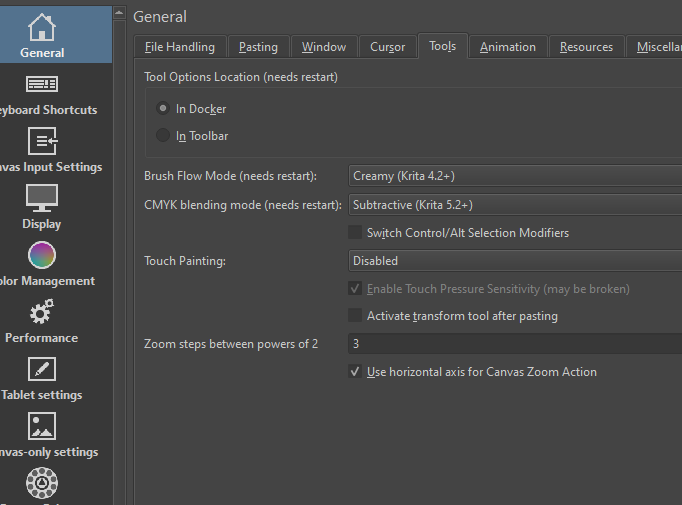
Ah, it’s what I suspected the difference between Photoshop and current stable version of Krita is the scrubby zoom direction is flipped. You’re trying to zoom horizontally and experiencing inconsistencies because Krita’s scrubby zoom is vertical. In Krita 5.3 (beta) there’s an option to have horizontal zoom, this should fix your issue. I have it on personally so switching between Photoshop and Krita isn’t too jarring

2 Likes

That might explain it :slight_smile:

@Takiro: It feels as if you are unfamiliar with the principle of metaphor and the purpose of exaggerated representation … :wink:

Sometimes you have to use sharp things (arguments) to pierce thick skins. :wink:

Michelist

I thank you, I shall try this tomorrow, if this works it’d be amazing.

It will work, enjoy the Photoshop zooming tomorrow :+1:

The brake pedal is on the ceiling here, because a car is ‘luxury’ doesn’t mean it should ignore ergonomics. If a pilot switches from a Boeing to an Airbus, they expect the flight controls to be in a similar spot for safety. Why should painting software be any different?