Oh, shoot. Mine seems to be ok so I wondered if you had changed the location of the resource files and now kritarc is creating a conflict? I vaguely remember something in the release notes about not moving resource folders…
You could rename or delete the kritarc file but this is just a wild guess on my part. I have no idea if that would actually cure it. Krita will automatically make a fresh one the next time you start it.
Yes that was a wild guess on my part also, but I’m not sure if Android would “allow” me to do that without giving me a huge hissy fit (like a cat).
I guess I’ll wait until someone who is more familiar with that comes along then.
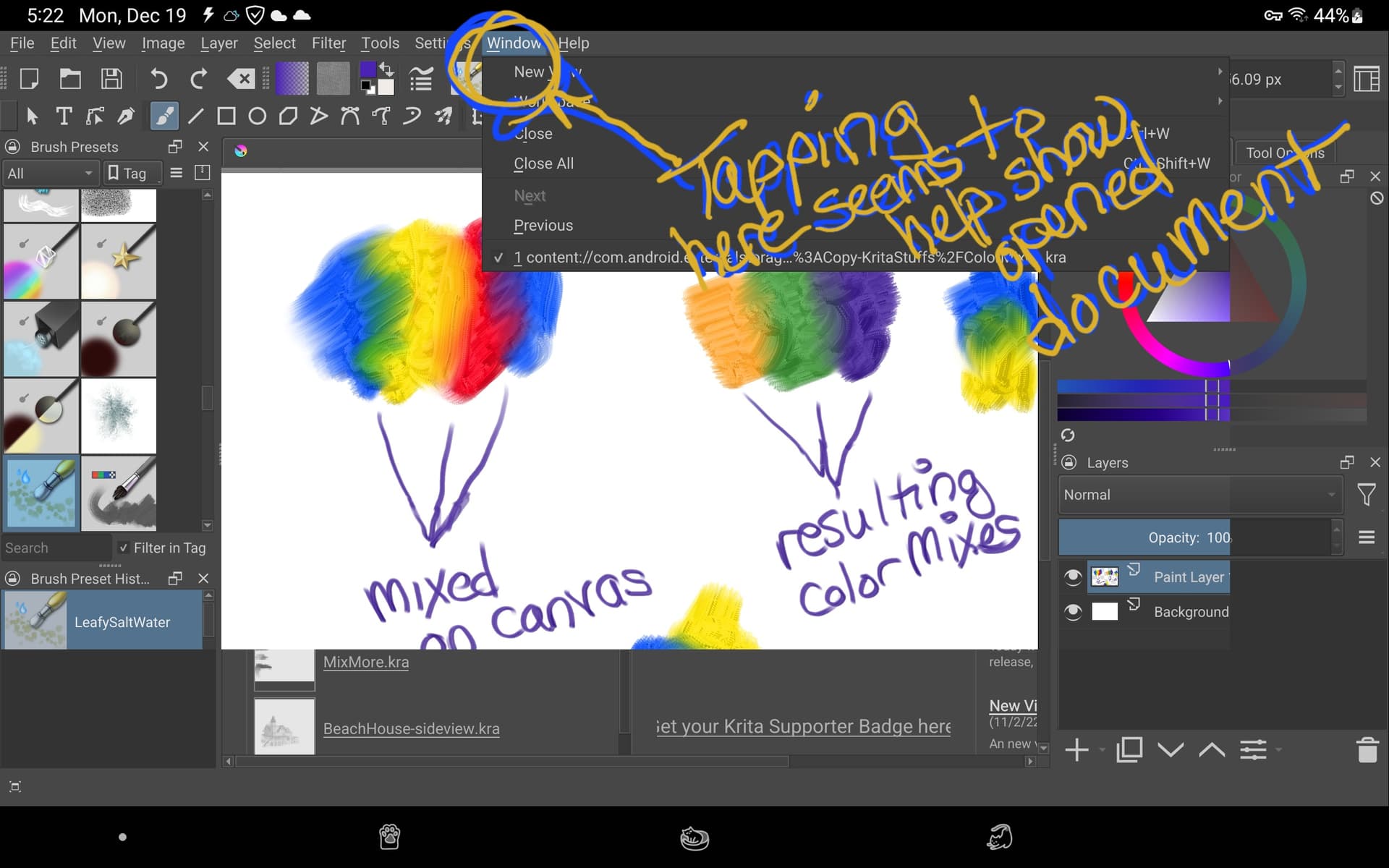
I’m also having this issue after updating to 5.1.4 (on Android 7.1). The document appears to take a long time to load, but tapping part of the window shows that the document is loaded and it was the UI that hadn’t updated, with opening the Window menu only partially updating the UI.
Sometimes Krita crashes instead. The crashlog doesn’t appear to be particularly interesting, but here it is:
  #00 pc 0004ac00  /system/lib/libc.so (tgkill+12)
  #01 pc 00048393  /system/lib/libc.so (pthread_kill+34)
  #02 pc 0001d995  /system/lib/libc.so (raise+10)
  #03 pc 000194e1  /system/lib/libc.so (__libc_android_abort+34)
  #04 pc 00017128  /system/lib/libc.so (abort+4)
  #05 pc 0031d945  /system/lib/libart.so (art::Runtime::Abort(char const*)+328)
  #06 pc 000b5503  /system/lib/libart.so (art::LogMessage::~LogMessage()+1134)
  #07 pc 001bd92f  /system/lib/libart.so (art::IndirectReferenceTable::Add(unsigned int, art::mirror::Object*)+194)
  #08 pc 002666f3  /system/lib/libart.so (art::JNI::GetObjectClass(_JNIEnv*, _jobject*)+426)
  #09 pc 001824bb  /data/app/org.krita-1/lib/arm/libQt5Core.so (QJNIObjectPrivate::QJNIObjectPrivate(_jobject*)+86)
  #10 pc 00183b55  /data/app/org.krita-1/lib/arm/libQt5Core.so (QJNIObjectPrivate::callObjectMethodV(char const*, char const*, std::__va_list) const+104)
  #11 pc 00183ba3  /data/app/org.krita-1/lib/arm/libQt5Core.so (QJNIObjectPrivate::callObjectMethod(char const*, char const*, ...) const+22)
  #12 pc 00183bc1  /data/app/org.krita-1/lib/arm/libQt5Core.so (QJNIObjectPrivate QJNIObjectPrivate::callObjectMethod<_jstring*>(char const*) const+8)
  #13 pc 00186285  /data/app/org.krita-1/lib/arm/libQt5Core.so (QJNIObjectPrivate::toString() const+36)
  #14 pc 00020ecb  /data/data/org.krita/qt-reserved-files/plugins/platforms/android/libqtforandroid.so
Ok, after some more experimenting, it’s still not ok, but useable on my tablet.
What I tried:
Renamed kritarc to kritarc-old then restarted Krita . Thankfully, it opened and I had to select my preferred workspace.
Then I tried opening a new document. I still had to tap on the top menu (I choose to tap on Window) and then the new document appeared (just as you see in the screenshot above). After that, documents open fine, a little laggy, but ok. Maybe my S7 tablet is being stupid with this Android 13 OS version, dunno.
I saved a few logs if @sh-zam or anyone else is interested in seeing them.
This is actually a very old bug (it used to happen in first versions of our Android port circa 4.2.0 I think). Can you please share usage log, system information and crash log with me?
I found the reason for the bug. Well not exactly, I found out what prevented this bug for the past couple of years and it turns out it was the touch docker – which we recently disabled because some actions in it were buggy on Android.
Ah, you’re right. The same crash happened a month ago, when I was using 5.1.0. I don’t remember what triggered it then, but the recent ones seemed to be triggered by closing a document and trying to open another one, which I was doing attempting to reproduce the GUI issue.
It means that colorsmudge brush has an inconsistency between two options- if the brush mode of the brush tip is set to something other than “Alpha Mask”, then “Use new smudge algorithm” under Smudge Length is supposed to be force-enabled, but for some reason it is not enabled.




 . Thankfully, it opened and I had to select my preferred workspace.