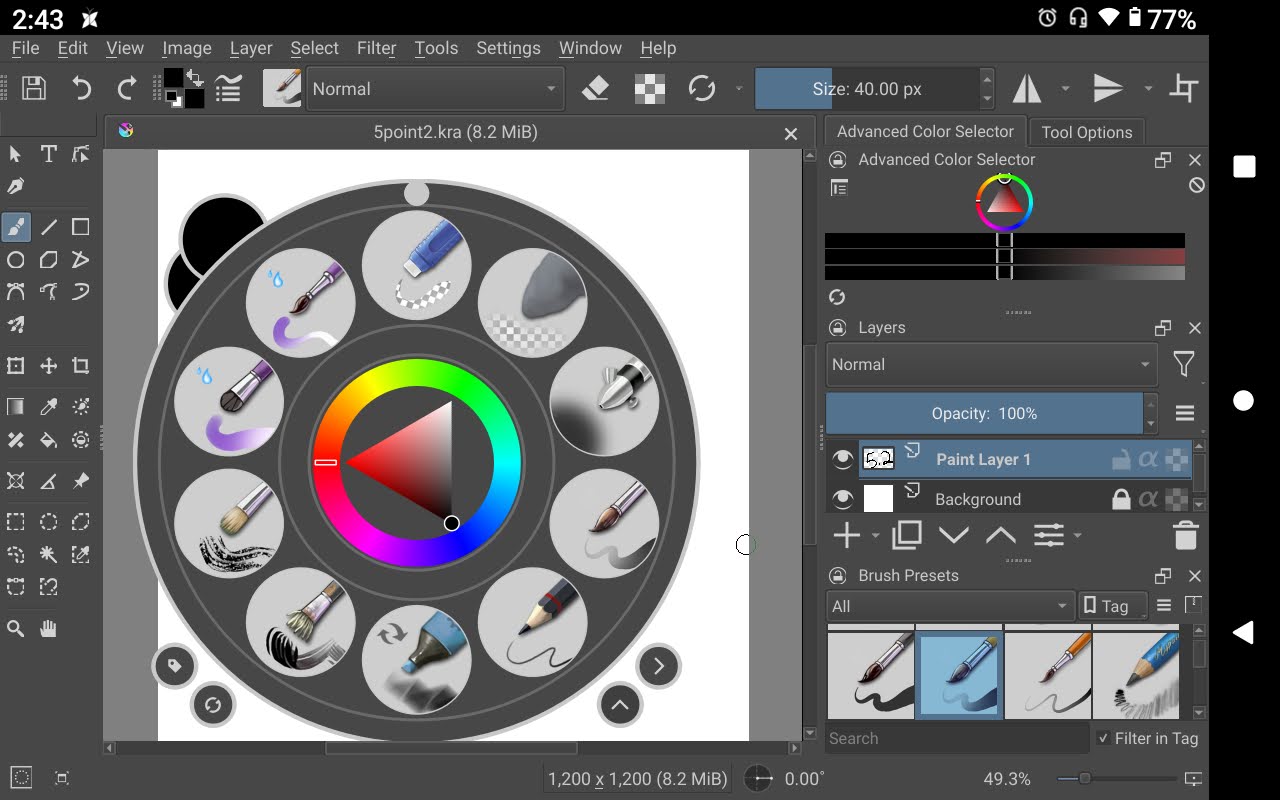
@sh-zam pop-up palette is working nicely for me when I use my finger (long press) and it comes up. But some of it is off to the side. Is there a way to fix that? I tried the settings but that seemed to not have much effect. See screenshot.

My tablet hides even more. It’s just an 8" - really too small for Krita but I love playing with it on my tablet. (This is a 5.2 pre-alpha git 1d06a65)
1 Like
It is possible to make it smaller than the 380px minimum slider setting in the Settings.
You can edit kritarc and find popuppalette/size=380 then reduce that value.
Below a ceratin value, it starts to get cut off but a little bit of reduction might help you.
2 Likes
Dunno if editing that is possible on Android. 
Ah, that Android file system permissions annoyance.
Here is an illustration, with the Selector Size at 100 to make it small to give more room for the brush slot icons.
This shows the difference between a palette size of 380px (the current slider minimum value) and a palette size of 270px (by editing kritarc):
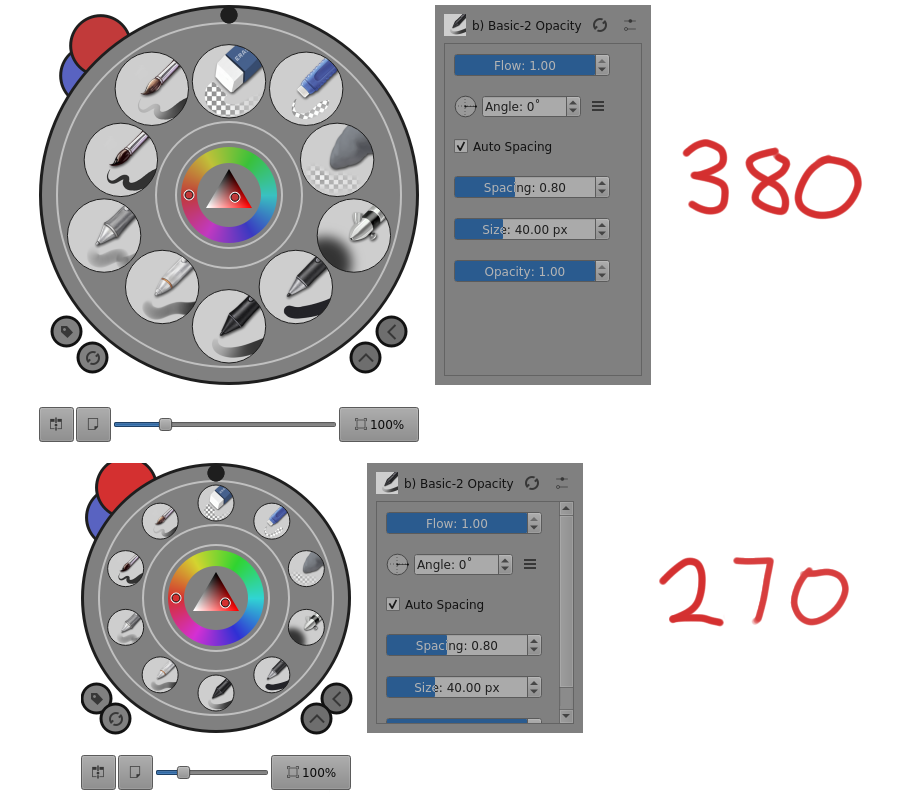
As you can see, at 270px, there is a small amount of cropping along the left edge and the top edge. That’s just cosmetic and doesn’t affect functionality.
I’d suggest that you make a formal bug report for this because the current minimum slider value can give problems for tablets, as you’ve demonstrated.
Pinging @sh-zam for advice and opinion.
1 Like
There’s an option in Qt to do display scaling, I have for quite some time now thought of implementing it in android to provide some control over App’s display scaling. There this a global option in Android, but the option being global can often mess up other apps’ scaling. I wonder if it would be good to have this to workaround issues like this?
Yes, it should be possible. You can either edit it by mounting it on your PC or by using a file manager that has an inbuilt file manager (I remember there being one that was shared here).
2 Likes
As I remember, File Commander can access various locations and may have an editor.
If it has no editor, it should be possible to use it to make a copy in a user accessible location, do the edit there and then replace the original kritarc with the user-edited one using File Commander again.
Experiments will be needed.
There’s no way for you to edit it the way @AhabGreybeard did then include it in a performance improvement update?
That was my point about a bug report.
If the minimum slider value was changed to 270 px, that would be better for you and other tablet users but be no problem for any other users.
2 Likes
Bug 458493 has been successfully created:
https://bugs.kde.org/show_bug.cgi?id=458493
Also, after using the long press, it will no longer work unless I change brushes. Only then will it work with long press again. Very curious. (I don’t remember if I mentioned that in the bug report.)
@CrazyCatBird You didn’t mention that in the bug report but that is not what the bug report is about.
Any long press problem would need a different formal bug report if it comes to that.
This topic mentions what appears to be the same problem:
Popup palette not always showing up with long tap/press
You could take part in those discussions.
For the palette size adjustment minimum size bug, I can’t go in to Confirm it because I don’t have a tablet.
So, could another tablet user please have a look at that and Confirm it if they also have that problem on a tablet?
2 Likes
I confirmed it.
2 Likes