Hi
Currently working on an animation, I’m using the clone frames function.
That’s a really interesting feature as it permit to get many frames in a cycling loop without being memory eater! 
Maybe there’s some possibilities of improvement because currently it need manual workaround to be used plainly.
Pinging @emmetpdx and @eoinoneill if interested by these easy[I hope  ] small improvements.
Here my current timeline

Improve timeline visual rendering (1)
Currently, to be able to made distinction between my original frames and the cloned one, I have to change color of first frame.
It helps but it’s not totally comfortable
Maybe what can be done is also to draw a mark on cloned frames.
Here some possible example of marks (but any other shape should be Ok for me ):
- 50% darker bullet
- 50% lighter bullet
- 50% darker bottom rect
- 50% lighter bottom rect

It doesn’t help to see which one is the first frame, but something like this will clearly help to identify immediately if a frame is a clone or not in timeline
Additional possibility: let the user choose marker color per frame (will allow for example to visually define start/end of a loop)
Improve timeline visual rendering (2)
My layers lines and color are in a group layer
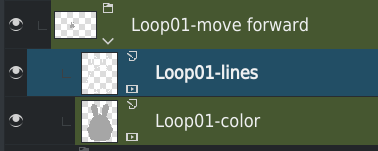
It could be interesting in time line to get a visual of group content (with may be, a distinct rendering than usual frames as it’s not real frames)
Example of how a selected group could be rendered in time line:
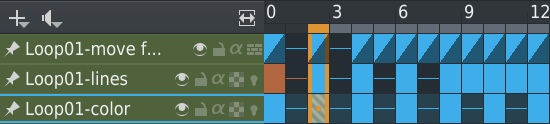
Note: the group rendered in timeline should render all sub-animated layers (including nested groups
) even if animated sub-layers:
– Are not visible in timeline
– Are hidden (PRO and CON for this one can be discussed I think…)
Improve clone workflow (1)
Basically, current workflow is:
- Select frames
- Right click → Clone keyframes
- Select target frame
- Right click → Paste keyframes
Encountered problems:
- The Paste keyframes action here is not intuitive… (I had to understand that once Clone has been clicked, I had to Paste)
- Once paste has been made, you have to repeat the process entirely

Possible improvements:
- When frames are cloned, it should be named Paste cloned keyframes UI will be immediately more intuitive

- When pasted, do not cleanup clipboard and let user be able to paste until next Clone keyframes action
- Add an action Paste multiples cloned keyframes (like we have insert multiples keyframe) were you can for example paste your clones 10 times (let user define number between 1 - 999 for example) in few clicks
Improve clone workflow (2)
An advanced clone workflow that could be useful
I’m often working with group layers.
Then, if Improve timeline visual rendering (2) idea is implemented, it could be great to:
- Be able to select frames from group row in time line
- Right click, then Clone keyframes
- Select target frame
- Right click, then Paste cloned keyframes
And in this case, it will automatically process action on all sub-animated layers for which there’s a keyframe
Grum999

