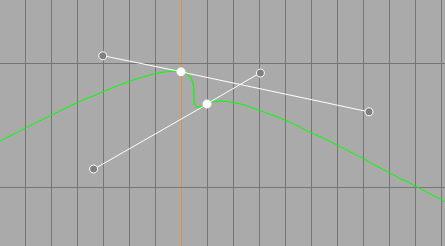
I’ve played around with krita in the past, in which i have gotten used to it very quickly and it is an extremely fun program to use, however, I have noticed an issue on mobile devices whilst trying to animate. This issue is that when using the animation curves, I struggle to select the handles of the bezier interpolation since they appear directly on the point. Even if I do manage to select it, I can’t tell when. Tested on both my lenovo tab and samsung A series, however I haven’t yet on my S series with the stylus.
I was just wondering if there was a way around this on a device without a stylus, and if there isn’t, will there ever be alterations to this part of the UI to make it easier?
I appreciate you for taking the time to read this post because it has been bothering me for a decent while. Thank you!
Hello @M4SK3D.M3T4L and welcome to the forum 
Manipulating the handles of the Bezier curves on the Animation Curves can’t be easy on a small screen.
A Bezier curve handle is a different colour to the normal keyframe control point (depending on the Theme you’re using) so you can tell that it’s there and grab it to drag it out for adjustment. This could be either one Bezier handle or two handles, depending on how many points are involved.
It is the case that nothing is shown unless you select a particular keyframe or keyframes:
Personally, I have no problem seeing them or grab-dragging them but I have the Animation Curves docker almost filling a second monitor when I use it.
It is a fact that when you start to drag a handle, handles showing on other keyframes vanish because other keyframes then become deselected. Then when you let go of the handle, that keyframe then becomes deselected.
It would be nice if they stayed selected and visible until you selected another keyframe(s).
However, the Animation Curves docker has many ‘paper cuts’, which the developers are aware of, but there is a limited supply of developer time and effort available.
What you can do is create a new topic in Develop: Feature Requests and explain the current behaviour then ask for an improved behaviour, with a detailed description.
2 Likes