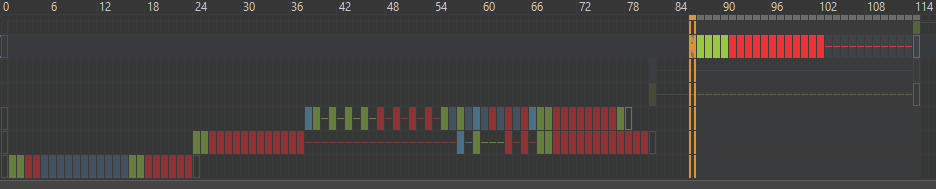
An unknown error is occuring when i attempt to export an animation. The frames are saving to the destination but are sitting there and the file, GIF/MP4/WebM are all corrupted and i get an unknown error message. I’m going back to my last trusted build but thought i should report this.
Edit: After rolling back to 5.1.1 i’m having the same issue. I have restarted my computer and i’m not sure what else i can do to remedy this situation. Could it be a problem with FFmpeg?
Edit: After playing around with the file it seems like the problem is with Transform layers. Even when i have flattened all layers in the file it exported fine then the next export had an error again. I’m not sure if it’s because it was trying to export into the same directory. I’m a little stumped as to what may be causing the error.
Edit: I was trying to export from frame 60 and got the error. Now, when i export from frame 1 it works fine. I’ve narrowed the problem down to here but i cannot work out what the difference could be to cause the file to corrupt by changing it’s starting position on the timeline.
Hey,
Here is an attached, cropped screenshot of the error box.
Here is the contents of the MP4 log file in the export directory:
[image2 @ 0000027dfcf6ae80] Could find no file with path ‘C:/Users/Dom/Desktop/temp/frame%04d.png’ and index in the range 141-145
C:/Users/Dom/Desktop/temp/frame%04d.png: No such file or directory
The individual frames are being exported to the directory along with the corrupted MP4 file.
I’m using Windows 10
Version 21H2
OS Build: 19044.2251
Windows Feature Experience Pack 120.2212.4180.0
I got my version of ffmpeg from the recommended link for krita.
It’s from 2020 so i may need to update?
I just updated my build of ffmpeg and the error still occurs.
I just tried to export to the same directory as the .kra file and the error occured once more.
I even flattened all layers(3) that had a transform layer on them and it still made the error, even in the parent directory. Once i set the start frame as frame 1 it worked and no error. So the error occurs only when starting the animation further on in the timeline. I then started it at frame 30 and it also worked. Then back to frame 84 and the error occurred again. Now, a few of the animation layers do not have frames in that specific time period. Could this be an issue?
Are you using the 5.1.2-essentials build from gyan? If not, please try that.
There was a fairly recent problem with rendering an animation from a non-zero start frame.
The content/structure of the .kra animation is not important because ffmpeg operates on the intermediate .png frame sequence that is first created by krita before it uses ffmpeg by calling it with a suitable command line.
Those are then normally deleted after ffmpeg has made the video output file.
Can you make a folder called ‘render-out’’ (or something) and make the target destination in there, then do the render using the Image Sequence option, then check the .png files in the render-out folder to make sure they are all there and have good content?
Also, note the index range of those .png files and how it compares to the start-end frame numbers you specified.
I have tried both of the latest builds( full and essentials) from gyan and both have the same error results.
The image sequence is exporting fine, it’s just when i try to create a video file.
The frames are exporting but are being left in the folder along with the corrupted video file and log file.
The frames are all present and the sequence is numbered with the start number from the image sequence options.
Edit:
I also tried the alternate build of ffmpeg available(BtbN) on their site and got the same error
That is strange because if I do a Video render starting at frame-240 (in an 870 frame animation), the image sequence starts at frame-0.
Then, I get an .mp4 file that doesn’t actually start at frame-240 but later in the animation.
Then all frame files are deleted except for frame-0 to frame-239.
There is no corruption of the .mp4 content, no error message and no error log.
Strange and bad things are happening.
Going back to krita version 4.x, they happen there as well. Until now, I’ve never tried rendering starting at a frame number greater than zero so I hadn’t noticed.
Can you make your animation .kra file available via a download link?
Things are bad in there. I also see that problem when trying to render your animation from frame-86 to frame-125.
There is something strange and wrong happening with the intermediate frame numbering combined with ffmpeg’s expectation of what frame numbers it is supposed to read and render.
Ffmpeg can’t find the frame numbers it expects to find.
I’ve tried kicking it in various ways to fix the intermediate frame numbering but it keeps going wrong.
I’ve stripped out your original content and replaced it with a frame counter from 000 to 125.
Here it is if anyone else wants to have a look at this: Fail-Render 86 to 125.kra
I’ll have a few more attempts at tracking down the cause and if I can’t find out what’s happening then I ought to make a formal bug report with the frame counter animation.