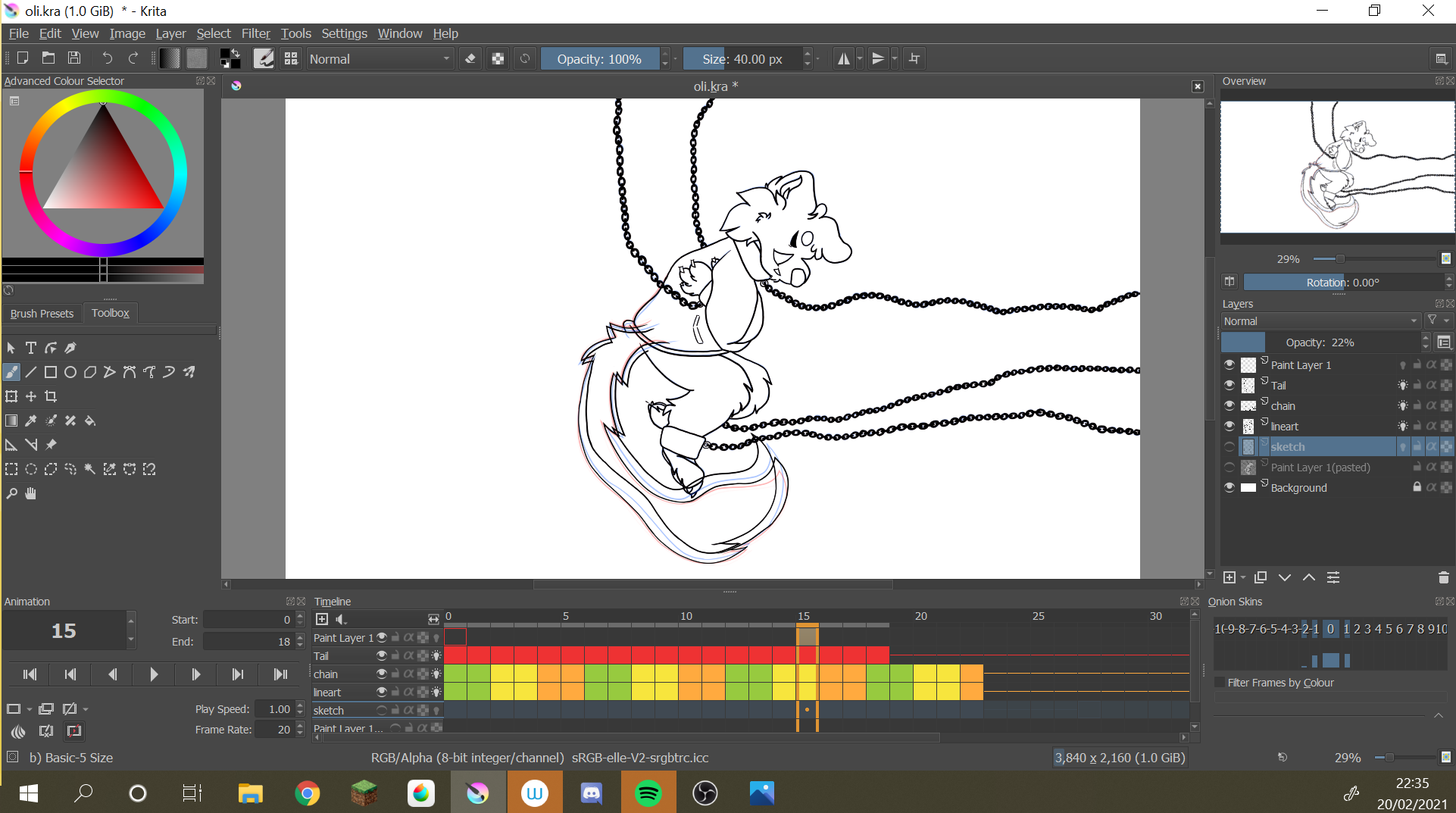
I’m new to animating and have been trying out krita.
I’m currently 18 frames in. However the 18th frame of a particular layer is always showing - no matter if i delete it, change the animation end time, etc. The only way, of course, is deleting the layer entirely or turning the layer off.
I have been told elsewhere that this is a bug, however they were unable to give any advice on how to fix this.
Is there anyway to fix this? i can try to attach screenshots or screen recordings of what is happening if necessary at all.
Thank you for any advice! all and any will be greatly appreciated.
Here I’ve selected the 15th frame, as an example, to show that the 18th frame won’t go away. When playing (unfortunately cannot attach footage!), the frame still remains while the rest move as they should.
I hope this makes sense - if not i can try and send a google drive/dropbox link to some recorded footage to show what I mean.
After, how this occurred is another story.
Not sure Krita have bugged with this; on my side I’m working animation with hundreds of frames and never saw this kind of problem.
The only case I see where this can occurs is:
You have the tail layer with animation frames
At a moment, you’ve created a new layer -that is not not animated- and drawn the tail that correspond to frame 18 on this layer
And then you’ve merged this layer with animated “tail” layer
In this case, layer not animated is merged on all frames of animated “tail” layer (that’s the normal behaviour)
Now to fix the tail frames, you have 2 possible solutions: Solution 1
Go to frame 18
Do Select > Select opaque > Select opaque (replace)
Go to frame 1, and delete selection content
Go to next frame, Select > Reselect and delete selection content (and repeat from frame 1 to 17)
Redraw “holes” in tail that result from deletion
Solution 2
Deactivate onion skin on “tail” layer, rename layer “tail-to delete”, set opacity to 25%
Create a new animated “tail” layer above “tail-to delete” layer
Redraw all frames on new “tail” layer, using the “tail-to delete” as model
Delete “tail” layer, and redraw all frames
You don’t have too many frames and tail isn’t complex, so solution 2 would be better because with solution 1, trying to fix holes made by deletion will probably generate visible connections…