Hii, I’m really new to krita and I’m trying to make my first animatic, but when I add more new frames my first frames get paler and paler until they aren’t visible. When I render the animation nothing changes. Is there a way to fix this? At the moment I have 24 frames and I have the basic animation dockers enabled but it just doesn’t make sense. I have tried reinstalling the flatpack version of the app from my software center on Linux. Any help is greatly appreciated ^^
Hello @Sky2 and welcome to the forum 
Which version of krita are you using and which Linux distribution?
Please note that there is currently a problem with the flatpack for krita and this is discussed here:
Krita Flatpack crashes when opening a file dialogue
It would be a good idea to use the appimage which is the official way of running krita on Linux and is available here so please try that. (Remember to give it execution permissions.):
Download | Krita
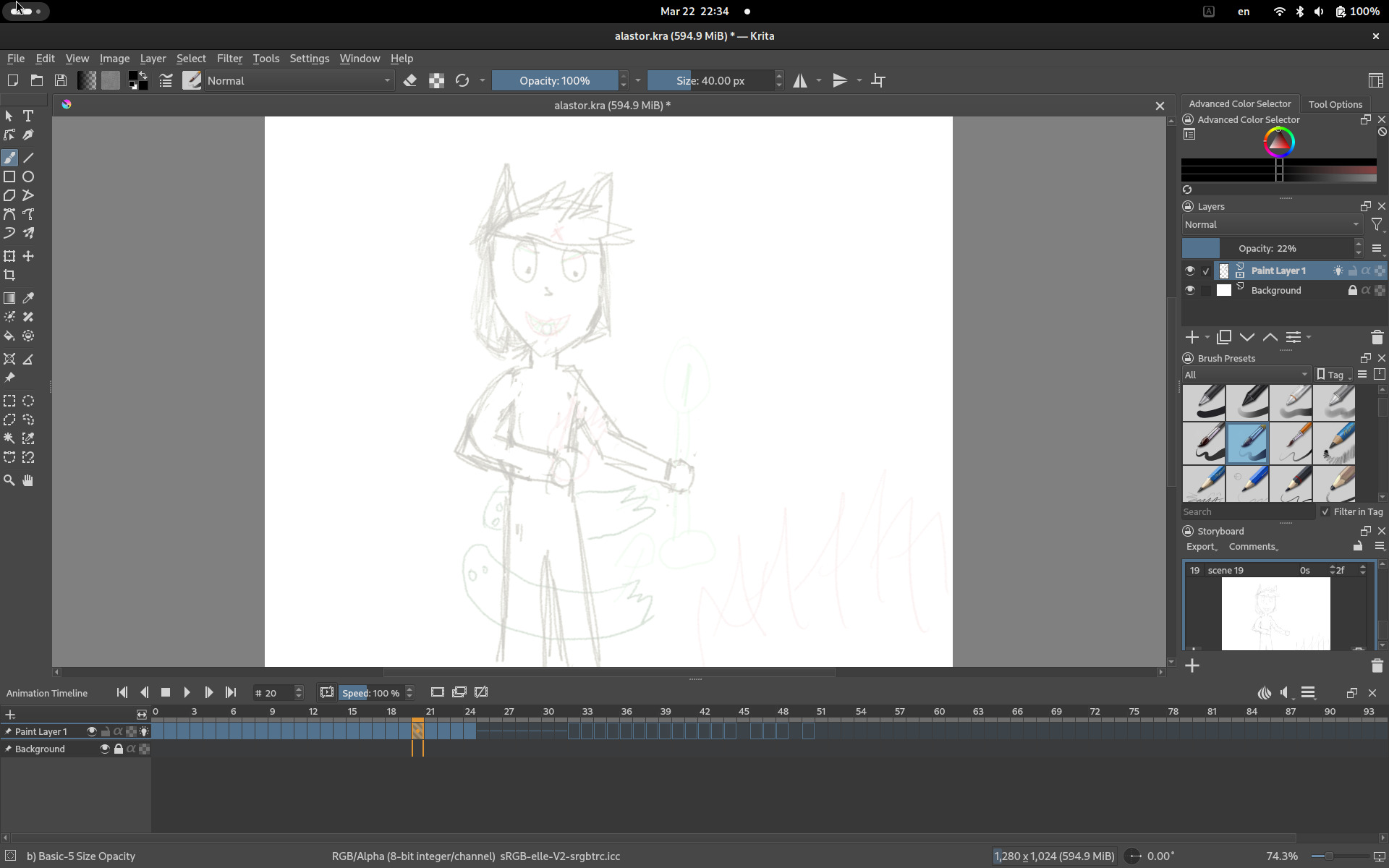
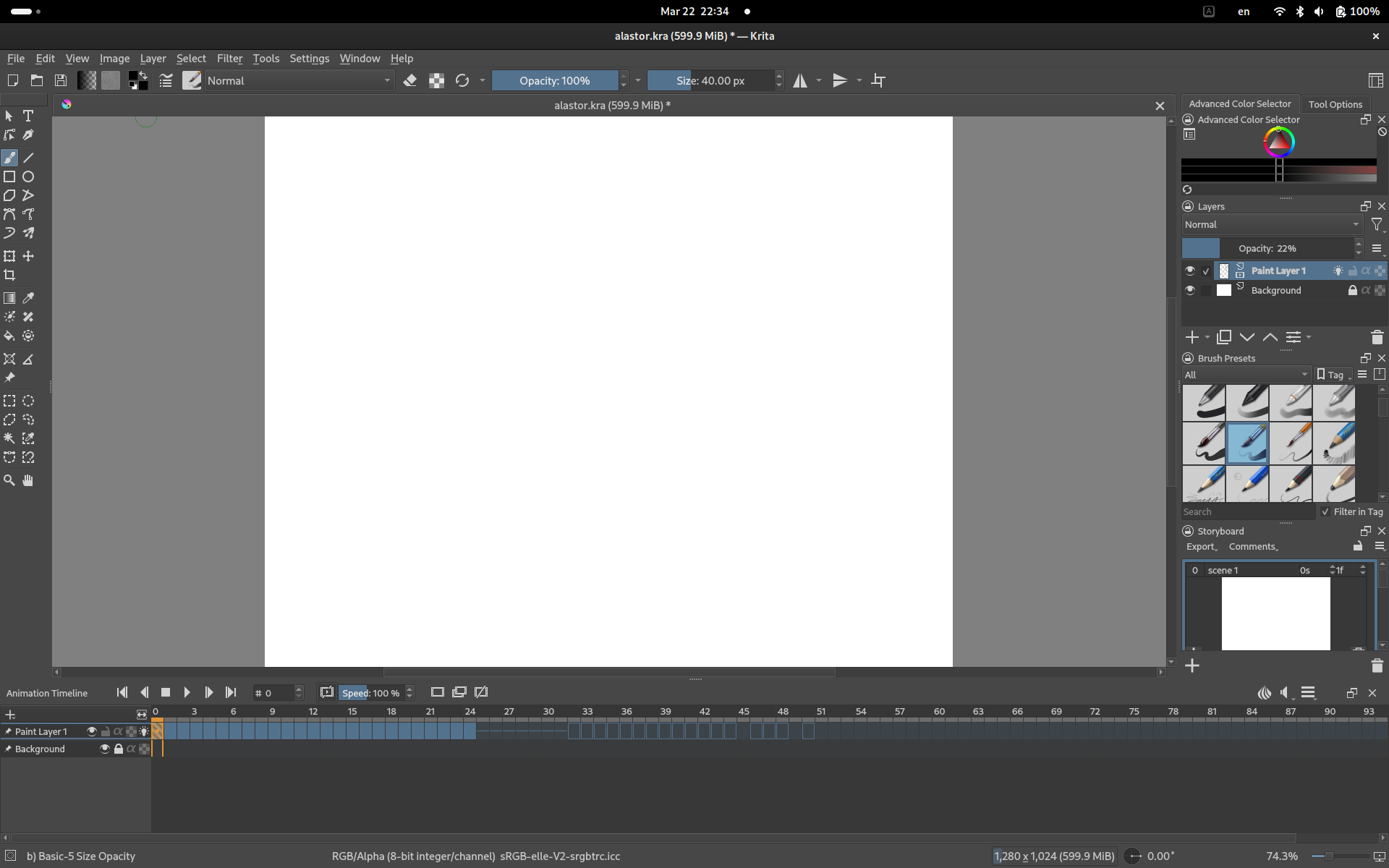
Please upload a full screen screenshot of your animation with the Animation Timeline docker and the Layers docker and the canvas fully visible.
The appimage is totally safe because it’s built by the krita developers themselves and you download it from the official website. many people use it and it is the official one for Linux.
It is compatible with all tablets that work.
In your screenshots, you have the image layer opacity set to 22% and you’re drawing with a black colour but you’re using a brush preset that has it’s opacity varying with pressure.
That explains the pale grey lineart.
You show an apparently empty frame-0 and a pale grey image in frame-20.
Are you saying that there should be an image in frame-0?
What do you see if you increase the Paint Layer 1 opacity to 100%?
What do you see if you select frame-10 for example?
I’ll be going offline soon but other people may ask you questions and have ideas about this.
Even at opacity 100 the first frame is empty and it should show a frame with lineart. Frame 10 is slightly visible but a lot paler than it was. I tried it with the app image and the first frames are still way too pale. Should i try redrawing them in the app image?
There should be no difference in functionality between the flatpack and the appimage.
(Note that the flatpack problem has now been fixed, apparently.)
Try redrawing them with layer opacity at 100% with full pen pressure to make sure you get black lines. Even better, use the Basic-1 brush preset to give maximum opacity lines.
You know (or should know) what you drew in each frame so I’m puzzled.
Can you provide the .kra file using a file sharing link?
well I hoped to prepare a sketch, and the first frames even used a type of pattern to make a glitch effect, its just a sketch at the moment, I just don’t understand why the more frames I add the first ones get paler and paler. I can’t seem to add the .kra file via the upload file
You can’t post .kra files here.
You need to use a file sharing service/website.
Try ufile.io which is free and needs no registration.
ohhh ok here: Upload files for free - alastor.kra - ufile.io
Frames-16 onwards show high opacity artwork. Frame-12 to frame-15 have faint artwork.
Frame-0 to frame-11 have very faint artwork.
I’ve no idea how that happened. I suggest that you redraw this and pay close attention to the end result. Also, keep going back to previous frames to check them in case this happens again.
I’ve added lines to your frames and Saved my changes and they show as full opacity artwork after krita is closed and then reopened.
and when you added frames, did the first ones get more clear? Cuz this is my second redraw, this happened on my first time and I thought it was just a bug or something, but it happened again, all I did was duplicate frames added a layer occasionally to help draw but everything was merged to layer 1 which is the animated one. Is there any way to prevent the frames getting paler?
No they didn’t.
I’ve isolated individual frames into their own non-animated paint layers and the content is pale so this is not an animation composition problem.
The previously drawn frames should not get paler. I’ve no idea why that happened to you.
Try making a new test animation with simple lineart that takes little time/effort and see what happens.
Interesting, I will definitely try it with clearer lineart, thanks for the tip, if the clear lineart doesn’t fix it, I’ll probably try a different software ^^