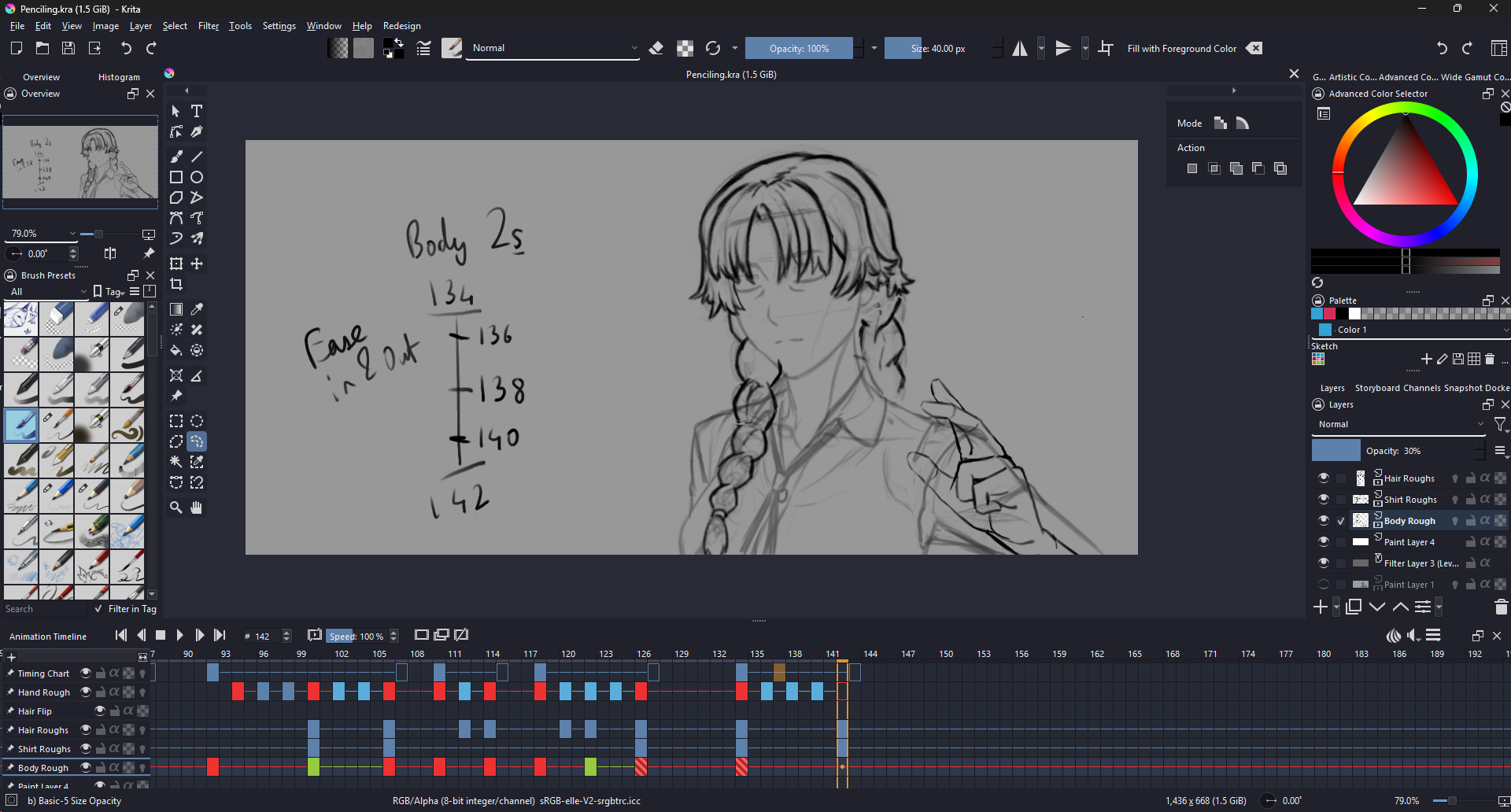
While trying to animate in Krita (because the drawing tools are really faster than Tahoma and Blender), but the way the frames work have been a major headache for me. Let me explain.
One of the major issues, possibly a bug, that I keep encountering is that every time I’m swapping between key frames to draw, sometimes it’ll draw on an entirely unrelated frame elsewhere while my cursor is on an intended frame. It doesn’t happen always, but it happens far too frequently in the process of animation. I don’t know if the situation is pertaining to the caching (which itself causes friction during the animation phase) or selection. All i know is that it simply happens and messes up the keyframes I’ve adjusted. Sometimes it’ll even create entirely new keyframes in the process.
The other issue I had (which is what made me want to post this in the first place) is that, strangely, some keyframes in a layer have just vanished and I have no idea how. Since this entire phase was to plan out the animation, I kept certain elements separate, including body from shirt so that I can focus on the forms and pose first. I’m pretty sure I carefully animated the body here. But after having animated the shirt, the hair, the hand, etc. when going back to the body, I noticed that the keyframes after a certain part have vanished and I can’t get them back. And that’s frustrating, because it took me a long time to draw them.
Can anybody help me in figuring out why this is happening?
1 Like
For your first issue, it’s very important that you click on the frame you wanna draw on in the animation timeline, not just the layers on the right because sometimes it just won’t switch properly then.
As for your second issue I may thing that maybe one time you accidentally selected the entire frame line (difficult to explain but basically all the frames at the same frame second) while working on another part of the character and moved them around causing them to overlap other frames and remove them.
Kritas animation timeline is very sensitive and its important to keep that in mind while working
I hope this helps some at least
Hi. Sorry for the late response.
After finishing my rough penciling in Krita, I finished my complete animation in Grease Pencil since the workflow was faster there. But while I was doing the rough animations, you’re right, deliberately clicking the frame helps. However, since I’m animating, I usually wanna scrobble through back and forth to understand movement and then drawing accordingly on my frame. Having to land on the frame I want to draw on, then clicking on it too, adds a bit of a redundancy that doesn’t even seem to always work (at least with my tablet).
Not to mention, I see no reason for the drawing-on-selected-frame aspect of things rather than which frame the cursor is on, since it’s not like you can draw on multiple frames either (which, incidentally, could actually be a pretty neat feature, but that’s not the point right now).
Even though Blender is much slower in terms of drawing and coloring, I was able to animate faster precisely because I could quickly scrobble through the animations and draw exactly on the frame I’m on without having to click the keyframe (unless I select Multiframe edit).
Also, another thing, which isn’t a bug necessarily but just a QoL thing… but every time I try to scrobble through the frames I accidentally end up dragging the animation docker by accident. It can get pretty annoying really quickly… I know it’s a user-error on my part, but it happens so frequently it can get frustrating. I don’t know if it helps in some way in designing the interface, but I just thought I’d mention.
EDIT: Another thing I forgot to mention is that, while scrobbling and drawing, it doesn’t even draw on the selected frame, nor where the frame-cursor is on, but randomly picks a frame closer to the cursor (but not too close for some reason) to draw on. It’s… weird.
Yeah animating on Krita is kinda wonky, as someone who only ever used krita to animate I don’t know better but I understand the frustration.
1 Like