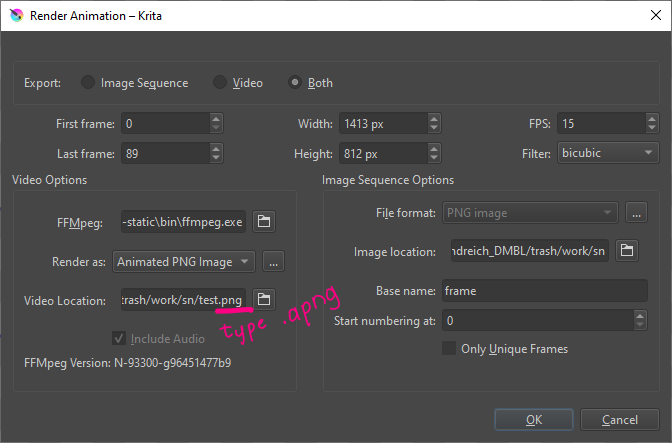
Hey, I need to export my work with transparent background, but the only rendered who work is Gif format, but I loose a lot of quality.
My problem is that when I make a rendered at the format Animated Png or Webp there is a white screen in the background (not transparent) who are added to the rendering and it is impossible for me to use my animations.
I see some people on the forums who are satisfate with the rendering apng & webp so I thing the problem come from my parameters maybe ?
I specify that I have the latest version of ffmpeg & Krita and I don’t have any white background on my work, there is all transparent pixels in the background
If you do File → Import Video Animation, then select the previously rendered .apng file and import it, you should see that it has a transparent background.
That is what I see if I make a .apng file with an animation that has transparency.
and the result will be .apng container with transparent frames.
Unfortunately, this line is automatically reset to .png each time ignoring the Render as: Animated PNG Image setting
I’m using the 5.0.2 appimage on Linux and it doesn’t matter if I Render the animated png as .apng or as .png file extension.
It defaults to .png as you showed.
When I do File → Import Video Animation, it’s imported with no problems and shows the transparency.
The rendered out .png file may have internal metadata that identifies it as an animated file?
It looks like you’re using Windows. I think that a bug report is needed.
I did a test on Windows VM and it worked fine here. If you do the import test and it fails. Can you try downloading a newer version of ffmpeg and try again? (though don’t delete the old one for future testing)
Win 10. Indeed, the result of .png and .apng has an identical size, but a simple format replacement on the finished file does not allow it to be imported, unlike aPNG, which was renamed in the previously specified way before exporting.
In fact, this exported animation, both Krita and the browser imports/opens as a video (regardless of the specified png apng) and the content works correctly.
But import to the VSDC editor is only possible for a file that is declared as apng before export.
png exported by default Explorer Win 10 considers a picture and not a video, the renaming of the finished file does not help
According to the recommendation on the ffmpeg download page for Krita, I used
ffmpeg-5.0-essentials_build
P.S. webm looks correct
You’re right, I had the old version active.
Version 5 did not give any visible differences.
Yes, renaming the file resolution works correctly, You are right, all 3 file options with .png and .apng resolution are absolutely equal, they can be opened in the bowser or imported back into Krita. Experimentally, it turned out that the video editor refuses to add files with a different name, but identical content (some kind of protection from duplicates) - my statement that “renaming doesn’t help” was erroneous.
But the difference between the .png and .apng extension for the video editor turned out to be significant, actually because of this I considered this export to be broken, and used the “sequence of images” to assemble the video in the editor. And it was only at the suggestion of AhabGreybeard that I realized that everything rests on the absence of “a”
It seems that some applications are sensitive to the exact form of the file extension.
When you choose Animated PNG as the rendered output format then the file extension is set to .png.
I think this needs a bug report.
Can you make one and post a link to it here?