Another remark regarding memory consumption/optimization

Greetings everyone.
So, behold, I wanted to finally tackle two spread comic making, on a document of about the size of two A4 pages @500 dpi.
I launched Krita vs Clip Studio.
But here’s what happened.

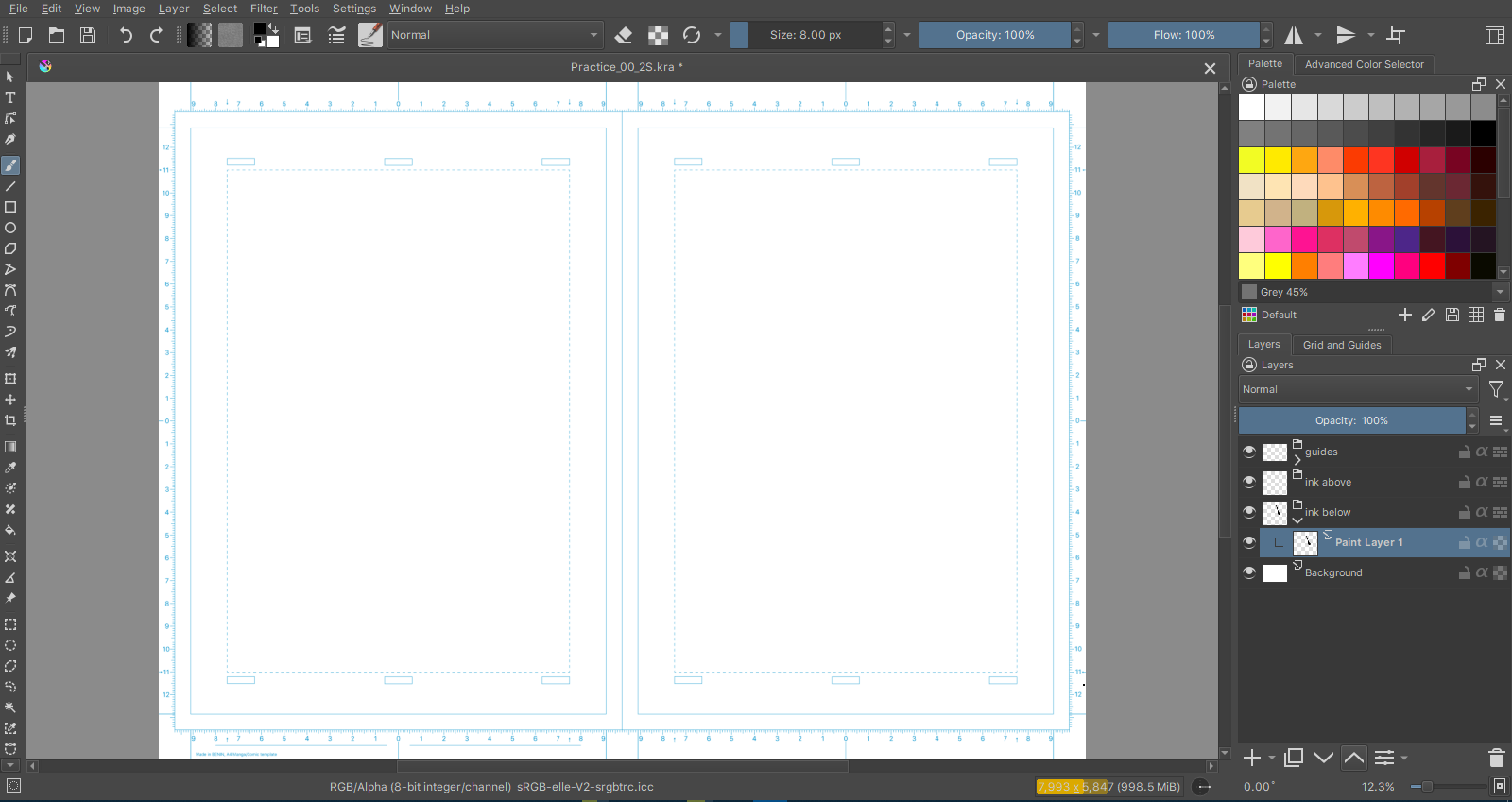
Krita layers and canvas :

Clip Studio Paint layers and canvas :

As you can see, even in CSP the document resolution is two A4 pages but at 600 dpi, which is even higher than in Krita.

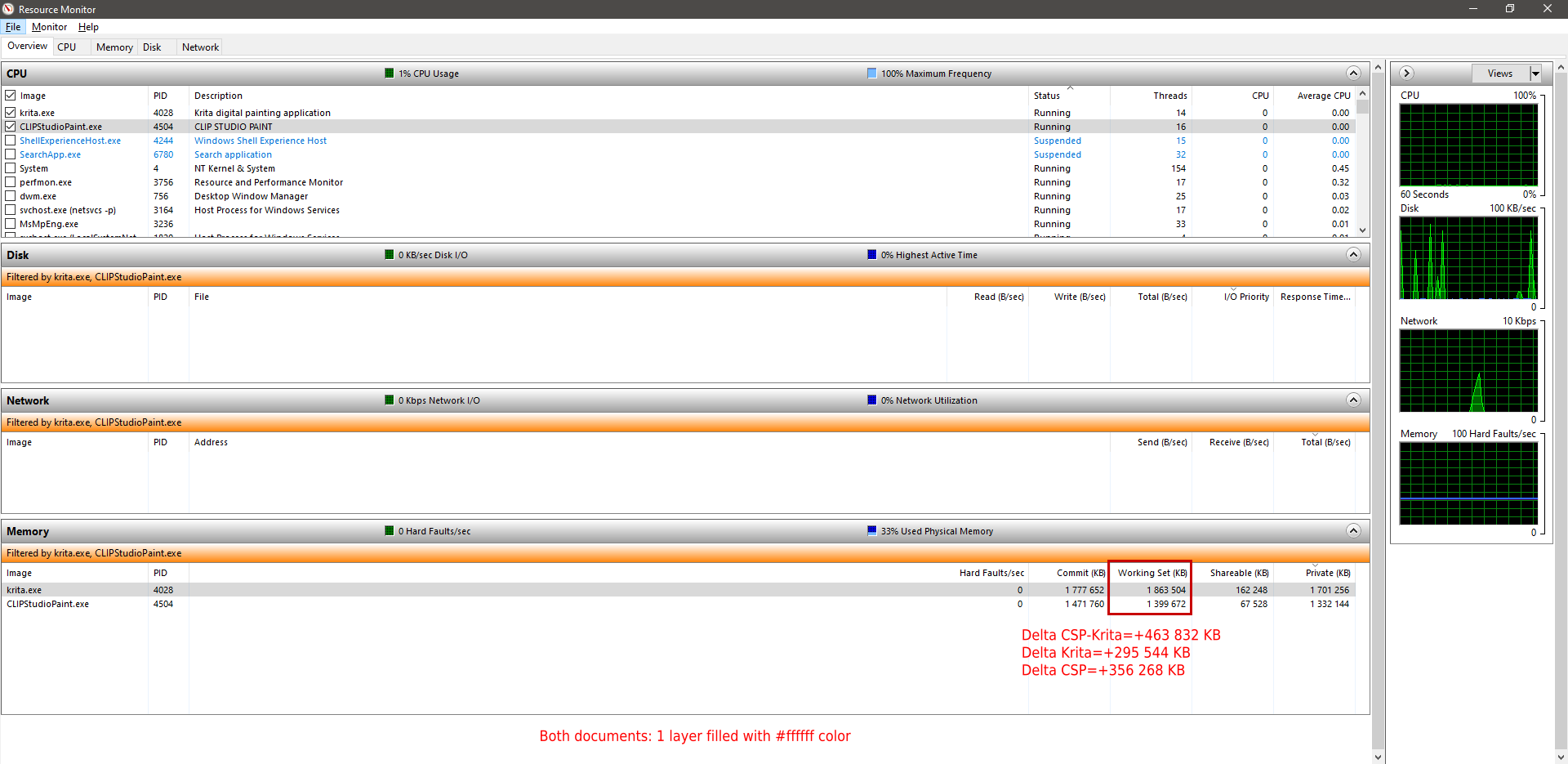
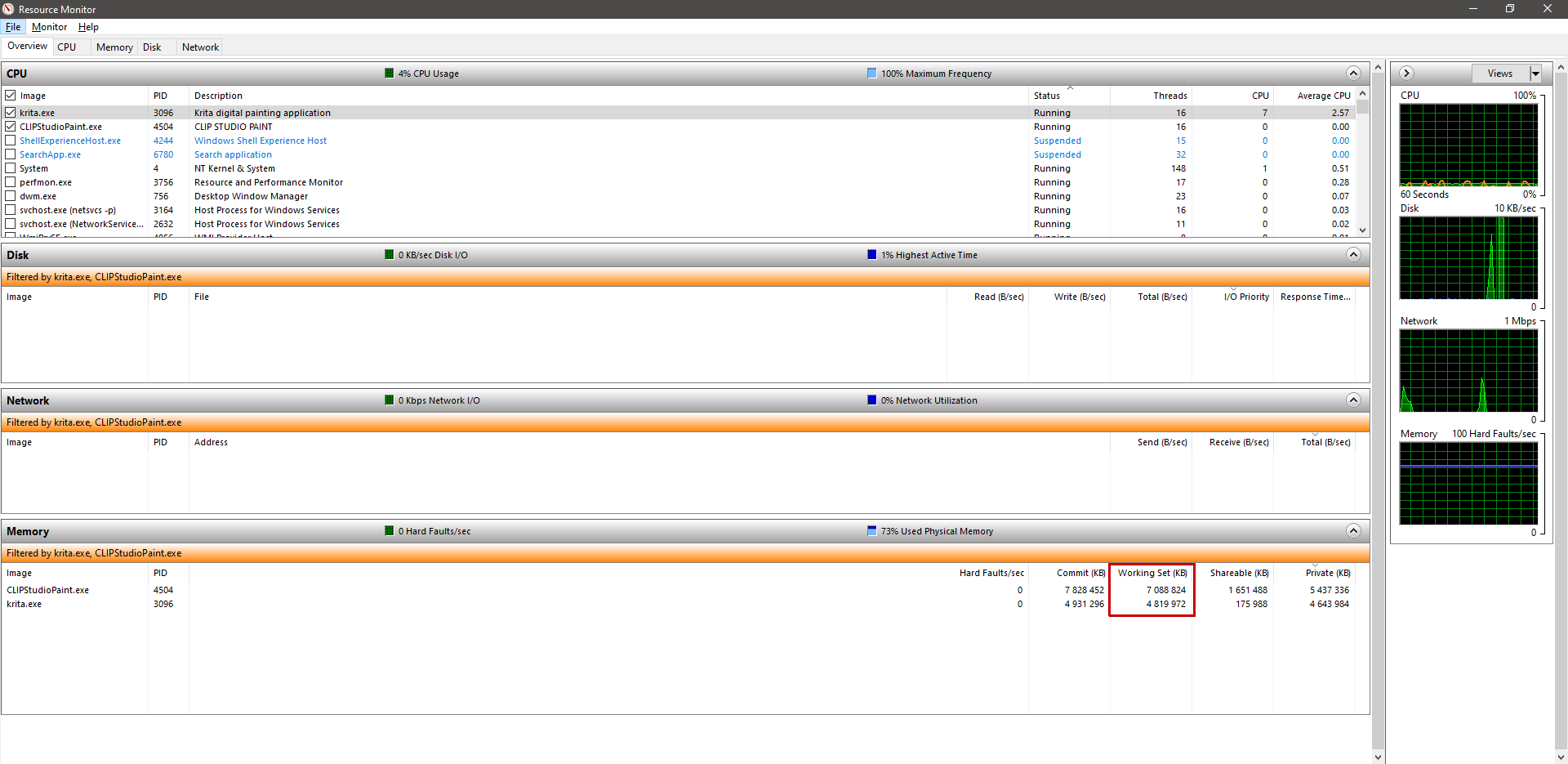
And yet, look at the difference in terms of memory consumption :

At this point I really don’t know why Krita is so so resource hungry. But anyway.
Another notice is this :
Painting and editing in Krita is constantly met with regular stuttering, performance drop. Short freeze periods(between 3-10 seconds, happens mostly when auto-save is about to occur) are noticeable as well. Now, given the percentage of used RAM memory of my system, it is arguable that it might be the reason of why things slow down. But again, in CSP, things are nevertheless fast, no stutter.
And painting speed is pretty much equivalent to real time work. Feels like it’s just signals that respond to the pen pressure and transmitted to the canvas, so freaking natural.

Anyway, this sums it for my test. Krita stills eats a lot of your resources, and I can only hope that a development miracle happens to put it super close to CSP performance wise if not the same or better.

App used : Krita 5.1.0 prealpha, git ae98fe
OS : Windows 10 21H1

You can’t really use task manager as an example. Because programs can set aside ram, or in some cases when ram is using shared system resources the increase in consumption would not be on the program itself (You can click that bottom of status bar that breaks down Krita’s memory consumption, which shows way less than task manager). Windows Resource Monitor I think should give more accurate number breakdowns.

Also, note some things can take up ram that are not directly tied down to your immediate document. Such as how large your undo history is.

I hope more people join the Krita Fund to make it easier for the developers to hire more developers to work on improving Krita.

6 Likes

… uh wait… 20% CPU consumption while not painting? Begs the question what load of crap is running there in the background… plus: running at 94% memory is asking for trouble.

Also, I find that constant pitching for CSP a bit funny. Tried it the other day, and above a certain brush size it comes down to a crawl - whereas Krita is still very responsive and fluid. I was considering getting CSP on Black Friday - but found its performance way worse than Krita’s.

2 Likes

CSP’s performance was always better no matter the case on my side.
Just my experience.
Also, I’m guessing that music being played might be the reason why the CPU load amounts 20 % when I’m not painting.

Well, in this case I suspect that there’s something on your system interfering badly with Krita.

Re: music playing - even with a video playing, my CPU is sitting between 0% and 2%. And my PC isn’t the latest and hottest either, I might add. But then, it has 16GB RAM…

In any case, the CPU being used at 20% is not the reason Krita slows down. I mean, it was still used at 20%, not 100%. I had my music and my browser opened in the background. And I can tell that the CPU charge caused by my browser increases and decrease at all times. But despite that, it was still fast in CSP here. Just why ? Why not in Krita and only with CSP ? Is browser the culprit again this time ?

And behold.
I didn’t allow Krita to use more than 4 GB of RAM.
But see what’s happening right now :

Something needs to be done about that memory management. If you’re not coding in C# but are using Qt and C++, then this would have to be handled on the code side.
I’m saying this because, it turns out that C# automatically handles memory considered as garbage.
My document weighs 1 GB in memory with the work I did. It’s not normal if Krita consumes this much.
Is it ? Somebody tells me what’s happening.

Again, using Task Manager to gauge memory isn’t very useful. Because applications can set aside memory. To put it simple, imagine you have a file that is 5gb in ram, and you end up copying it. What happens? Assuming it is a true copy, it would be 10gb right? But what if you only have 3gb left? To insure applications are able to operate properly without any surprises, many can set aside memory.

Garbage collection only makes a difference if there is garbage to collect in the first place. And garbage collectors aren’t perfect either(hence why there are things like Rust). But when an application is setting aside memory for say your undo history or other things. No garbage collection will help there.

If you want a better indicator of an applications memory usage, you should look at Windows Resource Monitor, not Task Manager.

1 Like

Doesn’t matter much if it’s the Resource Monitor.
Indications in the memory tab gives about the same results as in the Task Manager.
The private memory amounts just for 4968136 KB, which means it uses pretty much 4.8 GB. Then there are commit and working sets. With one indicating that the memory allocated for Krita alone amounts for 5 GB.

Hello,
Krita will use only the memory that you allowed it in the settings. However the OS(Windows, Linux, Mac) will let free memory to be ‘reserved’ to certain applications.

Basically, instead of reusing free memory that Krita already let go of (what you called garbage collection), the OS gives krita a ‘new’ portion of memory and the ‘old’ unused one keeps being marked as used (or reserved) to Krita in the task manager. The thing is, if another program need the RAM is the OS the one responsible of getting the ‘over allocated’ memory from Krita to the new program.

In your example: Krita can only have 4 Gb, but the task manager says 5.8 Gb. Krita will only use 4 Gb.
The 1.8 Gb extra is free to any other application to use, and Krita will not use it as it already has a ‘true’ 4 Gb limit being used.

This is why there isn’t much we can do, it is a behavior of the OS. Letting free memory marked as being reserved, but at the same time being available to any other application to use it.

You can see a neat site that explain this in more detail (for linux in specific): Linux ate my RAM


Regarding your performance issues. It really is a matter of RAM?
For me I find that the new Smudge engine is smoother/faster than the Pixel Engine, when the Pixel Brush has all of the following: various options enabled (rotation, size, scatter) and it has textures. Even thou it should be Multi-threaded, while the Smudge is Single threaded.
I not sure but revisiting the performance of the pixel engine might be a interesting thing to do.

Cheers.

2 Likes

Additionally not every RAM is the same. If you have an old laptop with DDR2 RAM compared to a modern one with DDR3 or 4, then it’s only half as fast and copying data takes much longer which can affect responsiveness of the application during operations that are read/write heavy.

Also C#'s (or dot-net’s) garbage collector doesn’t collect whenever you really want it to, from my experiences. I mean, garbage collection is great to some extent but has its downsides too, for example you often can’t explicitly free memory yourself.

2 Likes

Aware of this one. I happen to have DDR3 RAM

Hi

That’s an obsession to compare Krita with CSP for CPU, memory, or I don’t know what… :sweat:
I’m sometime wondering why you’re using Krita as you’re always complaining of everything :man_shrugging:

But I’ve made some tests by myself, just to check, because I’m curious and want to be sure how comparison is made.

I’m using the same document dimension on both software, to be sure.

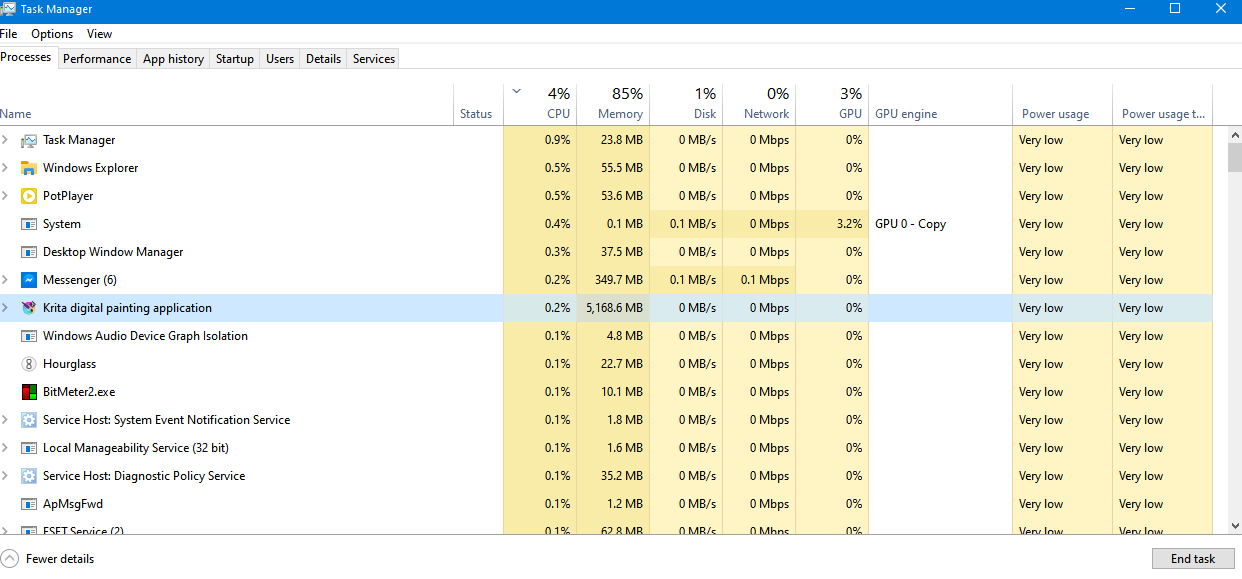
At startup, both software use approximately the same amount of memory.
One thing I really don’t like: CSP do some connection to Amazon Web Service :thinking: (but ok, not related to memory usage)

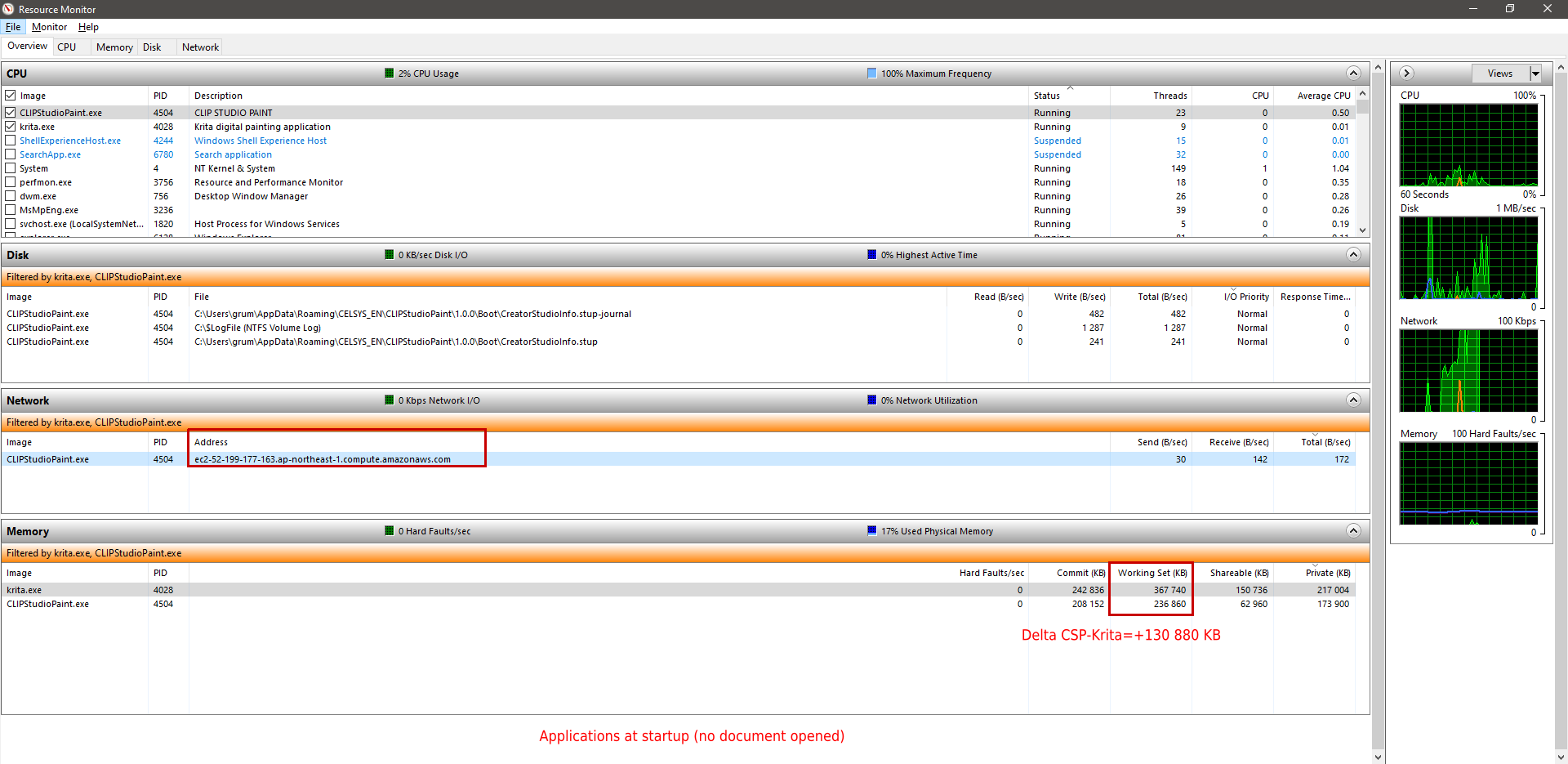
Then, I create the same document


So clearly, at this point Krita need more RAM than CSP (+660MB)

Then I add 5 empty layers:


Additional memory amount is similar between CSP and Krita (But CSP need more RAM than Krita)
Difference of total memory usage stay around 660MB

Starting to fill one layer


Additional memory amount is similar between CSP and Krita (But CSP need more RAM than Krita)
Difference of total memory usage is around 600MB

Filling a second layer


Additional memory amount is similar between CSP and Krita (But CSP need more RAM than Krita)
Difference of total memory usage is around 525MB

Filling a third layer


Additional memory amount is similar between CSP and Krita (But CSP need more RAM than Krita)
Difference of total memory usage is around 460MB

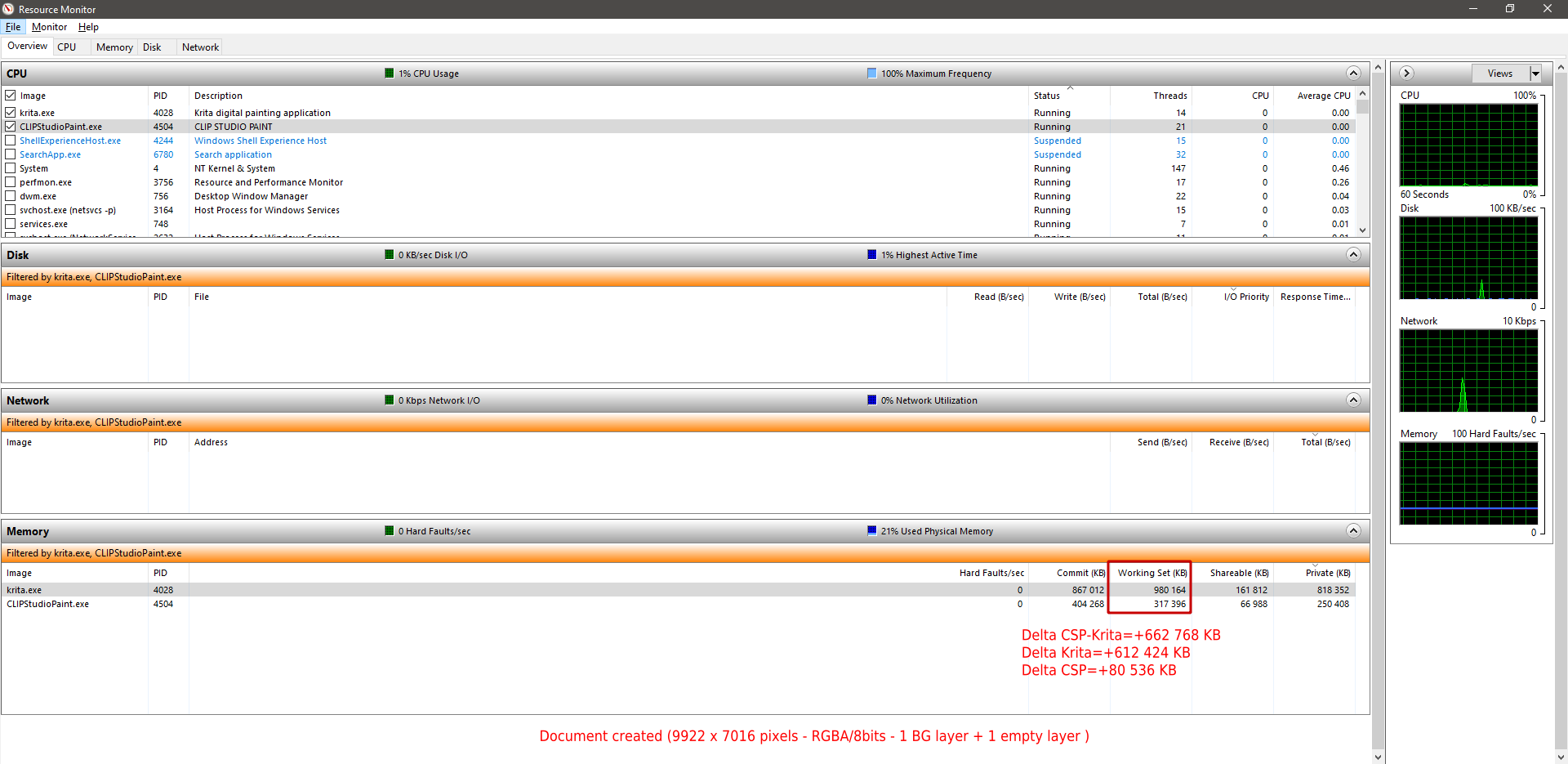
Finally document with:


Difference of total memory usage is around 200MB

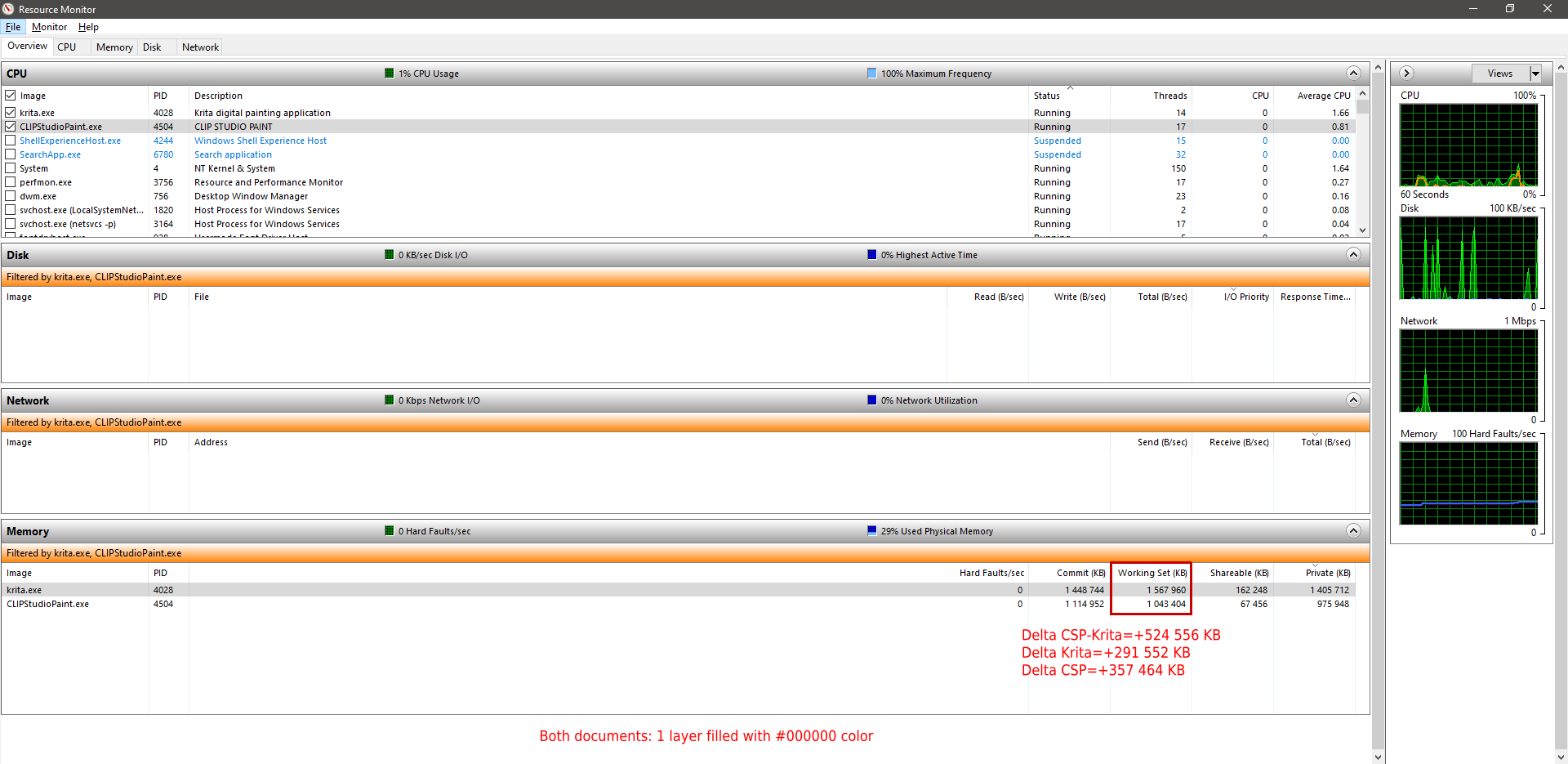
At 20 filled layers:

Clearly Krita use less RAM :partying_face:

My conclusion of my totally objective test: Krita have a better memory management than CSP :slight_smile:

But I also limited Krita RAM usage to 4GB (that’s insanity low according to document size and number of layers, but tried to reproduce your memory configuration)
So in this configuration Krita start to swap (and became slow)

If I increase RAM limit usage to 14GB, the same document in Krita will use 6520000KB (still less than CSP)


As you can see, we can compare what we want to tell this software have a better memory management than this other one; that’s possible even if I absolutely don’t have any idea about how internally both software are implemented, why the implementation has been made like this, and how memory management work for specifics OS.
But who cares of that because the truth is shown by resource manager: Krita use less memory than CSP on my document.

So at startup, Krita need more physical RAM yes.
But after, when layers starts to be used, Krita needs less RAM per layer…

And?

That’s just a nonsense to try to compare that.

If Krita was eating 10GB RAM for one layer maybe yes, we can tell there’s a problem.
But here I don’t think there’s abnormal usage of RAM.

How technically software manage their memory can’t be compared; there’s many things that can be take in account:

  • Pure “data” memory (how much bytes a pixel takes in memory)
  • “Objects” memory (using OOP use more memory as objects have many properties)
  • Different compiler can provides different results about memory management
  • Frameworks (Qt for Krita) can have an impact about how memory is used and developers can’t do anything for that even with a 10,000,000$ budget (or just rewrite Krita to use another framework maybe…)

And also:

  • memory measure made from resources monitor are information that give an idea more than a precise real usage
  • OS can move data from/to physical memory to/from swap according to other running process and their priority

And also, Krita is built to be multi-system compatible (Windows, Linux, MacOS, Android); this means that if developers want to optimize Windows memory footprint to satisfy your needs, they probably have to code specific things for windows. And ignore all others users (or also spent time to optimize Linux, optimize MacOS, optimize Android…)

Grum999
12 Likes

Outstanding post, Grum! :+1:

Thanks for this more in-depth comparison and explanation. Informative.
So it turns out that Krita use slightly less memory at the end of the day. So it’s more memory efficient. Have you tried to delete csp layers and even close all opened document to see if it decreases CSP’s RAM usage though ?

Krita was slow for me, but what I did was delete my resources folder (after backing it up of course) and generate a new one, then Krita worked very well again :blush:

2 Likes

Yes.

Krita as CSP free memory.
Not all memory, but most of memory is freed.

I already provided explanation about memory leak here, and also you’ll find in this post very technical information about how malloc/free works and why it does not really free memory.

Also you can considered that, if memory is not immediately freed, it will be later.

Maybe CSP is written in C# and C# may use different method to manage memory than C/C++ (there’s a garbage collector for C# but I don’t really know how underlying memory is managed - malloc/free like in C/C++ or more dedicated method? note that C# is a language initially dedicated for windows OS, even if now with Mono it’s possible to compile C# under linux…)

I won’t try to enter in detail anymore, you can do all tests you want to compare, you’ll never be able to compare the same things because layers, mask, and others thing are probably managed differently, and have different need of memory and memory usages.

Finally, the most important are functionalities provided by Krita, not the 600MB RAM used :slight_smile:

Grum999

1 Like

Well, although Krita is functional, it is currently much slower than CSP with big documents.
At least that’s the reality with my machine.

When memory limit defined in Krita settings is reached, Krita starts to swap on disk and when it start swapping, that’s slow.

After if Krita is slow in all cases -memory limit reach or not- I have no tip except:

  1. Change for a better computer if possible (I know, it’s not possible for everyone)
  2. Try to close other applications running in background (browsers, music players, things that need CPU/Memory - At the office, I have Skype and that’s pity, it’s sometime able to use 100% CPU during hours without being used… most of time I have to kill it)
  3. Try to work with less layers or smaller documents (but ok, maybe not possible)
  4. Try to use basics brushes is possible

Grum999