What brush produce this kind of effect. . . I remember someone using it, but i forgot where i see it and what brush he used. The effect isn’t exactly like this, but it is quite close.

That’s a truly interesting brush. Wish I had an answer for you.
You might get a lot more eyeballs on your question if you change the topic title to something less vague like “can you identify this strange brush?”
I’m not even sure that can be done with a single brush or a single stroke. Maybe with the liquify transform tool in a few strokes?
I’m pretty sure that there’s a gimic filter that can do the swirl.
The brush doesn’t exactly produce the same result. . . but close enough. . .

I am not sure @lenovoaxioo ,but this FX bundle provided me some very unpredictable result.
May be it can help you to achieve some close results .
not quite, but i think i can work on something.
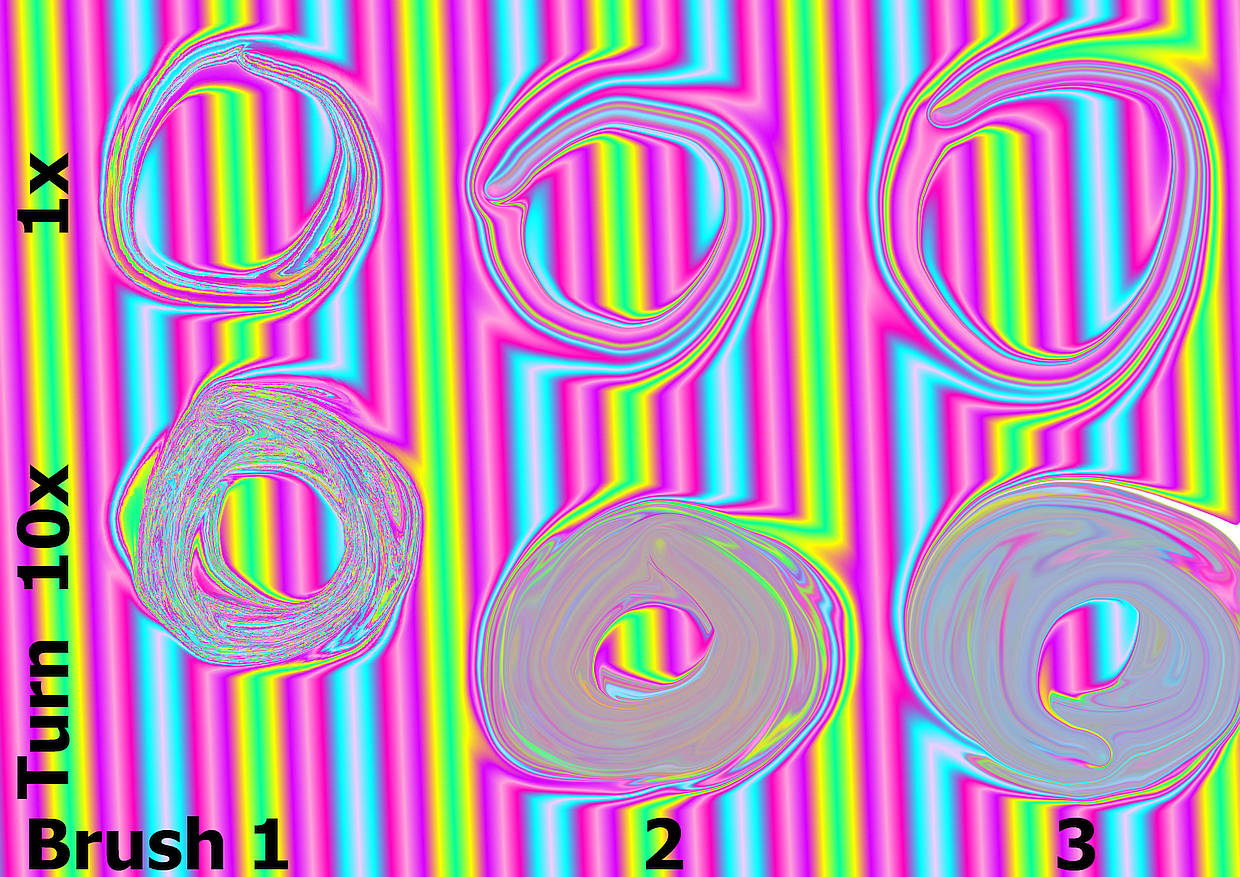
Pablo Cazorla (Cazu) has released 4 loose resource collections in the period 2013-2016, in them there are two effect brushes that may suit your needs. I have grouped these loose collections into bundles and also created an “All In One” bundle. In bundles 2 and 3 you will find the brushes respectively under the name FX Distort Move.kpp, in Krita they will then appear as FX Distort Move and FX Distort Move 3 (for the version from collection 3) to distinguish them, all licensed under CC BY-SA 3.0. To see what they can do, look at the picture at the end. ↓
Cazu Brush Collection for Krita

Release: 3.0
Licence: Creative Commons (CC BY-SA 3.0). http://creativecommons.org/licenses/by-sa/3.0/
Author: Pablo Cazorla
E-mail:contact@pcazorla.com
Here are the links to the bundles:
The “All In One” Version:
Pablo Cazorla (Cazu) - Krita Brushes v1-3 & Cazu Brush Collection for Krita.bundle -
Pablo Cazorla (Cazu) - Krita Brushes v1.bundle -
This contains FX Distort Move:
Pablo Cazorla (Cazu) - Krita Brushes v2.bundle -
In here is FX Distort Move 3:
Pablo Cazorla (Cazu) - Krita Brushes v3.bundle -
Pablo Cazorla (Cazu) - Cazu Brush Collection for Krita.bundle -
Furthermore, the brush GDqest PixelArt Deform Move might be interesting for you. This brush comes from the bundle GDquest_lite_v7.bundle by GDQuest, licensed under CC-Attribution-4.0. This bundle can be downloaded from here:
In the picture below, you can see which brush creates which effect with 1 turn and with 10 turns:
Brush 1= GDqest PixelArt Deform Move
Brush 2= FX Distort Move
Brush 3= FX Distort Move 3
Michelist