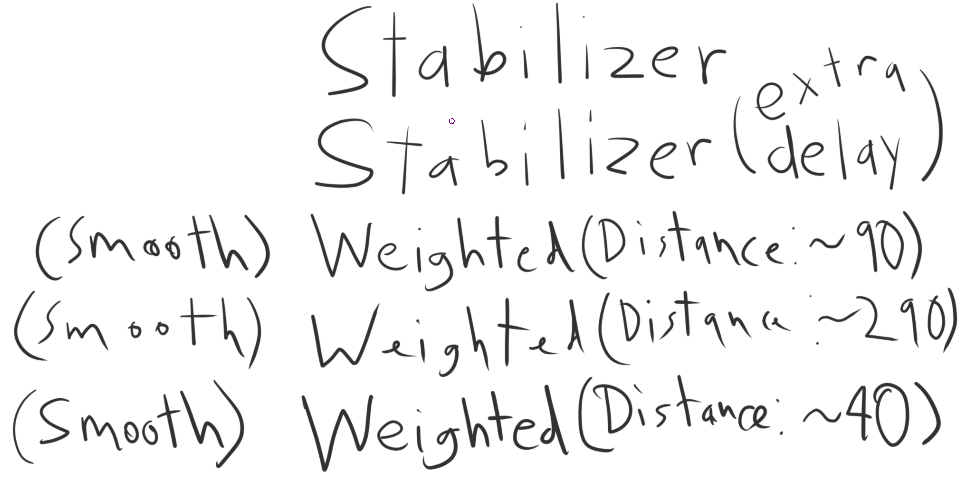
I’ve been using MyPaint for a long time now though I’ve been meaning to get into Krita as it has more tools and the painting seems more digital-artist friendly as opposed to trying to MyPaint which tries to simulate real brushes. However, I’m struggling in trying to get my sketching lines to feel natural. This is most easily portrayed through my handwriting:
(I was going to put an image from MyPaint here but I guess I’ll put it in a Reply since I’m a new user)
It seems like I can never strike a balance between enough distance that the line is smooth, but not so much distance that I have to slow down and let the brush catch up with my hand to get the line I intended to draw.
I am a guilty-as-charged wrist drawer, so could that also be playing into this?
What feels natural is highly individual. You can also try the dynamic brush tool, which has slightly different options that might feel better to you. Personally, I do almost all of my stuff with just the basic stabilizer because I hate the slowness of stabilizers.
Probably? The better you are at drawing good lines naturally, the less assistance you need from stabilizers. I can heartily recommend looking at the exercises from drawabox.com.
Have you tried the sketch engine? There are only a couple of default brushes that use it, and it can seem a bit weird (it fills between lines if you sweep the stroke back close to itself - like auto-shading). I dismissed it until recently, but I’ve found it has a nice feel for linework; and I’ve always struggled doing that digitally.
I don’t really understand the settings for the sketch engine - but found some that I like through trial and error. I also switch my cursor settings to no outline with a triangle cursor (so you have a fine point to draw with). That’s in Settings>Configure Krita>General>Cursor.
I use a loose preset for roughing out the sketch, then refine with a tighter one on a new layer.
I was about to say I showed the use of the dynamic brush tool in the post, but I realized that was in a different image I had to cut from the post because “New Users can only upload posts with one image”
As it relates to my skill, as arrogant as I know it sounds, I’m not sure this is a problem of skill. Maybe, but it just seems like I’m having difficulty trying to get the feel of the brush to match whatever MyPaint does. It feels like no matter what smoothing setting I mess with, it’s either too slow, has too much inertia, not smooth enough, etc.
I’m not sure it really changes the game up as it relates to getting my lines to feel natural. I did like the cursor suggestion though.
Yeah - I understand what you mean. And just to clarify - I’ve used Mypaint for many years.
Sketching was one of the things I liked it for, and have done some pretty natural looking pencil sketches in it in the past. I feel like there is some subtle stabilisation in Mypaint but not investigated that beyond just using the brushes.
Overall though - Krita is much more flexible when it comes to replicating the look of natural media.
The sketch engine I mentioned has a weightiness to the feel that I find pleasing, and the looser settings are nice for encouraging a more expressive approach before moving on to tighter presets.
I forgot to mention though - make sure the stabliser is switched off before using them or they’ll be very sluggish.
Not a scientific test by any means but I thought showing rather than telling might be helpful. As you can see, in MyPaint, the brush seems to follow where I’m going far more precisely, meaning when I hit the red line with the mouse and then turn hard, the resulting line I’ve drawn will hit the red line. Meanwhile in Krita, even if I slow down to make sure that I’m hitting the red (an unfortunate bit of human error that skews the results), the line doesn’t end up hitting the target.
Something else I’ve noticed is that if you draw a straight line quickly and then hold the brush in position, the line will reach the mouse after a short time in MyPaint, but in Krita, it seems to drag its feet. I think this may be the root difference that makes Krita feel so strange to me.
From the looks of it I think it’s a difference in stabilisation - given that the line lags behind the cursor in both instances. Lag can also be caused by a computer struggling to keep up with the program.
I don’t have any trouble with precision in Krita, but I rarely use stablisation. The drawn stroke keeps up with the cursor point (unless I’m doing something very resource-hungry).
I must admit I’m suprised you said you’re using a mouse - You’d be much better off with a graphics tablet if you want a more natural and precise feel.
This kinda sounds more like a performance issue to me. No matter what I set my stabilizers to, my brush never has to catch up, except when I use huge brushes on a huge canvas. For my everyday works I usually have stabilizers turned completely off, especially for sketching. That’s what feels most natural to me. I only use it when I have to work on delicate line works. However, as someone mentioned before. It’s very subjective what feels natural.
Considering the stabilizer, I saw your video and I can’t replicate your issue.
I hit the margins really well.
when it misses it is me missing the mark not the brush.
P.S. - I was checking MyPaint to see if I could see what you mean with natural and it seems like some sort of openGL simulation? not sure, but I doubt krita makes the brush strokes as original on each stroke, it has more the photoshop artifical cleaness to it going on like most programs do. it has some new brush engines that try to do it but I think it needs some work on it to reach MyPaint level, maybe it just needs some magical settings to replicate it.
It seems to lag if you have it set to stabliser with the distance setting ramped up - but it’s not something I’ve noticed before in Mypaint so you’re probably right!
That’s really interesting! - So there does seem to be some magic sauce in the Mypaint code!
Sorry I should’ve specified I am using a Wacom Intuos, I just use mouse and cursor interchangeably.
I don’t think it’s a performance issue. Besides my reasonably powerful computer, it’s not that the line is lagging so much behind my cursor when I move my cursor, it’s that when I stop the cursor and the line needs to continue following the cursor, the line needs to begin crawling towards the cursor and it does, but very slowly. (In this experiment where I used my mouse instead of my tablet, it actually doesn’t seem to crawl towards the cursor at all when I stop)
I should note this is using weighted smoothing with a distance of ~100, Smooth Pressure and Scalable Distance. (And no stroke ending)
I guess you could say it. The way I see it 2D raster programs are separated in 2 classes: “Standard” and “Simulation” (I just made up those names btw). If I recall it is kindda like this give or take.
Standard - Photoshop, Gimp, ArtRage, Firealpca, Medibang, OpenToonz, Paint Tool SAI / Manga Studio / Clip Studio, TvPaint Simulation - Corel, Rebelle, Verve Painter, Zbrush
At first it is a little difficult to get used to Krita because of this, but with practice you get used to it, it is as if the strokes had a little delay.
This is more noticeable if you come from programs like Paint Tool Sai, I hope soon they can make the strokes more fluid.