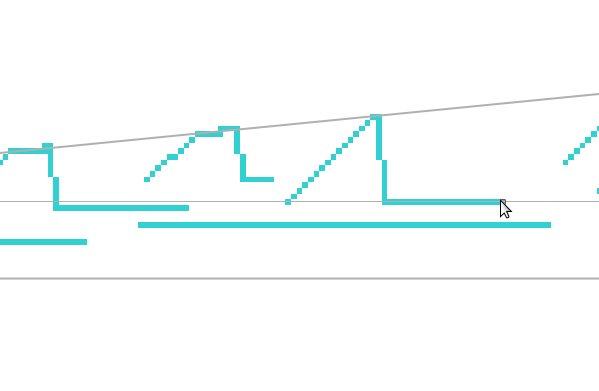
Currently drawing with 3 vanishing point assistants.
I have no problem to draw foreground.
But background is quite harder: it’s not possible to draw small lines.
Tested on a A4 @ 600dpi document, under ~20px the assistant doesn’t allow to draw a line
On a 1024x768 document, it’s under ~10px
But the fact is I don’t know if it’s a bug, or if it’s a technical choice: for example if more than 2 assistants are activated, I understand that we need to start to move in a given direction to choose the right assistant, and 1 or 2 pixels doesn’t allows to determinate a direction.
But 20pixels seems to be too much (for me )
Note:
when I talk about pixels, it’s literally pixels from document. With a 2000% zoom, 20pixels represent half of my screen and it doesn’t change anything: I just have to move across half of screen before the line start to draw (ok this just to illustrate the case, I rarely zoom at this level )
The problem occurs with Krita 4.2.9 and 4.3.0 (not yet tested with older version)
So before opening a bug or a feature request, is it possible to define after how many pixels the line start to be drawn?
I’ve just tried this with the 4.3.0 beta appimage on Debian 10.
2048 x 2048 canvas, 3 vanishing points, snap to assistants, magnetism 1000.
It takes 4 pixels before the line is drawn from the start point so the minimum line length is 4 pixels.
With an A4 600dpi canvas, it’s 18 pixels minimum.
If you reduce the magnetism to 500 you get a short line that lags the cursor then suddenly jumps along to get to the cursor at 18 pixels line length.
The result is the same with only one vanishing point assistant or one parallel ruler.
All this is best demonstrated with the Pixel Art brush.
Thanks for your test that confirm there’s something with assistant tool and small lines.
But how this should be considered?
A bug?
A feature, to allow the user to define the minimum distance for the tool snap an assistant?
In all case, I think it should be relative to current zoom level
I think it works better if you use a stabilizer with delay… I cannot confirm it from the technical point of view since I’m not exactly sure how the assistants are implemented. But the delay helped me to reduce the number of undos I had to do on lines that “kinda” fit two or more assistants.
Ahh wait, that won’t help your case… but maybe it would show you why the initial delay in the assistant itself (that I add the delay of the stabilizer to) might be necessary: to determine which assistant will be used.
I have a bit of idea for assistants:
a mode where only one assistant is switched on
a key iterates through the assistants to find the appropriate one
It would be in theory more tedious, but it would allow both to disable the delay in the assistants and fix the problem with guessing the wrong assistant in some circumstances.
Yes, it doesn’t help
The problem is that it’s not possible to draw a line under N pixels (N varies according to image size)
This sound interesting as I often use assistant for my drawings, and I effectively think that some improvement can be made with assistant management.
In addition, I could add:
The possibility to group assistants (by a tag color or something else) to allow to quicky hide/deactivate many of them
A list of current assistants to manage them
But like @AhabGreybeard did, I’ve made test with only one assistant (a parallel ruler): the problem is the same, it’s not possible to draw a small lines
So a solution to work on only one assistant [and reduce the delay/distance to select the right assistant] won’t solve the problem
I think I found where this delay/distance is managed (file /krita/plugins/assistants/Assistants/kis_assistant_tool.cc) and will try to play with it this week-end (still have to finish to learn git commands and finalize my current merge request, also fix bugs on my plugins involved by 4.3.0, but as I’m now able to compile Krita without any problem I think I’ll be able to play deeper with all of this )
Note: my current workaround is to use line tool: as the assistant marker follow the mouse, event if I can’t snap them I can see them and use the line tool to follow the assistant marker. It’s not as comfortable as using a brush snapped to assistant (take more time and it less precise) but it’s better than nothing
Finally, I wasn’t able to wait this week-end to test…
So, first, I was wrong: file /krita/plugins/assistants/Assistants/kis_assistant_tool.cc define class to manage assistants, so, useless to solve my my problem…
Looking on other files, I found this in (most of) project() method implemented on assistants classes: (Example from /krita/plugins/assistants/Assistants/VanishingPointAssistant.cc)
    qreal dx = pt.x() - strokeBegin.x();
    qreal dy = pt.y() - strokeBegin.y();

    if (dx * dx + dy * dy < 4.0) {
        // allow some movement before snapping
        return strokeBegin;
    }
Don’t really know why value of 4.0 has been fixed, but at this time if i change the value to 0.65, on a A4@600dpi document, line start to be drawn from 6pixels instead of 20pixels, that’s for me it much better (but i think 4px is my target )
I need to analyze this deeper but for me, the threshold should be defined according to:
The brush size: 6px for 2px brush size can be Ok, but for a 40px brush size it may doesn’t have sense
The current zoom: 6px on a 2000% zoom means a large movement and then, it could be interesting to have a threshold according to current zoom (ie: a number of pixels on screen instead of document)
I also understood (need to made some additional tests to confirm) why the number of pixels differs according to the document size:
When creating a document from template A4@600dpi, hey, we have 600dpi
When creating manually a 1027x768 document, I was with a 120dpi resolution
So finally the threshold may also take in account the current document resolution…
Note: it seems that when project() method is called, the assistant has already been choose
Concentric Ellipse: KO (minimum delay/distance + code contains the 4.0 value)
Ellipse: OK (no delay/distance + no code for it)
Fish Eye point: KO (minimum delay/distance + code contains the 4.0 value)
Infinite ruler: KO (minimum delay/distance + code contains the 4.0 value + start line is not on right position)
Parallel ruler: KO (minimum delay/distance + code contains the 4.0 value)
Perspective: KO (minimum delay/distance + code contains the 4.0 value)
Ruler: OK (no delay/distance + no code for it)
Spline: OK (no delay/distance + no code for it)
Vanishing Point: KO (minimum delay/distance + code contains the 4.0 value)
As 3 assistant are working properly without this code:
  qreal dx = pt.x() - strokeBegin.x();
    qreal dy = pt.y() - strokeBegin.y();

    if (dx * dx + dy * dy < 4.0) {
        // allow some movement before snapping
        return strokeBegin;
    }
I removed it from all assistants and tested the result: it’s good the assistants works perfectly.
One exception: the perspective assistant, for which it’s not possible anymore to choose the direction in grid…
Final conclusion: except for perspective assistant, there’s no need to ‘allow some movement before snapping’
So what I propose is to open a bug, and I fix it by removing the code (except for perspective)
There’s an interesting effect when you have a Parallel Ruler close to a Ruler and the drawn line jumps between the two, even with magnetism set to 1000.
The Parallel Ruler is horizontal.
It seems to be better, but it doesn’t fix completely the bug, because the switch between an assistant to another one seems to be defined in an another part of code and maybe relative to the ‘snap single’ option (once an assistant is snapped, I guess this option should avoid to snap another asssistant)
Maybe the position returned by project() method have a role in the choice of assistant to snap, but for now, I can’t confirm
Not necessarily. Think of the Spline assistant - it only allows for a limited number of points, so one needs to create a lot of them to create a complex shape. But it’s broken now a bit too - because the pen jumps between different parts of the same Spline…
 )
) )
)
 )
)
 )
)