Audio files simply won’t import at all. When choosing to import a file it will pull up the sub window and allow me to browse my files but as soon as I pick one nothing happens. No error message, it just behaves like I haven’t done anything at all. I’ve triple checked that I’m on the most recent version of krita, that my files are saved locally so its not a file path issue, and I’ve tried with .wav, .mp3, and .ogg. As far as I’m able to tell nothing is wrong with my device itself, either? I’m just not sure what to do from here 
I think the audio might already be there when you play your animation. It just doesn’t have an indicator yet. :’D
Have you also uncheck the Mute setting?
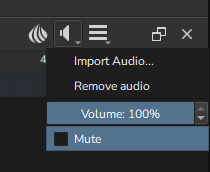
Also, Krita works best with .wav files for me.
 Hello @Slabimeslime, and welcome to the forum!
Although I may be wrong, and @SketchyRae already showed via which button you have to import audio into Krita, I guess you tried importing your audio via the File > Open-dialog.
If you should be new to animating with Krita the following chapter of Krita’s highly informative manual may be for you:
If you are new with Krita at all, you may like the full manual which you can always reach out of Krita with a press of your F1 key, or via this link:
By the way, with your support requests, you should always name the version of Krita you use as well as the OS and its version as it is very often needed to help users in the first place.
Michelist
1 Like
Ah, sorry, should have specified! I’m on windows 11 and krita 5.2.16, updating krita was one of the first things I tried. I’m not new to krita or animating with it. I’ve been using the program for years, just only now making a forum account. I’m quite sure I have been using the correct button. I hit play and let it run through a few times with each attempt to import just to make sure it wasn’t there and just wasn’t giving me a visual indication. I’ve read through the krita manual pages several times already, making an account to ask directly was my very last order of business after troubleshooting on my own for a few hours
Thank you for the additional information!
Okay, that is bad, my hope here was that you perhaps won’t know Krita’s UI and had a misconception that gets modern these days (which is trying to import anything into Krita via the File > Open dialog).
But okay, you can try the following which does not help always but at least often enough to at least try it, but I don’t know if this can be done with animations too, but I hold my fingers crossed that it works.
And because I just gave this hint to another user I’ll give you the link to my posting in the other topic:
Can you import the audio into the new document after transferring all layers to the new document?
The thing is, if that did not help, I’m out of my wits, and you will need support of users with knowledge of animation, because I can give mainly common hints since I don’t animate.
Michelist
2 Likes
Also try this: Render the animation to an .mp4 file and see if the .mp4 file has audio playing.
If it doesn’t then please provide the ffmpeg log file which should be in the same location as the rendered video file.
It would be better to make it available by a link to a file download service or a pastebin because the content can be many lines of text.
1 Like
I hadn’t tried it before but the audio is actually playing when I export it to an mp4! Id there a way to get it to show up or play within krita itself again? Either way thank you, it helped me feel a little less helpless to see that something was happening, at least.
this didn’t work unfortunately, but thank you for the help anyways 
1 Like
I think you mean: after you render it to .mp4 and then play the resulting .mp4 file?
If so, that implies that there is no basic problem with your computer hardware or with your Windows 11 operating system audio facilities.
Have you made animations with audio using krita in the past at any time and did the audio work at all when you tried that?
Have you tried different audio files other than the one having a problem at the moment?
Are you sure that Mute is disabled (unchecked) and that the volume is set to 100%?
Does the audio file name use standard ASCII ‘latin/western’ characters in its name?
If you rename the audio file to audio.mp3 (or .wav), does that work?
If you put the audio file on the Desktop, does that work?
(Note: krita doesn’t ‘process/incorporate’ the audio file into the rendered .mp4 file. It gives the name of the audio file to ffmpeg to let ffmpeg do its job of rendering. Hence it is theoretically possible for ffmpeg to work ok with audio but for krita to have some kind of problem.
Having said that, I’ve used audio files in krita animation for about six years with many krita versions, including 5.2.16, with no problems when using the Linux appimage and Windows 10 installations.)
Where did you get krita 5.2.16 from? The options I know about are Download | Krita (for an installer .exe or a portable .zip package), the Microsoft Windows Store and Steam.
I’ve run out of ideas for diagnostic enquiry on this subject but I or someone else might think of something depending on your answers to the questions above.
1 Like
This topic was automatically closed 30 days after the last reply. New replies are no longer allowed.