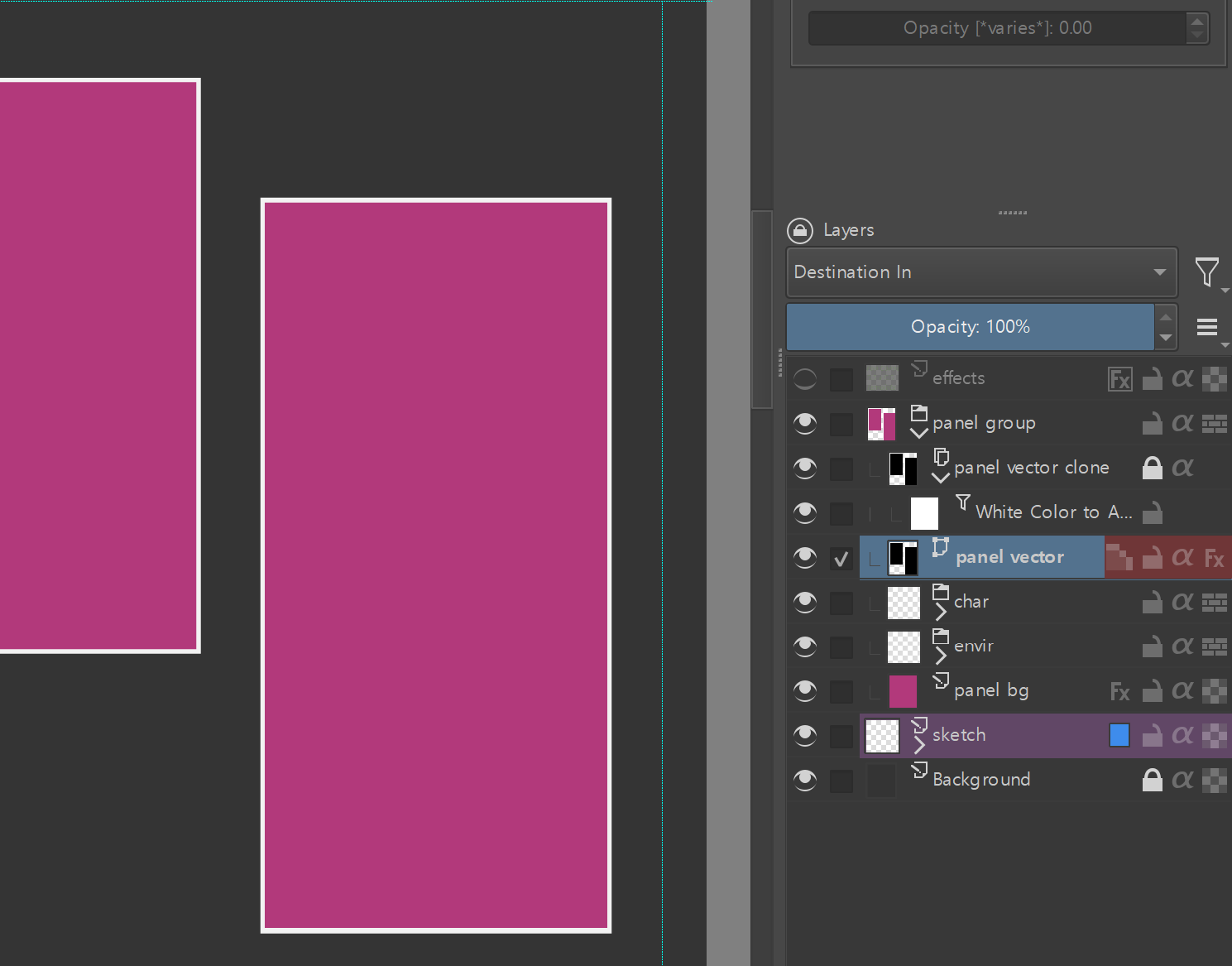
The default Krita comic templates uses a BW rectangle. All layers in the panel are alpha inherited to that vector shape, and there’s a clone layer with multiply blend mode for the outlines.
The problem of this set up is that it’s hard to set other color outlines, especially if they’re lighter than the panel/background. It’s also annoying you that you have to alpha inherit all of them.
There’s an alternative way, using “Destination In” blending mode:
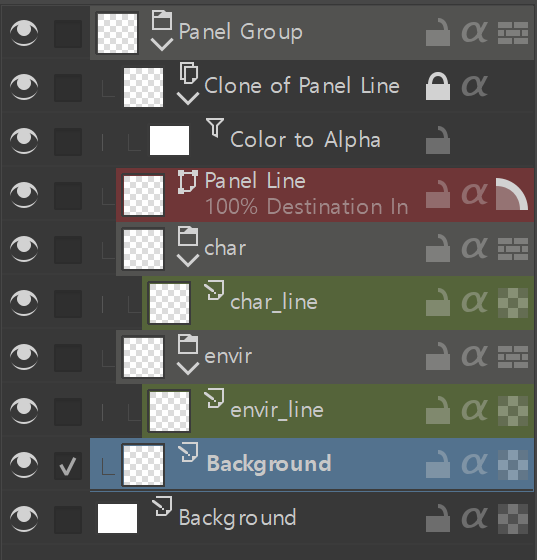
You can have any vector shape in “Destination In” blending mode on top, which will essentially act as a mask to everything underneath. Then a locked clone layer with Color to Alpha filter (with threshold set to something relatively low) turns the fill color transparent, only leaving the outline visible. Voila! It works with overlapping and nested panels too, and panels are fully editable with masking automatically updating.
I don’t understand why this isn’t set as the comic template default, maybe this blend mode is new? And I had to search forum threads for “Destination In” b/c there’s no documentation for it. But anyways hope people find this helpful!
I wrote a short python script that sets up this panel group (along with some character/environment groups and colored labels)! You can save this script and set it to use with Ten Scripts plugin or other similar utilities to quickly make comic vector panels set up.
I added comments next to the code so it’s easy to understand what to change if you want to tweak what the script makes! Hope people find this useful.
from krita import Krita, Filter, InfoObject
from PyQt5.QtGui import QColor

# Set up so script knows what's the current document to work with
app = Krita.instance()
doc = app.activeDocument()
root = doc.rootNode()

# Make panel group
group = doc.createGroupLayer("Panel Group")
root.addChildNode(group, None)

# Make contents of the panel group
paint_layer = doc.createNode("Background", "paintlayer") #1st argument is layer name, 2nd arg is layer type

char_group = doc.createGroupLayer("char") #Making groups
envir_group = doc.createGroupLayer("envir")

char_line = doc.createNode("char_line", "paintlayer")
char_line.setColorLabel(2)  #green - starts from 0 and in the order of the colors
char_group.addChildNode(char_line, None) #1st arg is layer, 2nd arg is above which layer to put it in. None means it'll be at the bottom-most

envir_line = doc.createNode("envir_line", "paintlayer")
envir_line.setColorLabel(2)  #green
envir_group.addChildNode(envir_line, None)

# Vector layer for panel lines above paint layer; set blend mode as Destination In
vector_layer = doc.createNode("Panel Line", "vectorlayer")
vector_layer.setBlendingMode("destination-in")
vector_layer.setColorLabel(6)  #red

# Make clone of vector layer to show outline on top
clone_layer = doc.createCloneLayer("Clone of Panel Line", vector_layer)

# Color to alpha filter object
cta_filter = app.filter("colortoalpha")
cfg = cta_filter.configuration()
props = cfg.properties()

props["targetcolor"] = QColor(255, 255, 255)  #white - color to turn into alpha
props["threshold"] = 45 #this usually works for my colors
cfg.setProperties(props)
cta_filter.setConfiguration(cfg)

# Make filter mask and lock the clone layer
filter_mask = doc.createFilterMask("Color to Alpha", cta_filter, clone_layer)
clone_layer.addChildNode(filter_mask, None)
clone_layer.setLocked(True)

# Add groups and layers to panel group
group.addChildNode(paint_layer, None)
group.addChildNode(envir_group, paint_layer)
group.addChildNode(char_group, envir_group)
group.addChildNode(vector_layer, char_group)
group.addChildNode(clone_layer, vector_layer)

doc.refreshProjection() #refresh