So I’m trying to move from Photoshop to Krita, but am having a lot of difficulty with a tool I’d relied on previously. Bevel and Emboss just doesn’t work the same way, and I can’t figure out how to duplicate the effect.
For example. Let’s take this simple shape:
With settings copied straight from what I’d been using for years in PS:
What if you choose a different Highlight mode for the light color? What if you chose Divide? What if you turned down the opacity if it’s too bright or harsh?
I like messing around with watermarks and those are the things I do.
(Grain Extract and Grain Merge are my favorites.)
Every highlight and shadow mode I tried made the center of the box the same color as the bright edge. No amount of angle or altitude adjustment helps either.
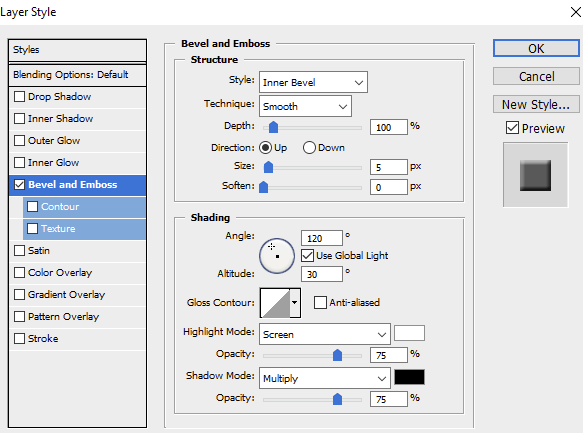
I think the opacity and the blend mode for the highlight is the issue can you show us the screenshot of the layer style window in photoshop as requested by @AhabGreybeard
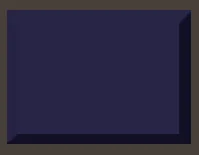
Here’s the settings from photoshop. Notably, this creates a beveled box where the “middle” or body color is the color I chose for the shape. See below:



 What if you chose Divide? What if you turned down the opacity if it’s too bright or harsh?