Hi all! I’m trying to create some custom printed fabric and using Krita was wonderfully easy with my drawing pad. I sent the image (attached) to spoonflower and a couple of other custom printing places and the samples they sent to me were uniformly blurry- which means it’s an issue on my end.
Can anyone guide me at how to improve this? I saved the images to 350dpi (I think)!
Also, please let me know if there are other things I need to inform y’all of. I’m incredibly new to the world of digital art so I don’t really know what I’m doing- but I’m a fast learner!
If the image you’ve posted is the full size image, it’s about two inches wide if it’s 350 dpi.
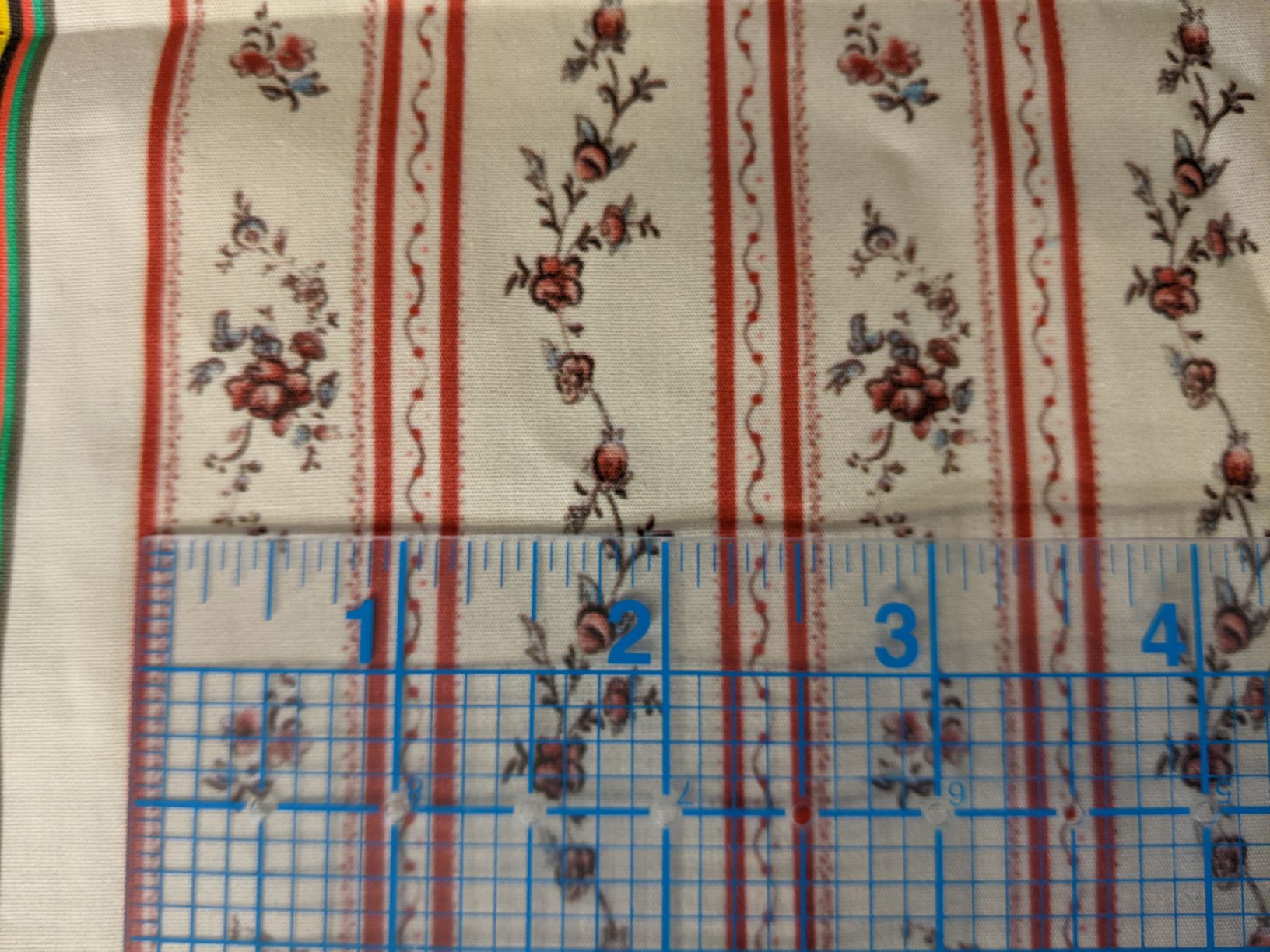
Can you post a photograph of the fabric with a ruler laid on it as a size guide?
About 300dpi is regarded as a good resolution for printing images on paper. I’d be surprised if a fabric could hold that level of detail but it doesn’t hurt to use 300 dpi for the image but you can halve the size of the image by using 150dpi if that’s acceptable in the final printed result.
You don’t Save an image at a dpi size, you create it with a particular physical size and dpi in mind.
If you intend to print a 10 inch by 10 inch sheet at 300 dpi, you need to create a 3000 x 3000 image.
Thanks! I had the samples done at full size and smaller as a repeat. And that makes sense with the saving to size.
Is there a step in the saving process I should be doing that will make the lines/image easier to comprehend on the printer’s side of things? I didn’t flatten the image or anything before saving.
Now I see that the image you sent to them was printed as a repeating pattern about two inches wide.
Only the printing company can give you advice about what format, image size etc. they recommend. It all depends if you’re doing repeated printing across a fabric, etc.
I assume you sent them a .png or .jpg file of the image that you’d have Exported out from krita. Never flatten your image before Saving it in krita as a .kra file because you’ll throw away the layer structure and organisation, which is essential for ease of making future changes to it.
Looking at the photograph, that fabric is of the order of 100 threads per inch. So it would be impossible for it to hold an image at a 300 dpi resolution.
You need a finer weave fabric or you need to produce a design that looks good at 100 dpi.
Again, the printers should be giving you details and advice about this because it’s their process and their equipment and they should know it. Also, you’re paying them so they need to perform for your benefit.
If the first image is what you sent them, and I read the ruler correctly, the actual print resolution is 755 pixels / 2.5 inch = ~300 ppi.
However the image already has some blurriness, it looks like it was scaled up. So for printing on paper, it’s not ideal.
But I agree with Ahab, on this kind of fabric, you’re not really going to get more detail, if the printer tried to preserve sharper edges, the fine lines and dots would probably start to look irregular.
You could only ask if you can influence the printing parameters to make it look more like a classic stamping technique, but I’m not convinced it’ll really look better, the details just seem too small.