I will post what this means in a bit, but I first wanted to see if any devs understand it, without having to explain it. or if anyone can see the possible uses this would add.
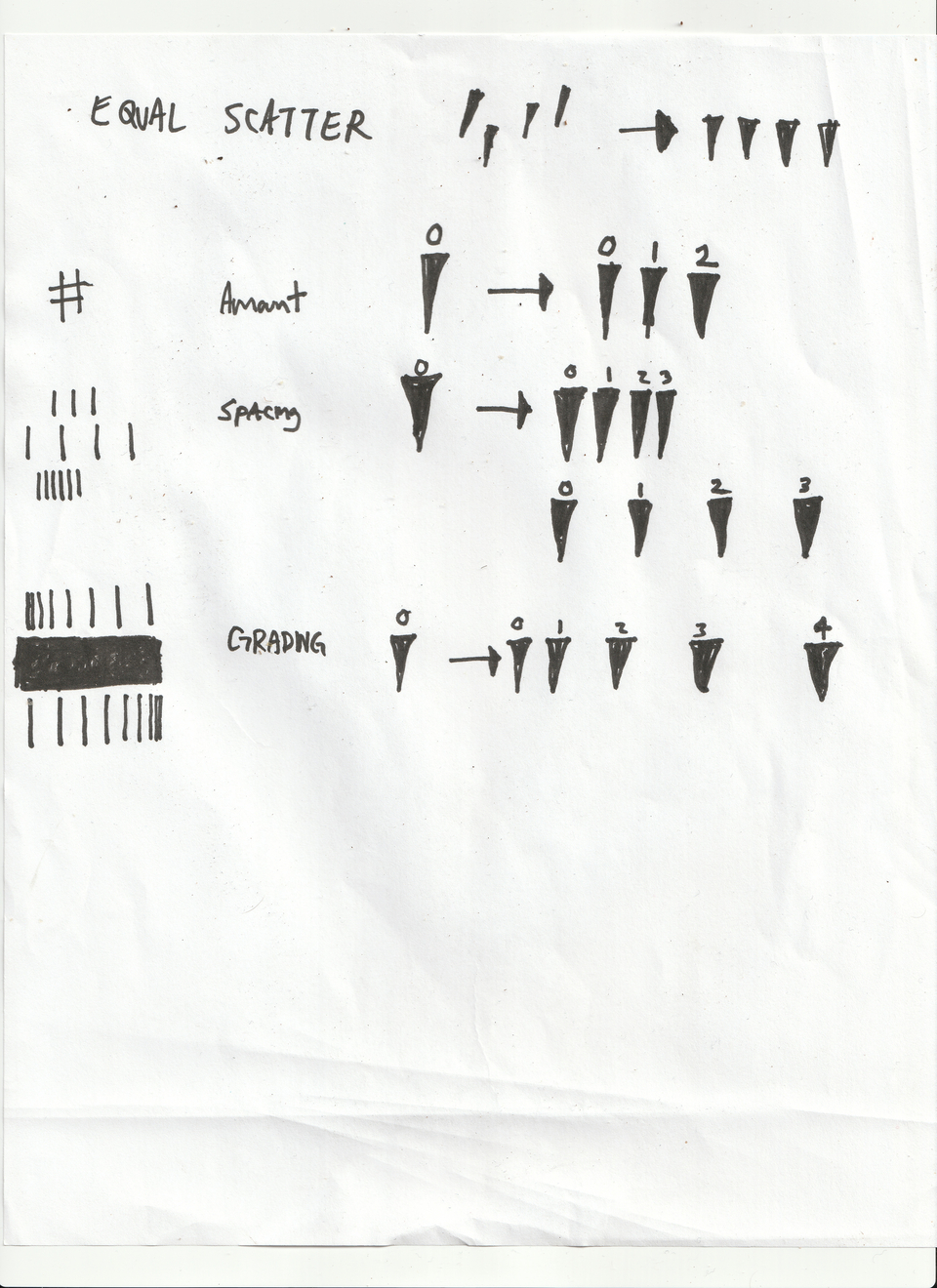
When you create a feature request it is on you to explain what it should do, how it should work and how it is useful, not for other people to guess on it. This is not a quiz.
as i mentioned, i will explain. i know already exactly what i am asking for and its possible uses. i am just curious as to how well the quick drawing translates to something thats easy to understand or if it makes people to actually have to think. i hope that makes sense.
I moved it to a different category because currently it’s not satisfying the requirements for a feature request.
If you want to make a feature request, it’s better to actually formulate what you want, not make a rebus puzzle out of it.
Right now the scatter is not even, and scattered all over the place. I propose an added option to make it ever (equal scatter line)
possible additions would be:
amount
this is how many it spreads out in one single direction
spacing
this allows for closer scatter amounts and more spread out scatter amounts
grading
this allows an increasing or decreasing amount spacing for whatever scatter amount
this would open up a lot of options!
scales, stitches, patterns, grasses, furs, debris, fx, comic inking, etc.
anything that has a gradient, equal spacing, different spacing, clusters together, or has a mix of any of these can be created if this gets implemented. it would be fun to use honestly, and save a lot of time for repetitive tasks.
vote!
The whole point of scatter is being all over the place, that’s pretty much what the word means. What you describe already exists with the Spacing property.
Here are multiple lines made in one stroke with a mouse utilizing dynamic Spacing (I used the fade setting)
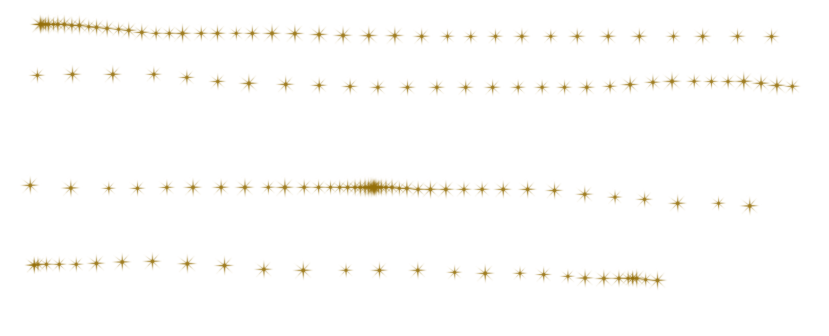
You can combine this with the existing scatter option to have more variation on the other axis.
spacing doesnt have the count. i know multibrush exists, but thats not saved to the brush. having to got to the setting to change it for the brush every time you want to use it, it just doesnt seem like a good use of time or a proper workflow.
I’m having a hard time imagining any use case where having a count option on the scatter setting would be actually beneficial. You listed a bunch of things in your previous post but pretty much all of them are (in my opinion) solved much easier and simpler by using patterns, animated brush tips or stamps (or simply drawing another line). I’m painting for decades, so maybe my mind is just blocked by “old ideas”, I don’t know.
Heres an example, try drawing a simple curve line that looks like a snake. now try drawing that exact same line an equal distance from the first line. the count makes everything clean and uniform and saves time.
I don’t get it. Clean and uniform is the exact opposite of what I would expect scatter to do.
That seems more like an example of what the multibrush tool should be able to do, drawing multiple lines simultaneously. Doing it via scatter/jitter/offsets seems like more of a hack, in the MyPaint brush engine you can do it by adding a Stroke input with a sawtooth curve to the various directional offset inputs… although looking at it, it seems like Krita doesn’t actually give you proper editing capabilities for that, so it’s something you’d have to import to see.
maybe asking to add it to the scatter options wasnt thought completely through. its the closest thing to what i have in mind, but i get that having it undder or with the scatter option may be confusing. it can be its own option with a name like Array? would that work? or maybe parallel? Group maybe?
Can you upload an example of the mypaint brush engine?
thanks
Here’s some rakes that work with that principle: https://drive.proton.me/urls/XCWPRVACRW#sUWXM7seheGU. Settings → Manage Resources → Import to load the bundle. They will be in the “MyPaint Rake” tag.
They try to work anyway, like I said, it’s kind of a hack, but it shows pretty well why this is less useful than e.g. a proper multi-brush feature that makes parallel strokes. It also seems like Krita’s implementation of MyPaint brushes also does not actually let you edit the relevant offset settings. It also changes the brush settings every time you select the brush for some reason, so ideally reload the original preset after selecting the brush to get the intended result.
Can this be moved to the feature requests. i explained what i was asking for.
thanks